
Power BI Alternative for ERP Exports: Why a Workspace Beats a Dashboard

The dashboard you built to save time is likely the very thing stealing it. Most finance teams find themselves trapped in a cycle of cleaning CSV exports and fixing broken formulas every time the ERP updates its output format. If you're looking for a power bi alternative for erp exports, the answer isn't a prettier chart; it's a smarter workflow. You likely agree that spending hours in Excel just to make data readable is a poor use of your professional expertise. It's frustrating when a minor system update breaks an entire reporting suite, forcing you to wait on IT or expensive DAX specialists for a fix.
This article shows you how an ERP Intelligence Workspace replaces these complex manual processes with automated AI analysis. You'll learn how to transform raw exports into executive-ready reports in minutes, bypassing technical bottlenecks entirely. We'll explore a streamlined approach that detects financial risks automatically and maintains high data quality without manual intervention. By the end, you'll understand why a dedicated intelligence environment is the fastest route from raw information to professional, actionable insights.
Key Takeaways
- Understand why traditional dashboards fail to interpret raw data and how an intelligence workspace bridges the gap between visualization and insight.
- Discover a streamlined power bi alternative for erp exports that eliminates the need for complex DAX coding or manual data cleaning.
- Learn to replace the "Model-Build-View" cycle with a faster "Upload-Analyze-Report" workflow powered by AI pattern recognition.
- Explore how browser-side processing ensures your sensitive financial data remains private without ever being stored on external servers.
- See how to generate executive-ready management reports in minutes using your existing CSV and Excel files.
Table of Contents
- Why Power BI Often Fails as an Analysis Tool for Raw ERP Exports
- Defining the ERP Intelligence Workspace: A Direct Alternative for 2026
- Comparing the Workflow: Power BI vs. AI-Powered Workspaces
- Step-by-Step: Converting Raw ERP Exports into Executive Reports
- Security and Privacy: Why Browser-Side Analysis Wins
Why Power BI Often Fails as an Analysis Tool for Raw ERP Exports
Power BI is often the default choice for Business intelligence (BI), but it creates a significant "Visualization Gap" when applied to raw ERP data. A dashboard shows you a trend; it doesn't perform the analysis. You see a spike in aged receivables, but you still have to dig through the CSV to find the cause. This is the core limitation of visualization-first tools. They require human interpretation for every data point. If you need a true power bi alternative for erp exports, you need a system that understands the data structure before it draws a chart.
Power BI is a downstream tool. It relies on pre-modeled data to function effectively. When you feed it raw, unmodelled ERP exports, the system struggles. You're forced to build complex DAX measures just to align dates or handle currency conversions. These measures are fragile. If your ERP updates its export format, your entire reporting suite breaks. The maintenance cost of keeping these visualizations alive often outweighs the value they provide. A dashboard is a static view of the past, whereas a workspace is an active environment for immediate analysis.
The Problem with Static Dashboards
Dashboards often become data silos. Insights are trapped behind visual layers that don't allow for deep exploration. Finance teams spend days on manual data preparation before a single chart can be rendered. This "export trap" is most dangerous during month-end. While executives wait for reports, the finance team is stuck cleaning CSVs and mapping columns. This delay isn't just an inconvenience; it's a barrier to timely decision-making. You don't need a prettier picture of your data; you need the data to explain itself instantly.
Complexity vs. Clarity in Finance Teams
Hiring specialized BI consultants to manage simple ERP reporting is a massive hidden cost. Finance professionals don't want to learn complex coding; they want the flexibility of their exports with the speed of modern automation. They need a tool that bridges the gap between raw data and executive clarity. This is where an ai tool to analyze erp exports becomes the essential middle ground. It provides a direct power bi alternative for erp exports by focusing on active analysis rather than static presentation. It's about moving from a "Model-Build-View" cycle to a "Upload-Analyze-Report" workflow that respects your time.
Defining the ERP Intelligence Workspace: A Direct Alternative for 2026
Traditional business intelligence tools require you to build the infrastructure before you can see the data. You spend weeks constructing data warehouses and mapping fields. The ERP Intelligence Workspace flips this model entirely. It's a specialized environment designed for AI-driven analysis of the files you already generate. It doesn't ask you to be a data architect. It functions as a power bi alternative for erp exports by automating the heavy lifting of data interpretation. You stop building reports. You start receiving analysis.
The workspace uses sophisticated auto-detection to identify data types, currencies, and account structures instantly. Whether your export comes from SAP, NetSuite, or Oracle, the system recognizes the pattern. It eliminates the need for manual data mapping or column alignment. This flexibility allows finance teams to consolidate disparate data sources into a single, cohesive intelligence environment. You gain a unified view of your operations without the technical overhead of traditional BI suites. Speed is the primary objective here.
The Intelligence Layer Concept
An intelligence layer sits above your existing ERP. It doesn't require direct API integration or complex system handshakes. Instead, it analyzes the CSV and Excel exports you produce during your standard workflows. This decoupled approach bypasses many common privacy and security risks associated with deep system access. An AI agent identifies patterns across these files, connecting a Trial Balance to an AR Aging report in seconds. Deployment happens in minutes, not months. It's a friction-less way to gain clarity.
Automated Risk and Opportunity Detection
Most dashboards are reactive. They show you what happened yesterday. The workspace focuses on automated financial risk detection to show you what is at risk today. It flags cash flow gaps, duplicate payments, or inventory imbalances the moment you upload a file. You receive proactive alerts instead of hunting through charts for anomalies. This shift from manual monitoring to automated oversight transforms how finance teams manage their time. If you want to see this efficiency in action, you can access the Stratoryn workspace to begin your first analysis. It's a pragmatic solution for a complex data landscape.
Comparing the Workflow: Power BI vs. AI-Powered Workspaces
Power BI requires a rigid "Model -> Build -> View" sequence. This traditional approach forces you to define every relationship and calculation before you see a single insight. If your ERP export changes a column header or an account code, the entire model fails. An AI-powered workspace offers a superior power bi alternative for erp exports by adopting an "Upload -> Analyze -> Report" workflow. The system identifies the data structure on the fly. It removes the friction of pre-modeling, allowing you to move from a raw file to a finished analysis in minutes. This speed is essential for high-stakes finance operations.
The "Data Cleaning" phase, which often consumes the majority of a finance professional's time, is eliminated. AI pattern recognition identifies inconsistent formats across different ERP versions or business units. It reconciles these differences automatically. This capability is the engine behind automated erp reporting software. You no longer need to manually scrub CSV files in Excel to make them "Power BI ready." The workspace handles the messiness of raw data so you can focus on the results. It's a direct route to clarity.
Eliminating the DAX Bottleneck
Relying on DAX (Data Analysis Expressions) creates a single point of failure in your reporting. If your resident BI specialist leaves or is reassigned, your reporting logic becomes a "black box" that no one else can maintain. This proprietary formula language adds a layer of complexity that most finance teams simply don't need. Natural language AI replaces this complex coding. It performs financial calculations using standard accounting logic that is easy to verify. This creates a "transparent analysis" environment. The AI doesn't just provide a number; it explains the specific findings and the methodology behind them. You maintain control without needing to write a single line of code.
Data Quality as a First-Class Citizen
Visualizations often mask underlying data issues. A chart might look professional even if a significant percentage of the entries are duplicates or incorrectly formatted. The workspace functions as an erp migration data quality tool by validating data integrity before it reaches the final report. It detects duplicates, identifies formatting errors, and flags outliers that would break a traditional Power BI model. This shift makes the workspace a practical power bi alternative for erp exports for teams that prioritize accuracy over aesthetic complexity. You gain absolute confidence in your numbers without performing manual spreadsheet audits. It ensures data integrity remains intact throughout the entire analysis process.
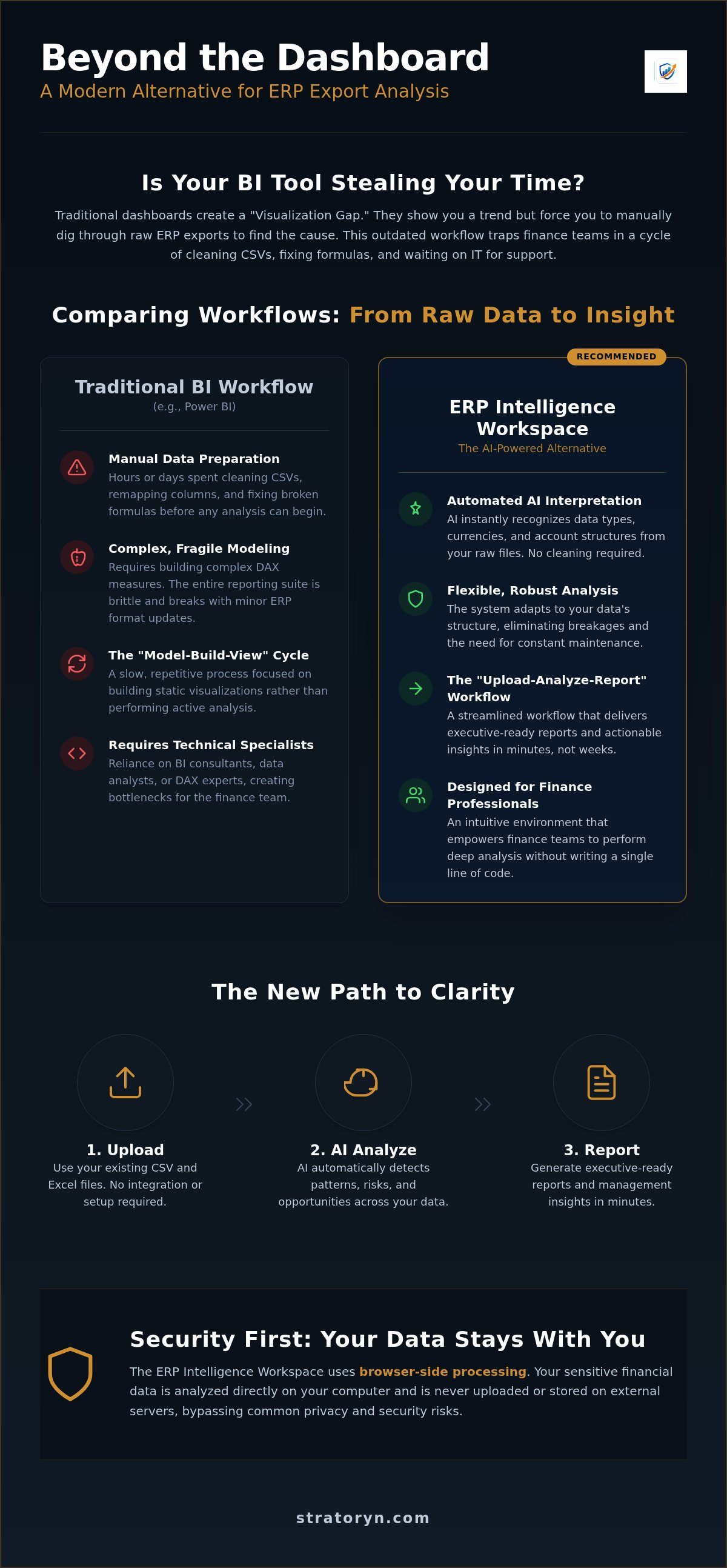
Step-by-Step: Converting Raw ERP Exports into Executive Reports
Transitioning from raw data to actionable insight should not require a team of developers. By utilizing a power bi alternative for erp exports, you can bypass the technical hurdles of data modeling. The process is designed to be linear and efficient, moving you from a system export to a management presentation in minutes. This approach values your time by automating the repetitive tasks of data preparation.
- Step 1: Perform a standard export from your ERP system. Whether you use SAP, Oracle, or NetSuite, generate a Trial Balance, AR Aging, or Inventory report as a CSV or Excel file.
- Step 2: Upload the raw file directly to the Stratoryn workspace. There is no need for manual formatting, column reordering, or cleaning before the upload.
- Step 3: Allow the AI Data Analyst to detect the data structure. The system performs immediate risk profiling, identifying anomalies and trends within seconds of the file being processed.
- Step 4: Review the automated findings. The workspace highlights specific cash flow risks and data quality gaps that require professional attention, saving you from hunting through rows of data.
- Step 5: Generate and download an executive-ready report. You receive a polished document ready for immediate distribution to stakeholders, formatted for clarity and impact.
What Makes a Report Executive-Ready?
A standard data dump is not a report; it's a burden for the reader. Executive-ready reports focus on clarity and decision support. They distinguish themselves by structuring insights into three distinct categories: Risks, Opportunities, and Action Items. Credibility is the foundation of these documents. This is why ai for data quality management is essential. It ensures the numbers presented are accurate and verified, preventing errors during board meetings or financial reviews. You provide the strategy while the AI provides the verified evidence.
Tailoring Insights for Stakeholders
Different stakeholders require different perspectives on the same data set. A CFO focuses on liquidity and debt, while an Operations Lead prioritizes throughput and inventory turns. The workspace allows you to pivot these insights without manual recalculation. You can highlight specific KPIs, such as Days Sales Outstanding (DSO), with a single click. The AI identifies the anomalies, but you provide the final layer of human context. This combination ensures the power bi alternative for erp exports delivers more than just charts; it delivers strategic value. You can start generating executive reports today to experience this streamlined workflow firsthand. It's a pragmatic shift from building tools to delivering results.
Security and Privacy: Why Browser-Side Analysis Wins
Data security is often the primary friction point when adopting new financial tools. Traditional BI platforms require deep integration into your ERP database, creating a permanent doorway for potential vulnerabilities. Choosing a power bi alternative for erp exports allows you to maintain a much smaller security footprint. By utilizing browser-side processing, your sensitive financial data is analyzed locally within your session. This architecture ensures that the heavy lifting of data interpretation happens on your machine, not on a remote server. It's a fundamental shift in how enterprise data is handled.
Stratoryn operates on a "No Raw File Storage" model. When you upload a CSV or Excel export, the system performs transient processing. The AI extracts the necessary insights and risks without permanently storing the raw source files on external servers. This is the ultimate privacy model for 2026. It satisfies strict data residency requirements because the raw data never leaves the control of your local environment for long-term storage. You retain ownership and control throughout the entire analysis lifecycle. This approach provides a level of reassurance that cloud-integrated dashboards cannot match.
Privacy by Design in AI
Corporate governance standards for AI usage in finance are becoming increasingly rigorous. There is a critical difference between "uploading for storage" and "uploading for transient processing." Browser-side analysis prevents server-side data breaches because there is no massive database of raw ERP exports to target. This design choice mitigates the risk of large-scale information leaks. It allows finance teams to meet compliance requirements without sacrificing the speed of automated analysis. You get the intelligence of an AI agent with the privacy of a local spreadsheet. It's a pragmatic way to scale oversight without introducing new risks.
The Zero-Integration Advantage
Not connecting directly to your ERP database is a strategic security feature. It bypasses the complex IT security approvals and penetration testing required for traditional data pipelines. This is why a workspace is a superior power bi alternative for erp exports for firms that need immediate results. You don't have to wait six months for a technical setup or risk compromising your core system's integrity. Traditional BI projects often stall in the procurement and security review phases. IT departments are rightfully cautious about granting third-party tools read-access to the ERP. By removing the need for a live connection, you eliminate these technical roadblocks.
The workspace functions as an isolated intelligence environment that processes the exports you've already authorized for local use. This allows you to bypass months of back-and-forth between finance and IT. You get the clarity you need today, while your technical team maintains the integrity of the core system. The ROI is instant because the barrier to entry is non-existent. You can start analyzing your exports today without waiting for IT tickets or system handshakes. It's time to move toward a secure, frictionless way of managing your financial insights.
Reclaim Your Time with Automated ERP Intelligence
The shift from manual data cleaning to automated analysis is no longer a luxury; it's a necessity for modern finance teams. By moving away from static dashboards and toward an active workspace, you eliminate the technical debt associated with fragile DAX measures and manual CSV scrubbing. This streamlined approach provides a definitive power bi alternative for erp exports that prioritizes speed and executive-level clarity over complex visualization. You don't need to be a data scientist to get professional results.
Security remains at the forefront of this transition. Browser-side processing ensures 100% data privacy, while the zero-integration model means you never have to wait on IT tickets or complex system handshakes. You can generate instant executive reports from any ERP export without the friction of traditional BI implementations. It's time to stop building tools and start delivering the insights your business requires for strategic growth. Your expertise is better spent on strategy than on spreadsheet maintenance.
Access the Stratoryn ERP Intelligence Workspace for Free and experience the future of autonomous financial analysis. Your data is ready to explain itself.
Frequently Asked Questions
What is the main difference between an ERP Intelligence Workspace and Power BI?
The primary difference is the focus on intelligence versus visualization. Power BI is a downstream tool requiring pre-modeled data and manual setup to function. An ERP Intelligence Workspace operates as a power bi alternative for erp exports by analyzing raw data immediately upon upload. It identifies patterns and financial risks without the need for a pre-defined data schema or a technical modeling phase.
Do I need to know how to code or use DAX to use this alternative?
No, you don't need any technical coding skills or knowledge of DAX. The workspace uses natural language AI to perform complex financial calculations and data mapping automatically. This removes the dependency on specialized BI consultants or IT teams. You can generate professional insights using the same business logic you already apply in your manual spreadsheet reviews, but with total automation.
Does the workspace store my sensitive financial CSV files on its servers?
No, the workspace does not permanently store your raw financial files on its servers. It utilizes browser-side processing to analyze the data within your local session. This architecture ensures that your sensitive CSV and Excel files remain under your control at all times. It's a privacy-first model designed to meet strict corporate governance standards for financial data management in 2026.
Can I use this with exports from older, legacy ERP systems?
Yes, the workspace is compatible with exports from any system that produces CSV or Excel files, including legacy ERPs. It doesn't require a direct API connection or modern database integration to work. As long as you can download a report from your old system, the AI Data Analyst can detect the structure and perform a full risk profile on the information.
How does the AI detect risks like cash flow issues in a raw export?
The AI uses advanced pattern recognition to compare disparate data sets like Trial Balances and AR Aging reports. It identifies anomalies such as duplicate entries, aging spikes, or cash flow gaps that deviate from standard accounting benchmarks. Instead of just showing you a chart of what happened, the system flags specific transactions that pose a direct risk to your operations.
Is there a file size limit for the Excel or CSV exports I upload?
The workspace is designed to handle standard enterprise-level exports efficiently. While browser performance dictates the practical limits, it comfortably processes large CSV files containing tens of thousands of rows. This capability makes it a robust power bi alternative for erp exports for mid-market and enterprise firms that deal with high transaction volumes across multiple business units or regions.
Can I generate reports that are ready for a board of directors meeting?
Yes, the system generates polished, executive-ready reports that are formatted specifically for management and board-level reviews. These reports move beyond simple data dumps to provide high-level summaries of risks, opportunities, and action items. You receive a professional output that is ready for immediate distribution, saving you hours of manual formatting and slide preparation before every critical meeting.
Does this tool help with data cleansing before an ERP migration?
Yes, the workspace includes a dedicated Data Quality Analysis feature that is highly effective for pre-migration audits. It identifies formatting errors, duplicate records, and inconsistent account structures before you move data into a new system. Using the workspace ensures your data integrity is verified, reducing the risk of carrying legacy errors into your modern ERP environment during a transition.
Frequently asked questions
What Makes a Report Executive-Ready?
A standard data dump is not a report; it's a burden for the reader. Executive-ready reports focus on clarity and decision support. They distinguish themselves by structuring insights into three distinct categories: Risks, Opportunities, and Action Items. Credibility is the foundation of these documents. This is why ai for data quality management is essential. It ensures the numbers presented are accurate and verified, preventing errors during board meetings or financial reviews. You provide the strategy while the AI provides the verified evidence.
What is the main difference between an ERP Intelligence Workspace and Power BI?
The primary difference is the focus on intelligence versus visualization. Power BI is a downstream tool requiring pre-modeled data and manual setup to function. An ERP Intelligence Workspace operates as a power bi alternative for erp exports by analyzing raw data immediately upon upload. It identifies patterns and financial risks without the need for a pre-defined data schema or a technical modeling phase.
Do I need to know how to code or use DAX to use this alternative?
No, you don't need any technical coding skills or knowledge of DAX. The workspace uses natural language AI to perform complex financial calculations and data mapping automatically. This removes the dependency on specialized BI consultants or IT teams. You can generate professional insights using the same business logic you already apply in your manual spreadsheet reviews, but with total automation.
Does the workspace store my sensitive financial CSV files on its servers?
No, the workspace does not permanently store your raw financial files on its servers. It utilizes browser-side processing to analyze the data within your local session. This architecture ensures that your sensitive CSV and Excel files remain under your control at all times. It's a privacy-first model designed to meet strict corporate governance standards for financial data management in 2026.
Can I use this with exports from older, legacy ERP systems?
Yes, the workspace is compatible with exports from any system that produces CSV or Excel files, including legacy ERPs. It doesn't require a direct API connection or modern database integration to work. As long as you can download a report from your old system, the AI Data Analyst can detect the structure and perform a full risk profile on the information.
How does the AI detect risks like cash flow issues in a raw export?
The AI uses advanced pattern recognition to compare disparate data sets like Trial Balances and AR Aging reports. It identifies anomalies such as duplicate entries, aging spikes, or cash flow gaps that deviate from standard accounting benchmarks. Instead of just showing you a chart of what happened, the system flags specific transactions that pose a direct risk to your operations.
Is there a file size limit for the Excel or CSV exports I upload?
The workspace is designed to handle standard enterprise-level exports efficiently. While browser performance dictates the practical limits, it comfortably processes large CSV files containing tens of thousands of rows. This capability makes it a robust power bi alternative for erp exports for mid-market and enterprise firms that deal with high transaction volumes across multiple business units or regions.
Can I generate reports that are ready for a board of directors meeting?
Yes, the system generates polished, executive-ready reports that are formatted specifically for management and board-level reviews. These reports move beyond simple data dumps to provide high-level summaries of risks, opportunities, and action items. You receive a professional output that is ready for immediate distribution, saving you hours of manual formatting and slide preparation before every critical meeting.
Does this tool help with data cleansing before an ERP migration?
Yes, the workspace includes a dedicated Data Quality Analysis feature that is highly effective for pre-migration audits. It identifies formatting errors, duplicate records, and inconsistent account structures before you move data into a new system. Using the workspace ensures your data integrity is verified, reducing the risk of carrying legacy errors into your modern ERP environment during a transition.
- power bi alternative for erp exports
- Power BI
- ERP
- Data Analysis
- Business Intelligence
- Reporting Automation
- Financial Reporting
- ERP Exports
- AI Analysis
- erp intelligence workspace
- erp reporting automation
- finance data analysis
- automate csv cleaning
- dax alternative
- bi tools for finance