
Mastering Self-Service ERP Analytics: From Raw Exports to Executive Insights

Why does your executive reporting process still rely on a three-week IT ticket for a three-minute question? It's frustrating to sit on raw data exports that require hours of manual cleaning before they're even readable. You likely feel the pressure to deliver insights faster, yet the technical gap between your ERP and a finished dashboard remains. Modern self-service ERP analytics shifts this power back to finance and operations teams by removing the need for complex, specialized training or constant IT intervention.
This article shows you exactly how to bypass these technical hurdles to transform raw, messy exports into polished, executive-ready insights independently. We'll explore how to use modern intelligence workspaces to automate data integrity checks and generate high-level reports in minutes. You'll learn to identify hidden financial risks and improve your data quality before migration. This approach ensures your business decisions are always based on clear, actionable intelligence rather than static, outdated spreadsheets. By the end, you'll have a clear path to becoming a data-driven leader who no longer waits on technical teams to unlock business value.
Key Takeaways
- Shift from IT-dependent reporting to user-led workflows that allow non-technical teams to visualize enterprise data without specialized training.
- Understand the core components of self-service ERP analytics, including automated data detection that recognizes financial structures like GL and AR instantly.
- Compare the speed and cost-effectiveness of integration-free reporting against native ERP tools for rapid executive insights and audit preparation.
- Learn standardizing practices for CSV and Excel exports to ensure data integrity and prepare sub-ledgers for high-level AI analysis.
- Discover how to use the Stratoryn ERP Intelligence Workspace to automatically surface hidden financial risks and generate executive-ready reports from raw files.
Table of Contents
- The Evolution of Self-Service ERP Analytics in 2026
- Key Components of an Effective Self-Service Analytics Framework
- Integration-Free vs. Native ERP Reporting: A Strategic Comparison
- Best Practices for Preparing ERP Data Exports for AI Analysis
- Empowering Finance Teams with the Stratoryn ERP Intelligence Workspace
The Evolution of Self-Service ERP Analytics in 2026
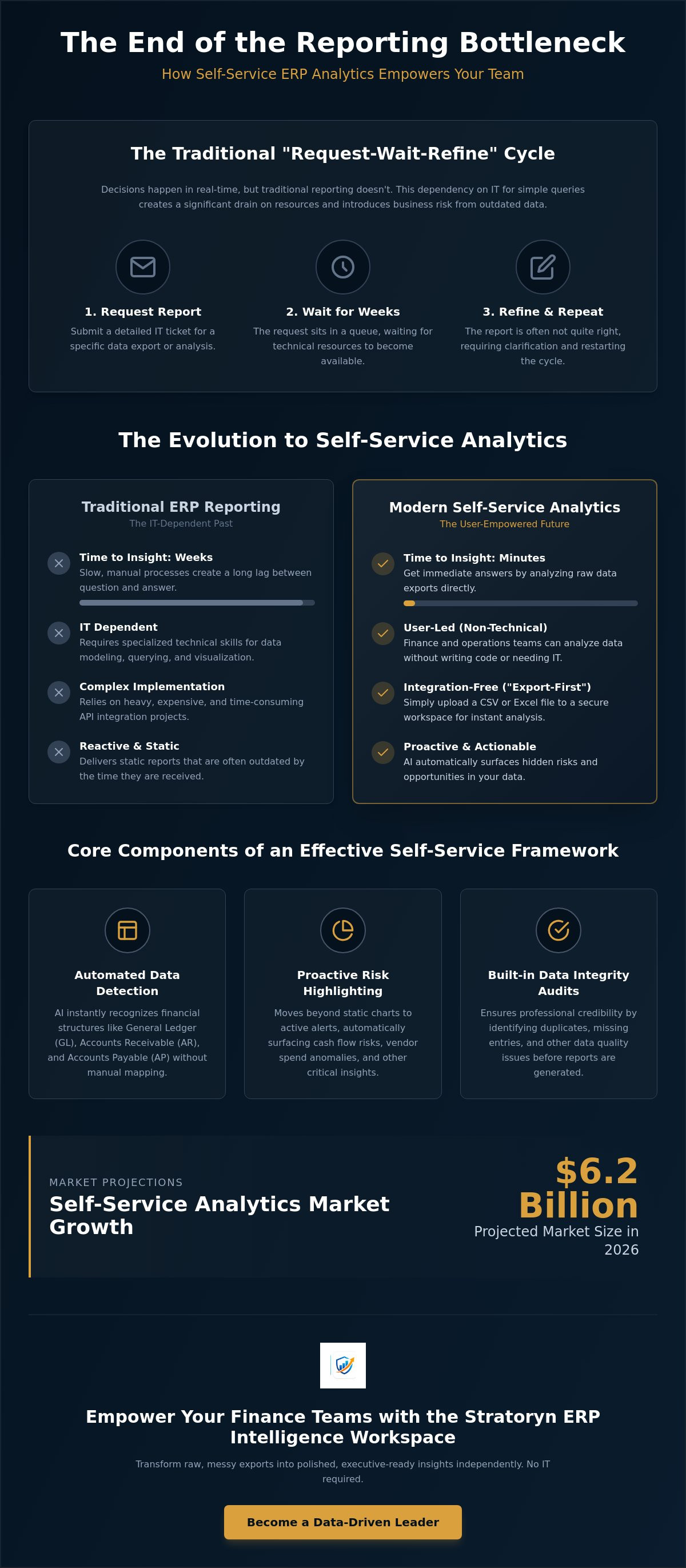
Self-service ERP analytics isn't just a dashboard with a few filters. It's a fundamental shift in who holds the keys to enterprise data. In 2026, the definition has evolved. It now means non-technical users can query complex datasets and visualize results without writing a single line of code or understanding database schemas. Traditional Business Intelligence (BI) often fails this test. Most BI tools still require specialized data modeling before a user can even drag and drop a field. If you need a data engineer to set up the environment, it isn't truly self-service. The market is responding to this friction. The self-service analytics market is projected to reach $6.2 billion in 2026, driven by a need for autonomy in finance and operations departments.
Modern self-service ERP analytics leverages AI to bridge the technical gap. In 2026, AI-native platforms don't just display data; they understand it. These systems automatically detect whether a column represents a General Ledger code, an Accounts Payable date, or a vendor ID. This automation eliminates the manual mapping that previously tethered business users to their IT departments. The result is a transition from IT-led reporting to user-led intelligence. You no longer need to be a technical expert to surface business risks or identify financial opportunities. You simply need the right questions and access to your data.
Why Traditional ERP Reporting is a Bottleneck
The "Request-Wait-Refine" cycle is a primary source of business inefficiency. You ask IT for a specific report. You wait days, or even weeks, for the ticket to be processed. When the report finally arrives, it's often missing a key dimension or uses the wrong date range. You refine the request and the cycle repeats. This dependency on IT for simple variance analyses and ledger queries is a significant drain on resources. Decisions happen in real-time, but traditional reporting doesn't. Making a high-stakes executive call based on two-week-old data is a risk your business can't afford. This lag between a business need and a technical solution is exactly what modern self-service tools aim to eliminate.
The Rise of Integration-Free Intelligence
2026 marks the end of the "integration-only" era. For years, the industry believed that you couldn't analyze data without a permanent, complex API connection to your ERP. That's no longer true. We're seeing a massive move toward "Export-First" analytics. This approach uses browser-side processing to handle data locally and securely. It's a streamlined solution for rapid, ad-hoc business inquiries. You take a raw CSV or Excel export, drop it into a secure workspace, and get immediate answers. This method is faster and more flexible than waiting for a full-scale integration project to finish. It allows teams to be agile, performing deep-dive audits or migration prep without the overhead of a permanent software implementation.
Key Components of an Effective Self-Service Analytics Framework
An effective framework for self-service ERP analytics must prioritize automation over manual configuration. It isn't enough to have access to data; you need a system that understands the context of that data. The first pillar of this framework is automated data detection. A modern system should recognize General Ledger (GL), Accounts Receivable (AR), and Accounts Payable (AP) structures immediately upon upload. This removes the "technical tax" that usually delays reporting. When the software handles the mapping, finance teams can focus on the results rather than the formatting.
Beyond simple visualization, the framework must incorporate proactive risk and opportunity highlighting. Moving from static charts to active alerts is essential. You need to know about cash flow risks or vendor spend anomalies before they impact the bottom line. This requires a built-in data integrity audit. The system should identify duplicates or missing entries during the analysis phase. Ensuring your data is clean before it reaches an executive-ready report is the only way to maintain professional credibility. High-quality self-service ERP analytics transforms raw CSV exports into polished, board-level insights in a single click.
Automated Insight Generation vs. Manual Visualization
Traditional BI tools provide the tools to build a story, but they don't find the story for you. Modern frameworks change this dynamic. AI-driven analysis is the key to empowering finance teams to act with speed. Automated risk detection can surface inventory aging or slow-moving stock without requiring manual formulas. It looks for patterns in accounts receivable to predict payment delays. If you want to see how these automated audits function in a live environment, the ERP Intelligence Workspace offers a streamlined way to detect these patterns without manual intervention.
Security and Privacy in 2026 Analytics
In 2026, security is defined by data residency. A "No Raw Storage" policy is now the gold standard for sensitive financial exports. Browser-side analysis keeps your data on your local machine. It never touches a persistent cloud database. This approach simplifies compliance with global regulations while allowing for rapid, ad-hoc analysis. You gain the computational power of modern software without the security risks associated with long-term file storage. It is a cleaner, safer way to handle enterprise data that prioritizes user privacy and corporate security.
Integration-Free vs. Native ERP Reporting: A Strategic Comparison
Choosing between native reporting and an integration-free workspace isn't about finding a "winner." It's about selecting the right tool for your specific business requirement. Native reporting is designed for real-time operational monitoring. It's built into your ERP, which sounds ideal until you consider the IT overhead. Building custom dashboards in a native environment often requires weeks of development and significant licensing costs. It tethers your analytics to a specific platform, which can become a liability during a system transition or upgrade.
For rapid audits and ad-hoc executive reporting, self-service ERP analytics via an integration-free model is superior. This approach uses raw data exports rather than persistent API connections. It eliminates the "integration debt" that occurs when your ERP structure changes. You simply export the data and analyze it immediately. This is the fastest way to turn a raw CSV into actionable business intelligence. It provides a streamlined solution for finance teams who need answers today, not after the next IT sprint cycle.
When to Bypass IT and Use Self-Service Workspaces
Closing the month is a high-pressure period where waiting for IT isn't an option. Analyzing trial balances and ledger exports instantly allows your finance team to identify variances before they become problems. If you're preparing for a system change, using erp migration data quality tools is essential. These tools help you audit legacy data and identify integrity issues before they're imported into a new environment. When management asks for a specific vendor spend report on a Tuesday afternoon, a self-service workspace delivers a professional output in minutes.
The "Single Source of Truth" Myth
Many vendors claim that a native integration is the only way to maintain a "single source of truth." In reality, complex BI dashboards often hide the truth behind layers of filters and manual data modeling. Raw exports are often more reliable for specific audits because they represent the exact state of the ledger at a specific moment. You aren't seeing a filtered version of the data; you're seeing the data itself.
This point-in-time analysis is vital for detecting financial risks that might be smoothed over in a rolling dashboard. Maintaining data integrity is easier when you're working with a direct export that hasn't been transformed by a third-party middleware. Confidence comes from seeing the raw data, not just the filtered visualization. By leveraging self-service ERP analytics, you ensure your executive-ready reports are based on the most accurate, unfiltered information available.
Best Practices for Preparing ERP Data Exports for AI Analysis
Raw exports are rarely ready for immediate analysis. To get the most out of self-service ERP analytics, you must first address the "dirty data" problem. Standardizing your CSV or Excel files ensures that AI algorithms can interpret your financial structures accurately. This starts with clean headers. Every column needs a unique, descriptive name. Avoid merged cells or sub-totals within the data range, as these break the logical flow of the dataset. Consistent data types are equally important. If one row uses a date format of MM/DD/YYYY and another uses DD/MM/YYYY, your analysis will fail.
Managing large datasets requires a strategic approach. Modern browser-side workspaces can handle multi-thousand-row exports, but efficiency is key. If your export exceeds 50,000 rows, consider whether you need the full history or just the last four quarters. Validating data quality before running automated risk detection prevents "garbage in, garbage out" scenarios. Check for null values in critical fields like "Invoice Amount" or "Vendor ID" to ensure your final reports are mathematically sound. Selecting the right sub-ledger is also vital. Use your Accounts Receivable (AR) export for cash flow forecasting and your Accounts Payable (AP) export for vendor spend analysis.
Cleaning Up ERP Data for Migration and Analysis
ERP data cleansing is the process of removing inaccuracies and inconsistencies from enterprise data exports to ensure reliable AI analysis. Detecting duplicate records in vendor or customer masters early prevents overstating liabilities or assets. Formatting dates and currency fields for cross-platform compatibility ensures that your data remains readable whether it's in your legacy ERP or a modern intelligence workspace. Clean data is the foundation of any successful migration or audit. It ensures that your automated risk detection identifies real threats rather than simple formatting errors.
Selecting the Right Data for Executive Reports
Executive leadership doesn't need to see every transaction. When presenting ERP insights, "less is more" is a professional requirement. Focus on high-level KPIs that drive strategy. Track Days Sales Outstanding (DSO) to monitor collection efficiency. Monitor Days Payable Outstanding (DPO) to manage liquidity. Use inventory turnover rates to identify capital tied up in slow-moving stock. Bridging the gap between raw ledger data and executive-ready management reports requires distilling thousands of rows into these core metrics. If you're ready to automate this process, you can start using the ERP Intelligence Workspace today to generate these insights instantly.
Empowering Finance Teams with the Stratoryn ERP Intelligence Workspace
Stratoryn provides the final link between raw enterprise data and strategic clarity. Most self-service ERP analytics tools require weeks of setup and complex API configurations. Stratoryn requires none. It's an AI-powered workspace designed specifically for finance and operations professionals who value speed and precision. You don't need an IT ticket to begin your analysis. You simply need your data. By removing the technical barriers to entry, the workspace allows you to reclaim your time and focus on high-level decision-making.
The "Upload and Analyze" workflow is the core of this efficiency. When you drop a file into the workspace, the AI Data Analyst immediately begins its work. It doesn't just read the file; it understands the underlying financial logic. It identifies whether you've provided a General Ledger, a Trial Balance, or an Accounts Payable sub-ledger. Then, it surfaces risks automatically. It looks for anomalies, duplicates, and missing entries that human eyes often miss during manual reviews. This level of automation ensures that your insights are both deep and accurate.
Security is a primary pillar of the Stratoryn framework. The platform uses browser-side processing to ensure your data stays under your control throughout the analysis. Our "no raw file storage" commitment means your sensitive financial exports aren't sitting on a third-party server indefinitely. You get the power of sophisticated AI without the privacy trade-offs common in traditional cloud BI platforms. This approach allows you to act with confidence, knowing your corporate data is protected by design and modern software-as-a-service standards.
From CSV to Executive Insights in Minutes
Transforming a messy export into a polished report shouldn't be a manual task. Stratoryn's automated risk detection highlights cash flow bottlenecks and inventory issues without requiring you to write a single formula. It bridges the gap between raw data and Executive-Ready Reports. You can move from a multi-thousand-row CSV to a professional, management-ready summary in minutes. As a bold innovator in the space, Stratoryn simplifies cumbersome data processes so you can focus on strategy rather than spreadsheets. It's a streamlined solution for a complex data landscape.
Getting Started with Stratoryn Today
Finance and operations professionals can now join the early-access phase of the Stratoryn ERP Intelligence Workspace. In 2026, this early-access period offers a unique opportunity to use these advanced tools for free. You can run your first Data Quality Analysis immediately to identify integrity issues before they impact your reporting. There's no integration to manage and no software to install. It's a frictionless way to audit your data and identify hidden financial risks. Access the Stratoryn ERP Intelligence Workspace for free to start turning your raw exports into executive insights today.
Reclaiming Your Financial Autonomy
The shift toward self-service ERP analytics is more than a technical upgrade; it's a strategic move that places reporting power back in the hands of finance leaders. By adopting integration-free workflows, you eliminate the three-week wait typically associated with IT-led dashboards. You've seen how standardizing your CSV exports and focusing on high-level KPIs can transform raw data into a narrative that executives actually value. This approach ensures your insights are based on unfiltered ledger truths rather than filtered visualizations. It allows you to move at the speed of business without being held back by legacy technical constraints.
Stratoryn simplifies this entire transition by providing a tool that values your time and security. Our workspace requires no complex integration and uses browser-side processing to keep your sensitive data secure on your local machine. It automatically detects your data structures and highlights hidden risks before they impact your balance sheet. You don't have to navigate these technical hurdles alone or wait for a developer to build your next report. Analyze your ERP exports for free with Stratoryn and start generating professional, executive-ready insights today. Your data is ready to work for you.
Frequently Asked Questions
What is self-service ERP analytics?
Self-service ERP analytics is the ability for non-technical users to query, analyze, and visualize enterprise data without waiting for IT intervention. It removes the technical barriers between raw ledger data and actionable business intelligence. By using modern tools, finance teams can generate insights independently, bypassing the traditional "Request-Wait-Refine" cycle. This democratization of data ensures that decision-makers have immediate access to the information they need for strategic planning.
Is it safe to upload ERP data to a self-service analytics tool?
Security depends on the platform's architecture, but modern tools prioritize local processing to minimize risk. Stratoryn uses browser-side analysis, meaning your data stays on your machine and is never stored on a persistent cloud database. This "no raw file storage" commitment aligns with global security standards and protects sensitive financial information. It offers the power of AI analysis without the risks associated with long-term external data residency.
Do I need IT approval to use an export-based analytics platform?
Export-based platforms often don't require the same level of IT integration as native ERP extensions. Since these tools process local CSV or Excel files rather than establishing a permanent API connection, they frequently fall under standard business software usage policies. However, you should always verify your internal data governance rules before beginning. The lack of direct integration typically simplifies the adoption process for finance and operations professionals looking for rapid results.
How does AI help with ERP data analysis?
AI automates the identification of complex data structures and surfaces hidden financial patterns that manual reviews might miss. In 2026, self-service ERP analytics uses machine learning to recognize General Ledger codes and sub-ledger details without manual mapping. It proactively highlights risks like cash flow bottlenecks or duplicate vendor payments. This automation transforms raw information into strategic intelligence, allowing you to focus on high-level outcomes rather than manual data entry.
Can self-service tools help with ERP migration data quality?
Yes, self-service tools are highly effective for auditing legacy data before a system transition. They allow you to perform a Data Quality Analysis on raw exports to identify duplicates, formatting errors, or missing entries. Cleaning your data in a specialized workspace ensures that only high-quality information reaches your new ERP. This proactive approach reduces the risk of migration failures and ensures long-term data integrity across your entire enterprise.
What are the benefits of browser-side data processing for finance teams?
Browser-side processing offers a unique blend of speed and security for sensitive workflows. It allows your computer to handle the heavy lifting of data analysis locally, which keeps financial records within your control. This method eliminates the need for persistent cloud storage of raw files, simplifying compliance with privacy regulations. It provides a frictionless way to perform deep-dive audits without the security overhead of traditional, integration-heavy BI platforms.
Can I generate executive-ready reports from a simple CSV export?
You can move from a raw CSV file to Executive-Ready Reports in minutes using automated intelligence. Modern workspaces distill thousands of ledger rows into core KPIs like DSO, DPO, and inventory turnover. The AI handles the formatting and data validation, ensuring the final output is professional and mathematically sound. This speed allows you to respond to sudden management requests with polished, board-level summaries almost instantly.
What types of ERP systems are compatible with Stratoryn?
The Stratoryn ERP Intelligence Workspace is compatible with any ERP system that can export data to CSV or Excel formats. This includes major platforms like Oracle NetSuite, SAP, and Microsoft Dynamics, as well as industry-specific legacy systems. Because the workspace is integration-free, it doesn't rely on specific API versions or cloud-native architecture. If your system can generate a data export, you can use self-service ERP analytics to analyze it immediately.
Frequently asked questions
Why Traditional ERP Reporting is a Bottleneck
The "Request-Wait-Refine" cycle is a primary source of business inefficiency. You ask IT for a specific report. You wait days, or even weeks, for the ticket to be processed. When the report finally arrives, it's often missing a key dimension or uses the wrong date range. You refine the request and the cycle repeats. This dependency on IT for simple variance analyses and ledger queries is a significant drain on resources. Decisions happen in real-time, but traditional reporting doesn't. Making a high-stakes executive call based on two-week-old data is a risk your business can't afford. This lag between a business need and a technical solution is exactly what modern self-service tools aim to eliminate.
The Rise of Integration-Free Intelligence
2026 marks the end of the "integration-only" era. For years, the industry believed that you couldn't analyze data without a permanent, complex API connection to your ERP. That's no longer true. We're seeing a massive move toward "Export-First" analytics. This approach uses browser-side processing to handle data locally and securely. It's a streamlined solution for rapid, ad-hoc business inquiries. You take a raw CSV or Excel export, drop it into a secure workspace, and get immediate answers. This method is faster and more flexible than waiting for a full-scale integration project to finish. It allows teams to be agile, performing deep-dive audits or migration prep without the overhead of a permanent software implementation. An effective framework for self-service ERP analytics must prioritize automation over manual configuration. It isn't enough to have access to data; you need a system that understands the context of that data. The first pillar of this framework is automated data detection. A modern system should recognize General Ledger (GL), Accounts Receivable (AR), and Accounts Payable (AP) structures immediately upon upload. This removes the "technical tax" that usually delay
Automated Insight Generation vs. Manual Visualization
Traditional BI tools provide the tools to build a story, but they don't find the story for you. Modern frameworks change this dynamic. AI-driven analysis is the key to empowering finance teams to act with speed. Automated risk detection can surface inventory aging or slow-moving stock without requiring manual formulas. It looks for patterns in accounts receivable to predict payment delays. If you want to see how these automated audits function in a live environment, the ERP Intelligence Workspace offers a streamlined way to detect these patterns without manual intervention.
Security and Privacy in 2026 Analytics
In 2026, security is defined by data residency. A "No Raw Storage" policy is now the gold standard for sensitive financial exports. Browser-side analysis keeps your data on your local machine. It never touches a persistent cloud database. This approach simplifies compliance with global regulations while allowing for rapid, ad-hoc analysis. You gain the computational power of modern software without the security risks associated with long-term file storage. It is a cleaner, safer way to handle enterprise data that prioritizes user privacy and corporate security. Choosing between native reporting and an integration-free workspace isn't about finding a "winner." It's about selecting the right tool for your specific business requirement. Native reporting is designed for real-time operational monitoring. It's built into your ERP, which sounds ideal until you consider the IT overhead. Building custom dashboards in a native environment often requires weeks of development and significant licensing costs. It tethers your analytics to a specific platform, which can become a liability during a system transition or upgrade. For rapid audits and ad-hoc executive reporting, self-service ERP anal
When to Bypass IT and Use Self-Service Workspaces
Closing the month is a high-pressure period where waiting for IT isn't an option. Analyzing trial balances and ledger exports instantly allows your finance team to identify variances before they become problems. If you're preparing for a system change, using erp migration data quality tools is essential. These tools help you audit legacy data and identify integrity issues before they're imported into a new environment. When management asks for a specific vendor spend report on a Tuesday afternoon, a self-service workspace delivers a professional output in minutes.
The "Single Source of Truth" Myth
Many vendors claim that a native integration is the only way to maintain a "single source of truth." In reality, complex BI dashboards often hide the truth behind layers of filters and manual data modeling. Raw exports are often more reliable for specific audits because they represent the exact state of the ledger at a specific moment. You aren't seeing a filtered version of the data; you're seeing the data itself. This point-in-time analysis is vital for detecting financial risks that might be smoothed over in a rolling dashboard. Maintaining data integrity is easier when you're working with a direct export that hasn't been transformed by a third-party middleware. Confidence comes from seeing the raw data, not just the filtered visualization. By leveraging self-service ERP analytics, you ensure your executive-ready reports are based on the most accurate, unfiltered information available. Raw exports are rarely ready for immediate analysis. To get the most out of self-service ERP analytics, you must first address the "dirty data" problem. Standardizing your CSV or Excel files ensures that AI algorithms can interpret your financial structures accurately. This starts with clean heade
Cleaning Up ERP Data for Migration and Analysis
ERP data cleansing is the process of removing inaccuracies and inconsistencies from enterprise data exports to ensure reliable AI analysis. Detecting duplicate records in vendor or customer masters early prevents overstating liabilities or assets. Formatting dates and currency fields for cross-platform compatibility ensures that your data remains readable whether it's in your legacy ERP or a modern intelligence workspace. Clean data is the foundation of any successful migration or audit. It ensures that your automated risk detection identifies real threats rather than simple formatting errors.
Selecting the Right Data for Executive Reports
Executive leadership doesn't need to see every transaction. When presenting ERP insights, "less is more" is a professional requirement. Focus on high-level KPIs that drive strategy. Track Days Sales Outstanding (DSO) to monitor collection efficiency. Monitor Days Payable Outstanding (DPO) to manage liquidity. Use inventory turnover rates to identify capital tied up in slow-moving stock. Bridging the gap between raw ledger data and executive-ready management reports requires distilling thousands of rows into these core metrics. If you're ready to automate this process, you can start using the ERP Intelligence Workspace today to generate these insights instantly. Stratoryn provides the final link between raw enterprise data and strategic clarity. Most self-service ERP analytics tools require weeks of setup and complex API configurations. Stratoryn requires none. It's an AI-powered workspace designed specifically for finance and operations professionals who value speed and precision. You don't need an IT ticket to begin your analysis. You simply need your data. By removing the technical barriers to entry, the workspace allows you to reclaim your time and focus on high-level decision-m
From CSV to Executive Insights in Minutes
Transforming a messy export into a polished report shouldn't be a manual task. Stratoryn's automated risk detection highlights cash flow bottlenecks and inventory issues without requiring you to write a single formula. It bridges the gap between raw data and Executive-Ready Reports. You can move from a multi-thousand-row CSV to a professional, management-ready summary in minutes. As a bold innovator in the space, Stratoryn simplifies cumbersome data processes so you can focus on strategy rather than spreadsheets. It's a streamlined solution for a complex data landscape.
Getting Started with Stratoryn Today
Finance and operations professionals can now join the early-access phase of the Stratoryn ERP Intelligence Workspace. In 2026, this early-access period offers a unique opportunity to use these advanced tools for free. You can run your first Data Quality Analysis immediately to identify integrity issues before they impact your reporting. There's no integration to manage and no software to install. It's a frictionless way to audit your data and identify hidden financial risks. Access the Stratoryn ERP Intelligence Workspace for free to start turning your raw exports into executive insights today. The shift toward self-service ERP analytics is more than a technical upgrade; it's a strategic move that places reporting power back in the hands of finance leaders. By adopting integration-free workflows, you eliminate the three-week wait typically associated with IT-led dashboards. You've seen how standardizing your CSV exports and focusing on high-level KPIs can transform raw data into a narrative that executives actually value. This approach ensures your insights are based on unfiltered ledger truths rather than filtered visualizations. It allows you to move at the speed of business with
What is self-service ERP analytics?
Self-service ERP analytics is the ability for non-technical users to query, analyze, and visualize enterprise data without waiting for IT intervention. It removes the technical barriers between raw ledger data and actionable business intelligence. By using modern tools, finance teams can generate insights independently, bypassing the traditional "Request-Wait-Refine" cycle. This democratization of data ensures that decision-makers have immediate access to the information they need for strategic planning.
Is it safe to upload ERP data to a self-service analytics tool?
Security depends on the platform's architecture, but modern tools prioritize local processing to minimize risk. Stratoryn uses browser-side analysis, meaning your data stays on your machine and is never stored on a persistent cloud database. This "no raw file storage" commitment aligns with global security standards and protects sensitive financial information. It offers the power of AI analysis without the risks associated with long-term external data residency.
Do I need IT approval to use an export-based analytics platform?
Export-based platforms often don't require the same level of IT integration as native ERP extensions. Since these tools process local CSV or Excel files rather than establishing a permanent API connection, they frequently fall under standard business software usage policies. However, you should always verify your internal data governance rules before beginning. The lack of direct integration typically simplifies the adoption process for finance and operations professionals looking for rapid results.
How does AI help with ERP data analysis?
AI automates the identification of complex data structures and surfaces hidden financial patterns that manual reviews might miss. In 2026, self-service ERP analytics uses machine learning to recognize General Ledger codes and sub-ledger details without manual mapping. It proactively highlights risks like cash flow bottlenecks or duplicate vendor payments. This automation transforms raw information into strategic intelligence, allowing you to focus on high-level outcomes rather than manual data entry.
Can self-service tools help with ERP migration data quality?
Yes, self-service tools are highly effective for auditing legacy data before a system transition. They allow you to perform a Data Quality Analysis on raw exports to identify duplicates, formatting errors, or missing entries. Cleaning your data in a specialized workspace ensures that only high-quality information reaches your new ERP. This proactive approach reduces the risk of migration failures and ensures long-term data integrity across your entire enterprise.
What are the benefits of browser-side data processing for finance teams?
Browser-side processing offers a unique blend of speed and security for sensitive workflows. It allows your computer to handle the heavy lifting of data analysis locally, which keeps financial records within your control. This method eliminates the need for persistent cloud storage of raw files, simplifying compliance with privacy regulations. It provides a frictionless way to perform deep-dive audits without the security overhead of traditional, integration-heavy BI platforms.
Can I generate executive-ready reports from a simple CSV export?
You can move from a raw CSV file to Executive-Ready Reports in minutes using automated intelligence. Modern workspaces distill thousands of ledger rows into core KPIs like DSO, DPO, and inventory turnover. The AI handles the formatting and data validation, ensuring the final output is professional and mathematically sound. This speed allows you to respond to sudden management requests with polished, board-level summaries almost instantly.
What types of ERP systems are compatible with Stratoryn?
The Stratoryn ERP Intelligence Workspace is compatible with any ERP system that can export data to CSV or Excel formats. This includes major platforms like Oracle NetSuite, SAP, and Microsoft Dynamics, as well as industry-specific legacy systems. Because the workspace is integration-free, it doesn't rely on specific API versions or cloud-native architecture. If your system can generate a data export, you can use self-service ERP analytics to analyze it immediately.
- self-service ERP analytics
- ERP
- Self-Service Analytics
- Business Intelligence
- Data Visualization
- Financial Reporting
- Executive Dashboards
- Data Integrity
- ERP Reporting
- ERP reporting
- business intelligence
- executive dashboards
- financial reporting
- data analytics for finance
- ERP data export