
The Rise of AI Tools to Analyze ERP Exports in 2026

Why are you still waiting for a six-month API integration when the data you need is already sitting in your downloads folder? For most finance and operations leads, the ERP export is a daily reality that quickly becomes a manual nightmare. You spend hours cleaning rows and pivoting data, only to worry that a single hidden error could mask a major financial risk. IT departments often block direct access to protect system integrity, leaving you trapped in a cycle of spreadsheet rework.
We understand that your time is better spent on strategy than on data cleansing. The good news is that 2026 has introduced a faster path to clarity. By leveraging a dedicated ai tool to analyze erp exports, you can bypass the technical hurdles and transform raw CSV files into actionable business intelligence. This approach respects your security constraints while delivering the speed your board demands. In this guide, we'll show you how to automate the detection of stock issues and generate executive-ready reports in minutes, not days. You'll discover how to turn your existing exports into a streamlined engine for growth without the need for complex system overhauls.
Key Takeaways
- Understand why the transition from manual spreadsheet manipulation to automated intelligence is the fastest path to business clarity in 2026.
- Learn the mechanics of how AI automatically identifies data types, such as Trial Balances and Stock Reports, directly from your raw CSV and Excel files.
- Compare the immediate speed-to-value of an ai tool to analyze erp exports against the high IT burden and security risks of native system upgrades.
- Master a framework for surfacing hidden cash risks and inventory aging buried within thousands of rows of financial data.
- Discover the roadmap for establishing a routine of automated data health checks within a streamlined ERP Intelligence Workspace.
Table of Contents
- Why AI for Data Analysis is Transforming the ERP Landscape
- The Mechanics of AI-Powered ERP Export Analysis
- Export-Based Analysis vs. Native ERP AI: A Strategic Comparison
- How to Use AI to Surface Hidden Risks in Financial Exports
- Transitioning to an AI-Driven ERP Intelligence Workspace
Why AI for Data Analysis is Transforming the ERP Landscape
Modern businesses generate vast amounts of data, but raw data isn't intelligence. In the context of Enterprise Resource Planning (ERP), AI for data analysis means using intelligent algorithms to interpret business logic rather than just calculating sums. This marks a shift from manual spreadsheet manipulation to automated intelligence. You no longer need to spend days cleaning data. Instead, you can focus on the strategic decisions that drive growth.
By 2026, the market has moved toward "decoupled" business intelligence tools. These platforms work independently of your core ERP, allowing you to gain insights without waiting for IT to approve a direct API integration. Implementing a specialized ai tool to analyze erp exports allows teams to bypass technical bottlenecks. The primary output is no longer a massive spreadsheet. It's an executive-ready report that highlights risks and opportunities in minutes. This transformation prioritizes the speed of the outcome over the complexity of the system.
The Limitations of Traditional ERP Reporting
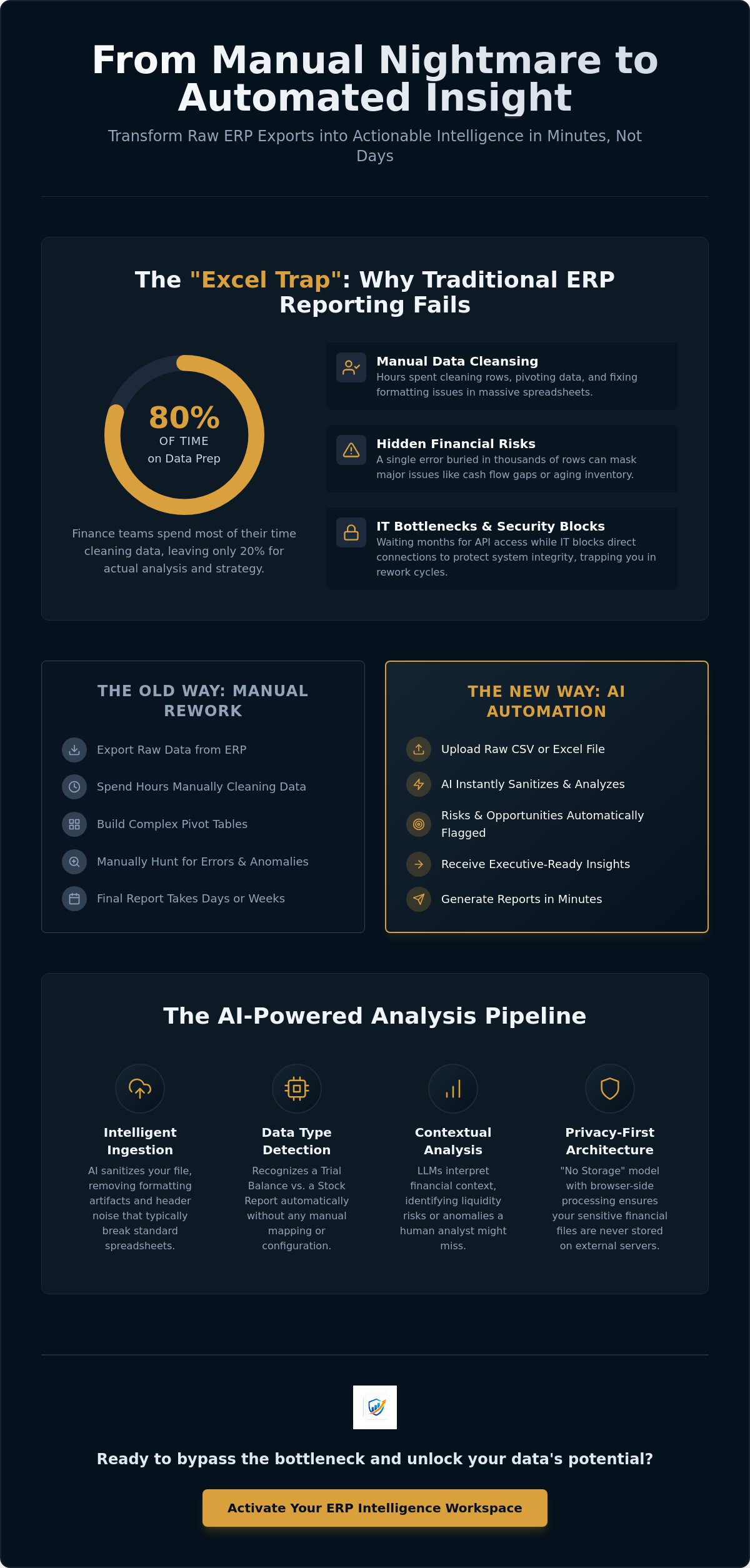
Standard ERP reports are often rigid and designed for record-keeping, not strategy. They tell you what happened, but they don't explain why it matters. This creates the "Excel Trap." Finance teams spend 80% of their time cleaning and formatting data, leaving only 20% for actual analysis. It's a drain on high-value resources. There's a persistent gap between raw data collection and actionable management intelligence. When you're buried in thousands of rows, hidden financial risks stay buried. You need a system that surfaces these risks automatically.
The Emergence of Specialized AI Data Analysts
Specialized AI agents now perform the role of a junior data analyst in seconds. These tools don't just read numbers; they recognize patterns. Modern systems automatically detect data types, identifying the difference between a Trial Balance and a Stock Report without manual mapping. This eliminates the need for tedious setup or constant re-configuration. AI data analysts are software that interprets business logic, not just numbers. This level of automation ensures that your ai tool to analyze erp exports delivers consistent, high-quality analysis every time you upload a file. It turns your existing data into a proactive asset for the entire executive team.
The Mechanics of AI-Powered ERP Export Analysis
The process of turning a raw file into a strategic asset begins the moment you upload your data. Unlike legacy Business Intelligence tools that require weeks of manual mapping, a modern ai tool to analyze erp exports uses intelligent ingestion to understand the structure of your file immediately. The system first sanitizes the data, removing formatting artifacts and header noise that typically break standard spreadsheets. Next, it performs automated data type detection. By recognizing specific column headers and numerical patterns, the AI identifies whether it's looking at a Trial Balance, a Stock Report, or an Accounts Receivable aging file.
Large Language Models (LLMs) play a specialized role in this pipeline. They don't just calculate totals; they interpret the financial context behind the numbers. For instance, the AI understands that a high concentration of overdue invoices in a specific region isn't just a data point, it's a liquidity risk. This layer of business logic allows the software to categorize transactions and flag anomalies that a human analyst might miss. You can experience this streamlined workflow firsthand through an ERP Intelligence Workspace designed for rapid analysis.
From CSV to Insight: The Processing Pipeline
Raw exports are often "flat," meaning they lack the relational depth needed for deep analysis. The AI pipeline solves this by restructuring the data into a multi-dimensional format. It uses pattern recognition to detect anomalies across thousands of rows in seconds. If a vendor payment appears twice or a stock level drops below a historical safety margin, the system flags it instantly. This transformation moves your data from a static list to an executive-ready report that highlights the "so what" behind the numbers. It replaces manual pivot tables with automated, high-level summaries.
Privacy-First Architecture in 2026
Security is the primary reason IT departments traditionally block external data tools. Modern AI solutions solve this through browser-side processing. This "No Storage" model ensures that your raw financial files never actually sit on a third-party server. The analysis happens locally within your browser, or through encrypted, transient sessions that delete data immediately after the report is generated. This architecture is a direct response to the 2026 regulatory environment, including the EU AI Act's strict requirements for data traceability and transparency. You get the speed of cloud-based AI with the security of an on-premise solution. It distinguishes between analyzing data and storing it, ensuring your sensitive financial information remains under your control at all times.
Export-Based Analysis vs. Native ERP AI: A Strategic Comparison
Choosing between native ERP AI and a decoupled export-based tool is a choice between long-term infrastructure and immediate utility. Native AI, such as SAP Joule or Microsoft Copilot, is deeply embedded within the system. While this allows for real-time triggers, it also requires a full system upgrade or complex licensing. For many organizations, the implementation timeline for native features stretches into months or even years. In contrast, an ai tool to analyze erp exports provides speed-to-value by working with the data you already have. It allows you to bypass the traditional implementation cycle entirely.
The IT burden is a significant differentiator. Native integrations require constant API maintenance and rigorous security clearances from IT departments. Every time the ERP updates, the integration risks breaking. Export-based analysis removes this friction. Because the tool operates on "flat" files like CSVs or Excel exports, it doesn't require a direct connection to the core database. This creates a "decoupled" environment where finance teams can operate with autonomy. You gain the power of advanced analytics without waiting in the IT integration queue.
Flexibility is also a core advantage. Large enterprises often manage disparate ERP systems across different subsidiaries. A native AI tool is usually locked into a single ecosystem. An export-based workspace can ingest data from NetSuite, SAP, and Sage simultaneously. It normalizes this data into a single view, providing a comprehensive "Source of Intelligence" that native tools simply cannot match. This approach doesn't replace your ERP; it enhances it by providing a specialized layer for strategic interpretation.
When to Choose Export-Based AI Tools
Immediate insight is often a requirement, not a luxury. During month-end close or urgent audit preparations, you don't have time for a system overhaul. Export-based tools serve as a vital bridge, especially for companies running legacy ERP systems that lack modern AI capabilities. By applying ai to erp data through exports, you can gain 2026-level insights from a 2015-level system. It allows you to modernize your reporting stack without the risk of altering your core financial records.
Bypassing the IT Integration Queue
The hidden costs of native AI often include expensive consultants and seat-based licensing that scales quickly. Finance teams are increasingly seeking autonomy through "No-Code" solutions. By 2026, the dominant trend in financial operations is the shift toward browser-based analysis tools that require zero technical setup. This allows your team to generate ai tool to analyze erp exports results on demand. You control the data, the timing, and the output, ensuring that executive-ready reports are available exactly when they are needed.
How to Use AI to Surface Hidden Risks in Financial Exports
Insight is worthless if it arrives too late. While traditional spreadsheets show you the current state of your accounts, they fail to project where your cash is actually at risk. Deploying a specialized ai tool to analyze erp exports allows you to move beyond basic totals. The system scrutinizes every transaction to identify patterns that signal operational friction. It transforms a static list of invoices into a dynamic map of your financial health, highlighting vulnerabilities before they escalate into crises.
Data integrity is the foundation of this process. Most ERP systems suffer from "dirty data," including duplicate vendor records, inconsistent naming conventions, and simple entry errors. An AI-driven approach performs a comprehensive Data Quality Analysis the moment you upload a file. It flags these inconsistencies instantly, ensuring that your strategic decisions are based on a clean, verified dataset. This proactive auditing improves your overall ERP data integrity without requiring manual line-by-line reviews.
Inventory management benefits significantly from this automated oversight. By analyzing stock aging and turnover rates from a simple CSV, the AI identifies slow-moving items that are tying up capital. It provides a clear framework for optimizing stock levels and reducing carrying costs. You can start surfacing these insights immediately with a dedicated AI Data Analyst that processes your exports in seconds.
Identifying Operational and Financial Red Flags
Financial red flags often hide in the volume of daily transactions. The software uses pattern recognition to detect duplicate payments and unauthorized vendor changes that manual audits frequently miss. It also monitors stock levels against historical demand to spot potential shortages or overages. AI identifies cash flow gaps by analyzing payment patterns in AR exports. This allows you to see which customers are consistently trending toward late payments, giving you the lead time needed to adjust credit terms or intensify collection efforts.
Generating Management Reports That Drive Action
In 2026, an "executive-ready" report must do more than display charts. It must provide a narrative that explains the "why" behind the numbers. Modern AI tools write these summaries automatically, translating complex data trends into clear, professional prose. This level of clarity is essential for ERP migration risk assessment and ongoing data preparation. It ensures that stakeholders at every level understand the risks and the necessary steps to mitigate them. You move from defensive data management to offensive strategic planning, supported by Executive-Ready Reports that are generated in minutes, not days.
Transitioning to an AI-Driven ERP Intelligence Workspace
Moving from manual data manipulation to a streamlined environment requires a clear roadmap. It starts with shifting your perspective on the ERP export. It isn't a dead-end file; it's the raw material for your next strategic move. By integrating an ai tool to analyze erp exports into your monthly workflow, you create a systematic bridge between raw data and executive action. This transition doesn't require a total system overhaul. It simply requires a workspace that prioritizes intelligence over storage.
Establishing a routine for regular "data health checks" is the next logical step. Instead of waiting for an annual audit, use AI to scan your exports weekly or monthly. The system identifies anomalies, entry errors, and financial red flags in real time. This consistent oversight ensures that your ERP remains a reliable source of truth. The AI Data Analyst functions as a force multiplier for your finance team, handling the heavy lifting of data processing so your human experts can focus on high-level interpretation. Stratoryn serves as the logical starting point for this friction-free analysis, providing the tools needed to modernize your operations immediately.
Building a Culture of Data-Driven Decision Making
A successful transition involves more than just software. It requires a culture where teams feel empowered to question the data, not just collect it. When you reduce the time spent on manual cleaning, you increase the time available for strategic inquiry. Rapid analysis leads to faster pivot cycles in both operations and finance. If the AI flags a sudden shift in inventory aging, your team can react in days rather than waiting for the next quarterly review. Maintaining clean, AI-ready data today ensures your business is positioned for seamless scaling in the future. You build a foundation of clarity that supports long-term growth.
Getting Started with Stratoryn
The Stratoryn ERP Intelligence Workspace is designed for immediate impact. You don't need to wait for IT approval or complex API configurations to begin. Our platform focuses on high-level reporting with a "no storage" model, ensuring your sensitive financial files remain private and secure. You gain access to sophisticated Data Quality Analysis and professional summaries the moment you upload your first file. This approach eliminates the traditional barriers to entry for advanced analytics. It's time to stop fighting with spreadsheets and start leading with insights. Analyze your first ERP export for free with Stratoryn and experience the speed of automated intelligence.
Modernize Your Financial Intelligence Today
The shift toward automated data interpretation is no longer a future concept; it's a 2026 necessity. You've seen how manual spreadsheet manipulation creates bottlenecks and hides critical financial risks. By adopting a dedicated ai tool to analyze erp exports, you gain the ability to bypass slow IT integrations and reclaim your team's time. This approach prioritizes immediate visibility through browser-side processing, ensuring your sensitive data remains private while you generate professional insights.
Automated detection of cash and stock risks allows you to move from a reactive posture to a proactive strategy. You can now produce executive-ready reports in seconds, providing your board with the clarity they require without the traditional overhead. The barrier to entry for advanced analytics has vanished, leaving only the opportunity to lead with precision. Take the first step toward a more efficient operation. Access the Stratoryn ERP Intelligence Workspace and transform your raw exports into strategic assets today. Your data is ready to work for you.
Frequently Asked Questions
Is it safe to use an AI tool to analyze my ERP exports?
Security is a primary feature of modern analysis tools. Using a platform that utilizes browser-side processing ensures that your raw financial files never sit on an external server. This "no storage" architecture complies with 2026 regulatory standards, such as the EU AI Act, by keeping sensitive data under your local control. You gain the power of advanced intelligence without the security risks associated with traditional cloud storage.
Do I need to integrate my ERP with the AI tool for it to work?
No integration is necessary to gain strategic insights. These tools are designed to ingest the standard CSV and Excel files you already export from your system. This decoupled approach allows finance teams to operate with total autonomy. You can bypass the IT integration queue and start your analysis immediately, avoiding the high costs and implementation timelines of native system upgrades.
Which ERP systems are compatible with AI export analysis tools?
Any system capable of generating a data export is compatible. Whether you use legacy software or modern platforms like SAP, Oracle NetSuite, or Microsoft Dynamics, an ai tool to analyze erp exports can interpret the data. The software recognizes universal business logic and financial patterns, allowing it to normalize information from disparate systems into a single, cohesive intelligence workspace.
Can AI tools detect specific financial risks like duplicate payments?
Yes, AI agents are specifically programmed to identify operational red flags. The system uses pattern recognition to scan thousands of rows in seconds, flagging duplicate payments, unauthorized vendor changes, and inventory aging. This automated oversight provides a level of data integrity that manual audits cannot match. It ensures that hidden risks are surfaced before they impact your bottom line or cash flow.
How long does it take for an AI tool to analyze a large CSV export?
Most analyses are completed in seconds or minutes. Even massive exports containing tens of thousands of rows are processed almost instantly by intelligent algorithms. This speed allows for rapid pivot cycles and immediate reporting during high-pressure periods like month-end close or audit preparation. You move from raw data to a finished report faster than a human analyst could clean a single tab.
What is the difference between an AI tool and a standard BI platform like Power BI?
Standard BI platforms require manual data modeling, formula creation, and human interpretation. An AI tool uses intelligent agents to automatically understand the context of your data. It doesn't just display charts; it writes narrative summaries and identifies the "why" behind the numbers. While BI tools focus on visualization, AI tools focus on delivering automated intelligence and executive-ready outputs.
Does using an AI tool require a background in data science?
No technical expertise or data science background is required. These platforms are built for finance and operations professionals who need results, not complex coding. The interface handles the heavy lifting of data cleansing and pattern detection. You simply upload your file and receive clear, professional insights that are ready for immediate use in strategic decision-making.
Can I generate executive-ready reports directly from an Excel export?
Yes, you can transform a raw Excel file into Executive-Ready Reports with a few clicks. The AI interprets the business logic within your export and generates a professional summary that highlights key risks and opportunities. This eliminates the need for manual formatting and slide creation. You provide stakeholders with high-level clarity based on the data you already have in your downloads folder.
Frequently asked questions
The Limitations of Traditional ERP Reporting
Standard ERP reports are often rigid and designed for record-keeping, not strategy. They tell you what happened, but they don't explain why it matters. This creates the "Excel Trap." Finance teams spend 80% of their time cleaning and formatting data, leaving only 20% for actual analysis. It's a drain on high-value resources. There's a persistent gap between raw data collection and actionable management intelligence. When you're buried in thousands of rows, hidden financial risks stay buried. You need a system that surfaces these risks automatically.
The Emergence of Specialized AI Data Analysts
Specialized AI agents now perform the role of a junior data analyst in seconds. These tools don't just read numbers; they recognize patterns. Modern systems automatically detect data types, identifying the difference between a Trial Balance and a Stock Report without manual mapping. This eliminates the need for tedious setup or constant re-configuration. AI data analysts are software that interprets business logic, not just numbers. This level of automation ensures that your ai tool to analyze erp exports delivers consistent, high-quality analysis every time you upload a file. It turns your existing data into a proactive asset for the entire executive team. The process of turning a raw file into a strategic asset begins the moment you upload your data. Unlike legacy Business Intelligence tools that require weeks of manual mapping, a modern ai tool to analyze erp exports uses intelligent ingestion to understand the structure of your file immediately. The system first sanitizes the data, removing formatting artifacts and header noise that typically break standard spreadsheets. Next, it performs automated data type detection. By recognizing specific column headers and numerical patter
From CSV to Insight: The Processing Pipeline
Raw exports are often "flat," meaning they lack the relational depth needed for deep analysis. The AI pipeline solves this by restructuring the data into a multi-dimensional format. It uses pattern recognition to detect anomalies across thousands of rows in seconds. If a vendor payment appears twice or a stock level drops below a historical safety margin, the system flags it instantly. This transformation moves your data from a static list to an executive-ready report that highlights the "so what" behind the numbers. It replaces manual pivot tables with automated, high-level summaries.
Privacy-First Architecture in 2026
Security is the primary reason IT departments traditionally block external data tools. Modern AI solutions solve this through browser-side processing. This "No Storage" model ensures that your raw financial files never actually sit on a third-party server. The analysis happens locally within your browser, or through encrypted, transient sessions that delete data immediately after the report is generated. This architecture is a direct response to the 2026 regulatory environment, including the EU AI Act's strict requirements for data traceability and transparency. You get the speed of cloud-based AI with the security of an on-premise solution. It distinguishes between analyzing data and storing it, ensuring your sensitive financial information remains under your control at all times. Choosing between native ERP AI and a decoupled export-based tool is a choice between long-term infrastructure and immediate utility. Native AI, such as SAP Joule or Microsoft Copilot, is deeply embedded within the system. While this allows for real-time triggers, it also requires a full system upgrade or complex licensing. For many organizations, the implementation timeline for native features stretches
When to Choose Export-Based AI Tools
Immediate insight is often a requirement, not a luxury. During month-end close or urgent audit preparations, you don't have time for a system overhaul. Export-based tools serve as a vital bridge, especially for companies running legacy ERP systems that lack modern AI capabilities. By applying ai to erp data through exports, you can gain 2026-level insights from a 2015-level system. It allows you to modernize your reporting stack without the risk of altering your core financial records.
Bypassing the IT Integration Queue
The hidden costs of native AI often include expensive consultants and seat-based licensing that scales quickly. Finance teams are increasingly seeking autonomy through "No-Code" solutions. By 2026, the dominant trend in financial operations is the shift toward browser-based analysis tools that require zero technical setup. This allows your team to generate ai tool to analyze erp exports results on demand. You control the data, the timing, and the output, ensuring that executive-ready reports are available exactly when they are needed. Insight is worthless if it arrives too late. While traditional spreadsheets show you the current state of your accounts, they fail to project where your cash is actually at risk. Deploying a specialized ai tool to analyze erp exports allows you to move beyond basic totals. The system scrutinizes every transaction to identify patterns that signal operational friction. It transforms a static list of invoices into a dynamic map of your financial health, highlighting vulnerabilities before they escalate into crises. Data integrity is the foundation of this process. Most ERP systems suffer from "dirty data," including duplicate vendor records, inconsistent
Identifying Operational and Financial Red Flags
Financial red flags often hide in the volume of daily transactions. The software uses pattern recognition to detect duplicate payments and unauthorized vendor changes that manual audits frequently miss. It also monitors stock levels against historical demand to spot potential shortages or overages. AI identifies cash flow gaps by analyzing payment patterns in AR exports. This allows you to see which customers are consistently trending toward late payments, giving you the lead time needed to adjust credit terms or intensify collection efforts.
Generating Management Reports That Drive Action
In 2026, an "executive-ready" report must do more than display charts. It must provide a narrative that explains the "why" behind the numbers. Modern AI tools write these summaries automatically, translating complex data trends into clear, professional prose. This level of clarity is essential for ERP migration risk assessment and ongoing data preparation. It ensures that stakeholders at every level understand the risks and the necessary steps to mitigate them. You move from defensive data management to offensive strategic planning, supported by Executive-Ready Reports that are generated in minutes, not days. Moving from manual data manipulation to a streamlined environment requires a clear roadmap. It starts with shifting your perspective on the ERP export. It isn't a dead-end file; it's the raw material for your next strategic move. By integrating an ai tool to analyze erp exports into your monthly workflow, you create a systematic bridge between raw data and executive action. This transition doesn't require a total system overhaul. It simply requires a workspace that prioritizes intelligence over storage. Establishing a routine for regular "data health checks" is the next logica
Building a Culture of Data-Driven Decision Making
A successful transition involves more than just software. It requires a culture where teams feel empowered to question the data, not just collect it. When you reduce the time spent on manual cleaning, you increase the time available for strategic inquiry. Rapid analysis leads to faster pivot cycles in both operations and finance. If the AI flags a sudden shift in inventory aging, your team can react in days rather than waiting for the next quarterly review. Maintaining clean, AI-ready data today ensures your business is positioned for seamless scaling in the future. You build a foundation of clarity that supports long-term growth.
Getting Started with Stratoryn
The Stratoryn ERP Intelligence Workspace is designed for immediate impact. You don't need to wait for IT approval or complex API configurations to begin. Our platform focuses on high-level reporting with a "no storage" model, ensuring your sensitive financial files remain private and secure. You gain access to sophisticated Data Quality Analysis and professional summaries the moment you upload your first file. This approach eliminates the traditional barriers to entry for advanced analytics. It's time to stop fighting with spreadsheets and start leading with insights. Analyze your first ERP export for free with Stratoryn and experience the speed of automated intelligence. The shift toward automated data interpretation is no longer a future concept; it's a 2026 necessity. You've seen how manual spreadsheet manipulation creates bottlenecks and hides critical financial risks. By adopting a dedicated ai tool to analyze erp exports, you gain the ability to bypass slow IT integrations and reclaim your team's time. This approach prioritizes immediate visibility through browser-side processing, ensuring your sensitive data remains private while you generate professional insights. Automated
Is it safe to use an AI tool to analyze my ERP exports?
Security is a primary feature of modern analysis tools. Using a platform that utilizes browser-side processing ensures that your raw financial files never sit on an external server. This "no storage" architecture complies with 2026 regulatory standards, such as the EU AI Act, by keeping sensitive data under your local control. You gain the power of advanced intelligence without the security risks associated with traditional cloud storage.
Do I need to integrate my ERP with the AI tool for it to work?
No integration is necessary to gain strategic insights. These tools are designed to ingest the standard CSV and Excel files you already export from your system. This decoupled approach allows finance teams to operate with total autonomy. You can bypass the IT integration queue and start your analysis immediately, avoiding the high costs and implementation timelines of native system upgrades.
Which ERP systems are compatible with AI export analysis tools?
Any system capable of generating a data export is compatible. Whether you use legacy software or modern platforms like SAP, Oracle NetSuite, or Microsoft Dynamics, an ai tool to analyze erp exports can interpret the data. The software recognizes universal business logic and financial patterns, allowing it to normalize information from disparate systems into a single, cohesive intelligence workspace.
Can AI tools detect specific financial risks like duplicate payments?
Yes, AI agents are specifically programmed to identify operational red flags. The system uses pattern recognition to scan thousands of rows in seconds, flagging duplicate payments, unauthorized vendor changes, and inventory aging. This automated oversight provides a level of data integrity that manual audits cannot match. It ensures that hidden risks are surfaced before they impact your bottom line or cash flow.
How long does it take for an AI tool to analyze a large CSV export?
Most analyses are completed in seconds or minutes. Even massive exports containing tens of thousands of rows are processed almost instantly by intelligent algorithms. This speed allows for rapid pivot cycles and immediate reporting during high-pressure periods like month-end close or audit preparation. You move from raw data to a finished report faster than a human analyst could clean a single tab.
What is the difference between an AI tool and a standard BI platform like Power BI?
Standard BI platforms require manual data modeling, formula creation, and human interpretation. An AI tool uses intelligent agents to automatically understand the context of your data. It doesn't just display charts; it writes narrative summaries and identifies the "why" behind the numbers. While BI tools focus on visualization, AI tools focus on delivering automated intelligence and executive-ready outputs.
Does using an AI tool require a background in data science?
No technical expertise or data science background is required. These platforms are built for finance and operations professionals who need results, not complex coding. The interface handles the heavy lifting of data cleansing and pattern detection. You simply upload your file and receive clear, professional insights that are ready for immediate use in strategic decision-making.
Can I generate executive-ready reports directly from an Excel export?
Yes, you can transform a raw Excel file into Executive-Ready Reports with a few clicks. The AI interprets the business logic within your export and generates a professional summary that highlights key risks and opportunities. This eliminates the need for manual formatting and slide creation. You provide stakeholders with high-level clarity based on the data you already have in your downloads folder.
- ai tool to analyze erp exports
- AI Tools
- ERP
- Data Analysis
- Financial Reporting
- Business Intelligence
- Automation
- Operations Management
- CSV Analysis
- Inventory Management
- erp data analysis
- ai for finance
- automated financial reporting
- csv analysis tool
- inventory analysis ai
- erp export automation