
Automated ERP Reporting Software: Turning Raw Exports into Executive Insights in 2026

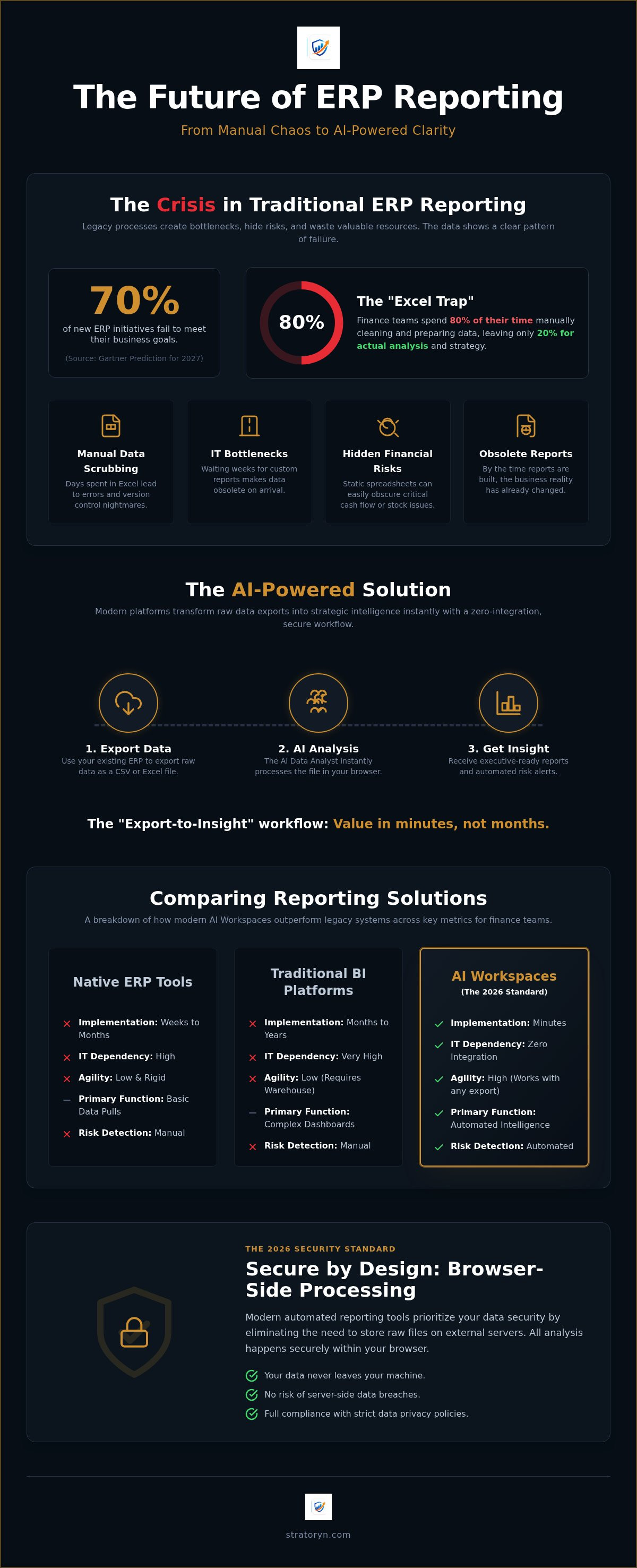
Gartner predicts that by 2027, over 70% of recently implemented ERP initiatives will fail to meet their original business goals. This failure often starts in the finance department. Professionals spend days every month manually scrubbing Excel exports just to produce a single accurate report. You understand the frustration of rigid native reporting and the fear that a hidden financial risk is buried somewhere in a static spreadsheet. It's time to stop acting as a data janitor. In this guide, you'll discover how automated ERP reporting software allows you to bypass complex IT integrations. You can generate professional management reports directly from your existing data exports without waiting on a six-month technical project. We will preview the 2026 landscape of AI-driven analysis. You'll see how to detect cash and stock risks automatically while maintaining a zero-integration workflow that respects your time and your data security. This is the essential shift from raw information to polished, executive-ready visibility.
Key Takeaways
- Learn how to replace manual data cleaning with an AI Data Analyst that interprets raw exports instantly.
- Discover how automated ERP reporting software bypasses IT bottlenecks by generating professional management reports directly from your existing CSV files.
- Compare the agility of AI-powered workspaces against traditional BI platforms that often demand expensive data engineering resources.
- Secure your financial information with browser-side processing, a 2026 standard that eliminates the need for raw file storage.
- Identify hidden risks in your cash flow and inventory by standardizing your reporting cycle for optimal AI detection.
Table of Contents
- The Evolution of Automated ERP Reporting: From Static Exports to AI Analysis
- How AI Software Automates Management Reports from CSV and Excel Exports
- Comparing Solutions: Native ERP Tools vs. BI Platforms vs. AI Workspaces
- Critical Security Considerations for Automated Reporting in 2026
- Implementation Strategy: From Manual Excel to Automated ERP Intelligence
The Evolution of Automated ERP Reporting: From Static Exports to AI Analysis
The definition of automated ERP reporting software has undergone a fundamental shift. It is no longer a simple tool for pulling numbers into a grid. Modern solutions interpret data without manual intervention, transforming raw files into strategic narratives. While traditional Business Intelligence (BI) focuses on building massive, expensive data warehouses, ERP Intelligence prioritizes the immediate clarity of the export. It's the difference between a six-month construction project and an instant insight. You don't need a data engineer to tell you your margins are shrinking; you need a tool that sees it the moment you click export.
The year 2026 marks a critical tipping point for this technology. The global market for Enterprise Resource Planning (ERP) software is projected to reach $106.22 billion this year. However, Gartner predicts that over 70% of recently implemented ERP initiatives will fail to meet their business goals. This gap exists because companies remain stuck in the "IT Bottleneck." Relying on technical teams to build custom dashboards is a legacy strategy. It creates a dependency that slows down every department. If you have to wait two weeks for a report, the data is already dead.
Why Traditional ERP Reporting Fails the Modern Finance Team
Most finance teams remain caught in the "Excel Trap." They spend 80% of their time cleaning data and only 20% analyzing it. This manual scrubbing creates version control nightmares where no one is sure which spreadsheet is the "source of truth." Static exports are often obsolete before they reach the boardroom. In a fast-moving economy, a month-old report is a liability. The hidden cost of this manual process is staggering. It consumes hundreds of human hours and introduces significant error risks that can lead to poor financial forecasting.
The Shift Toward AI-Powered ERP Intelligence
The industry is moving from asking "what happened" to asking "what does this mean." AI-powered automated ERP reporting software functions as a tireless AI Data Analyst. It uses automated data type detection to recognize specific financial categories like Accounts Receivable or Inventory instantly. This technology identifies patterns and anomalies that human eyes often miss in 50,000-row exports. It can flag a sudden cash flow risk or a stock discrepancy in seconds. By automating the transition from raw data to executive-ready visibility, your team can focus on high-stakes strategy instead of low-value data entry.
How AI Software Automates Management Reports from CSV and Excel Exports
The "Export-to-Insight" workflow has become the 2026 standard for agile finance teams. It replaces the months-long implementation cycles typically found in Gartner's analysis of ERP solutions with a process that delivers value in minutes. Modern automated ERP reporting software leverages the data you already have. It turns static files into dynamic intelligence without requiring a single line of code or a custom API connection. This transition allows you to move from raw data to strategic visibility at the speed of business, bypassing the traditional friction of enterprise software updates.
Step 1: The Zero-Integration Data Upload
Zero-integration is the ability to analyze data without IT intervention. While many vendors push for direct database access, CSV and Excel exports remain the most reliable source of truth. They represent the exact state of your records at the moment of export. By focusing on these files, you bypass the security risks and technical hurdles of deep system integrations. You don't need to manage API keys or wait for database permissions. You simply export your data and let the software handle the rest. This approach ensures that your reporting process isn't held hostage by technical bottlenecks or IT backlogs.
Step 2: Automated Risk and Opportunity Detection
Once the data is uploaded, the AI Data Analyst begins its work. It doesn't just display numbers; it hunts for anomalies. Risk detection algorithms identify cash flow gaps by spotting late payers and credit risks before they impact your liquidity. In the warehouse, the system performs a Data Quality Analysis to find slow-moving stock or missing entries that skew your inventory value. This automated mapping recognizes the difference between Accounts Receivable and Inventory instantly. It ensures that every row of data is categorized correctly without manual tagging. The software acts as a silent partner, highlighting issues that might stay hidden in a traditional spreadsheet for weeks.
Step 3: Generating Executive-Ready Management Reports
The final stage is the transformation of raw numbers into narrative summaries. Executives don't want to see 50,000 rows of data; they want to know what those rows mean for the business. The software automatically selects the most effective charts for your specific data types, creating Executive-Ready Management Reports from ERP Exports that are ready for the boardroom. This eliminates hours of manual formatting and design work. Companies that use systems with integrated automation report a 35% faster month-end close. This efficiency allows you to present a polished, professional output while your competitors are still wrestling with pivot tables. If you are ready to streamline your workflow, exploring an ERP Intelligence Workspace can help you reclaim your time and focus on high-level decision-making.
Comparing Solutions: Native ERP Tools vs. BI Platforms vs. AI Workspaces
Native ERP reporting tools are essential for day-to-day operations. They track transactions with high precision, showing you exactly "what is happening right now." However, they lack the flexibility required for strategic planning. If you need to forecast next year's stock requirements based on current raw exports, native tools often fall short. This is where automated ERP reporting software bridges the gap. It moves beyond simple data storage to provide high-level visibility. It allows you to look past the "now" and prepare for the "next."
In contrast, general Business Intelligence (BI) platforms like Power BI or Tableau offer immense power. They can visualize almost anything. Yet, they require a dedicated data engineer to maintain the pipelines. For a finance professional, the goal isn't to build a dashboard; it's to get an answer. AI Intelligence Workspaces represent a third path. These are designed for the business user. They prioritize speed and clarity over complex customization. You don't need a developer to interpret your data when the software acts as your analyst.
Why Power BI Might Be Overkill for Your Finance Team
There is a growing debate between visualization and insight. Do you need a pretty chart, or do you need to know why your cash flow is dipping? Many teams find that business intelligence for finance teams often becomes a maintenance burden. Custom data pipelines break. API connections require constant updates. The hidden cost of keeping a BI platform running can outweigh its benefits. If your team spends more time fixing dashboards than reading them, the tool has become an obstacle to efficiency.
The Rise of the AI Data Analyst Workspace
A dedicated AI tool to analyze erp exports provides a significantly faster ROI. It eliminates the "building" phase entirely. Instead of configuring widgets, you interact with an AI Data Analyst that has already mapped your data types. This self-service model empowers managers to run their own audits without waiting for a technical specialist. In 2026, the competitive advantage lies in the shift from building reports to reading reports. You gain the ability to spot stock-outs or payment delays in real-time. This ensures your strategy is based on facts rather than stale, manual spreadsheets. Using automated ERP reporting software in this way turns your finance department from a cost center into a source of intelligence.
Critical Security Considerations for Automated Reporting in 2026
The most common objection to adopting automated ERP reporting software is a simple question: "Where does my raw data go?" Finance professionals are rightly protective of their ledger data. In 2026, this concern is amplified by a complex regulatory landscape. The EU AI Act introduces strict obligations for high-risk finance uses starting in August 2026. Simultaneously, the Cyber Resilience Act (CRA) mandates incident reporting for digital products beginning September 11, 2026. Centralized cloud storage for raw ERP exports has become a liability. If your data is stored on a vendor's server, it's vulnerable to breaches and regulatory scrutiny. You need a solution that prioritizes data sovereignty.
Browser-side processing has emerged as the gold standard for data privacy. This method ensures that your sensitive information never leaves your controlled environment in its raw form. It's a non-negotiable requirement for modern finance teams. By processing data locally within the user's browser, you eliminate the risks associated with data residency and unauthorized access to centralized repositories. You maintain the speed of a cloud application with the security of an on-premise tool. This architecture is the only way to ensure that your financial intelligence remains private and compliant.
Understanding Browser-Side Data Analysis
Data analysis can occur entirely within your browser without ever hitting a third-party server. There is a fundamental difference between processing data and storing it. Processing involves the temporary calculation of insights; storage involves the long-term retention of the underlying files. Stratoryn does not store raw ERP files by default. This architecture ensures that your source of truth remains under your exclusive control. You get the benefits of AI-driven intelligence without the security trade-offs of traditional SaaS models. It's a cleaner, safer way to handle enterprise information.
Maintaining Data Integrity During Migration and Audit
Security isn't just about privacy; it's about accuracy. During high-stakes periods, such as a platform transition, you must perform a thorough erp migration risk assessment. Automated tools can identify duplicates, missing entries, and mapping errors that occur when moving data between systems. This ensures compliance with global standards like GDPR and NYDFS Part 500. You should always verify AI-generated insights against your original exports. Modern software provides the transparency needed to audit these results instantly. If you're ready to secure your reporting workflow, you can start using the ERP Intelligence Workspace today to gain clarity without compromising your data.
Implementation Strategy: From Manual Excel to Automated ERP Intelligence
The transition to automated ERP reporting software does not require a complete overhaul of your existing systems. It begins with a clear audit of your current reporting cycle. You must identify the specific time-sinks that delay your month-end close. For most teams, this is the manual scrubbing and reformatting of data. Once you isolate these bottlenecks, you can standardize your exports to ensure the AI recognizes your data structure instantly. This shift moves your team from reactive data entry to proactive strategic analysis.
Start with a pilot program. Choose a single department, such as Accounts Receivable or Inventory Management, to test the "Export-to-Insight" workflow. This limited scope allows you to verify data accuracy without overwhelming your operations. Once the Data Quality Analysis confirms the integrity of your outputs, you can scale the process. Moving from a single department to full Executive-Ready Reports for the entire leadership team ensures that every decision is backed by verified, real-time intelligence.
Standardizing CSV Exports for AI Success
To achieve optimal results, you must standardize your CSV exports. Whether you use SAP S/4HANA, Oracle NetSuite 2026.1, or Microsoft Dynamics 365, the export format is your foundation. Ensure your files include consistent headers for multi-currency transactions and multi-language entries. This clarity allows the AI to perform a deeper audit of your records. You should focus on Improving ERP Data Integrity by removing extraneous formatting before upload. By keeping raw data clean, you reduce the risk of mapping errors and ensure the AI Data Analyst can categorize every row with precision.
Getting Started with Stratoryn's ERP Intelligence Workspace
Getting started is a frictionless process that bypasses traditional IT hurdles. You can access the free early-access ERP Intelligence Workspace to begin your transformation today. Upload your first file and expect actionable insights within the first 60 seconds. The system identifies patterns, anomalies, and financial risks immediately. You move from a raw, cluttered export to your first professional management report in a single session. This is the fastest path to modern enterprise intelligence. It allows you to reclaim your time and focus on the high-level strategy that drives business growth.
Transitioning to Intelligent ERP Visibility in 2026
The era of manual spreadsheet scrubbing is ending. By adopting automated ERP reporting software, you move from a state of data fatigue to one of strategic clarity. You've seen how modern AI workspaces bypass the IT Bottleneck and provide a secure environment for your most sensitive financial records. This shift ensures that your month-end close is faster and your executive reports are more accurate. Total privacy is maintained because your raw files never leave your control.
Instant risk detection and automated data mapping are current necessities for agile teams. You can now transform raw CSV exports into polished insights without a single line of code or complex database connections. It's time to reclaim your time and lead your department with confidence. You are ready to turn your raw data into your greatest competitive advantage.
Get Free Early Access to the Stratoryn ERP Intelligence Workspace. Experience the power of an AI Data Analyst that requires no IT integration and offers browser-side processing for total privacy.
Frequently Asked Questions
What is automated ERP reporting software?
Automated ERP reporting software refers to intelligent platforms that interpret, clean, and format enterprise data without manual intervention. These tools function as an AI Data Analyst, transforming raw CSV or Excel files into Executive-Ready Reports. Unlike traditional reporting, these systems use automated data type detection to understand financial categories instantly. This eliminates the need for manual data scrubbing in Excel and ensures that management receives accurate insights at the speed of business.
Does automated reporting require direct integration with my ERP system?
No, direct integration is not required. Modern reporting intelligence uses a zero-integration model that works directly with your existing CSV or Excel exports. This approach allows you to bypass the IT bottlenecks and long implementation cycles associated with traditional database connections. You maintain full control over your data while gaining the ability to generate reports without waiting on technical teams to build custom APIs or connectors.
Is it safe to upload my financial data to an AI reporting tool?
Security depends on the tool's architecture, but browser-side processing is the gold standard for data privacy in 2026. This technology ensures that your data is analyzed locally within your browser rather than being stored on a centralized server. Stratoryn does not store raw ERP files by default, which minimizes the risk of data breaches. This architecture complies with modern regulations like the EU AI Act and the Cyber Resilience Act.
Can AI really detect financial risks in a CSV export?
Yes, AI algorithms can perform a comprehensive Data Quality Analysis on standard exports to identify anomalies human eyes often miss. By analyzing patterns in your ledger, the software can spot cash flow gaps, late payers, and inventory stock-outs before they impact your operations. This proactive detection turns a static spreadsheet into a dynamic risk management tool, providing a level of visibility that native ERP reports often lack.
How does automated ERP reporting differ from Power BI?
The primary difference lies in the user's role and the speed of implementation. Power BI is a powerful visualization tool that typically requires dedicated data engineers to build and maintain complex pipelines. In contrast, automated ERP reporting software is built for the business user. It prioritizes instant insights over custom development. You move from building reports to reading reports, significantly reducing the hidden maintenance costs of traditional BI platforms.
What ERP systems are compatible with automated reporting exports?
Compatibility is universal for any system capable of generating CSV or Excel exports. This includes major platforms like SAP S/4HANA Cloud 2602, Oracle NetSuite 2026.1, and Microsoft Dynamics 365. Because the software interprets the data structure after the export, it does not matter which specific ERP version you use. This flexibility ensures that you can maintain consistent reporting even if your organization manages multiple ERP systems across different departments.
How long does it take to set up an automated reporting workspace?
Setup is instantaneous. Since there is no direct integration or software installation required, you can begin analyzing data in less than 60 seconds. You simply upload your first export and the AI begins its analysis immediately. This speed allows finance teams to pilot the technology in a single department before scaling to full executive reporting, ensuring a fast return on investment without operational downtime.
Can I generate executive management reports for free?
Yes, you can generate professional management reports through the Stratoryn early-access phase available in 2026. This allows you to experience the transition from raw data to executive-ready visibility without an initial financial commitment. During this phase, you can test the AI Data Analyst capabilities and verify the accuracy of the risk detection algorithms before deciding to implement the workspace across your entire organization.
Frequently asked questions
What is automated ERP reporting software?
Automated ERP reporting software refers to intelligent platforms that interpret, clean, and format enterprise data without manual intervention. These tools function as an AI Data Analyst, transforming raw CSV or Excel files into Executive-Ready Reports. Unlike traditional reporting, these systems use automated data type detection to understand financial categories instantly. This eliminates the need for manual data scrubbing in Excel and ensures that management receives accurate insights at the speed of business.
Does automated reporting require direct integration with my ERP system?
No, direct integration is not required. Modern reporting intelligence uses a zero-integration model that works directly with your existing CSV or Excel exports. This approach allows you to bypass the IT bottlenecks and long implementation cycles associated with traditional database connections. You maintain full control over your data while gaining the ability to generate reports without waiting on technical teams to build custom APIs or connectors.
Is it safe to upload my financial data to an AI reporting tool?
Security depends on the tool's architecture, but browser-side processing is the gold standard for data privacy in 2026. This technology ensures that your data is analyzed locally within your browser rather than being stored on a centralized server. Stratoryn does not store raw ERP files by default, which minimizes the risk of data breaches. This architecture complies with modern regulations like the EU AI Act and the Cyber Resilience Act.
Can AI really detect financial risks in a CSV export?
Yes, AI algorithms can perform a comprehensive Data Quality Analysis on standard exports to identify anomalies human eyes often miss. By analyzing patterns in your ledger, the software can spot cash flow gaps, late payers, and inventory stock-outs before they impact your operations. This proactive detection turns a static spreadsheet into a dynamic risk management tool, providing a level of visibility that native ERP reports often lack.
How does automated ERP reporting differ from Power BI?
The primary difference lies in the user's role and the speed of implementation. Power BI is a powerful visualization tool that typically requires dedicated data engineers to build and maintain complex pipelines. In contrast, automated ERP reporting software is built for the business user. It prioritizes instant insights over custom development. You move from building reports to reading reports, significantly reducing the hidden maintenance costs of traditional BI platforms.
What ERP systems are compatible with automated reporting exports?
Compatibility is universal for any system capable of generating CSV or Excel exports. This includes major platforms like SAP S/4HANA Cloud 2602, Oracle NetSuite 2026.1, and Microsoft Dynamics 365. Because the software interprets the data structure after the export, it does not matter which specific ERP version you use. This flexibility ensures that you can maintain consistent reporting even if your organization manages multiple ERP systems across different departments.
How long does it take to set up an automated reporting workspace?
Setup is instantaneous. Since there is no direct integration or software installation required, you can begin analyzing data in less than 60 seconds. You simply upload your first export and the AI begins its analysis immediately. This speed allows finance teams to pilot the technology in a single department before scaling to full executive reporting, ensuring a fast return on investment without operational downtime.
Can I generate executive management reports for free?
Yes, you can generate professional management reports through the Stratoryn early-access phase available in 2026. This allows you to experience the transition from raw data to executive-ready visibility without an initial financial commitment. During this phase, you can test the AI Data Analyst capabilities and verify the accuracy of the risk detection algorithms before deciding to implement the workspace across your entire organization.
- automated ERP reporting software
- ERP
- Reporting Software
- AI
- Financial Reporting
- Business Intelligence
- Data Analysis
- Automation
- Finance Technology
- ERP reporting tools
- AI financial analysis
- business intelligence software
- management reporting
- no-code reporting
- finance automation