
ERP Migration Data Quality Tool: Ensuring Integrity in 2026

The success of your 2026 ERP transition isn't decided by the features of your new software. It's decided by the integrity of the data you feed it. Most organizations realize too late that their legacy information is a minefield of duplicates and formatting errors. Relying on manual Excel cleansing is a recipe for project delays and budget overruns. You need a dedicated erp migration data quality tool that automates the audit process before you move a single row of data.
We understand the pressure to deliver a clean, validated dataset without bottlenecking your IT department. It's a high-stakes environment where one bad import can ruin months of planning. This article explains how AI-powered analysis detects hidden anomalies and provides the visibility you've been missing. You'll learn how to generate executive-ready reports that prove data readiness. This ensures your new ERP functions as a source of truth rather than a digital landfill.
Key Takeaways
- Understand why source-data readiness is the critical first step in any modern ERP migration strategy.
- Use an erp migration data quality tool to identify anomalies and outliers that standard rule-based scripts often miss.
- Transition from slow ETL pipelines to an "Export-First" AI Intelligence Workspace to accelerate your data profiling timeline.
- Implement a simple two-step process to audit legacy files from SAP, Oracle, or NetSuite without direct system integration.
- Turn raw legacy exports into executive-ready reports that validate your data integrity before the move.
Table of Contents
- The Role of Data Quality Tools in ERP Migration
- Core Features of an AI-Powered ERP Migration Data Quality Tool
- Traditional ETL vs. AI-Driven Data Readiness Workspaces
- A Framework for Auditing ERP Exports Before Migration
- Stratoryn: Streamlining Migration Readiness with AI Intelligence
The Role of Data Quality Tools in ERP Migration
An erp migration data quality tool is specialized software designed to audit legacy data before it enters a new system. It serves as a diagnostic layer. Most projects fail because they focus on the mechanics of the move instead of the substance of the information. Data migration is the physical transfer of records between storage types or formats. Data quality, however, is the validation of that information against business logic. Without a dedicated tool, you risk the "Garbage In, Garbage Out" (GIGO) effect. If your legacy data contains duplicates or broken hierarchies, your new ERP will inherit those failures immediately.
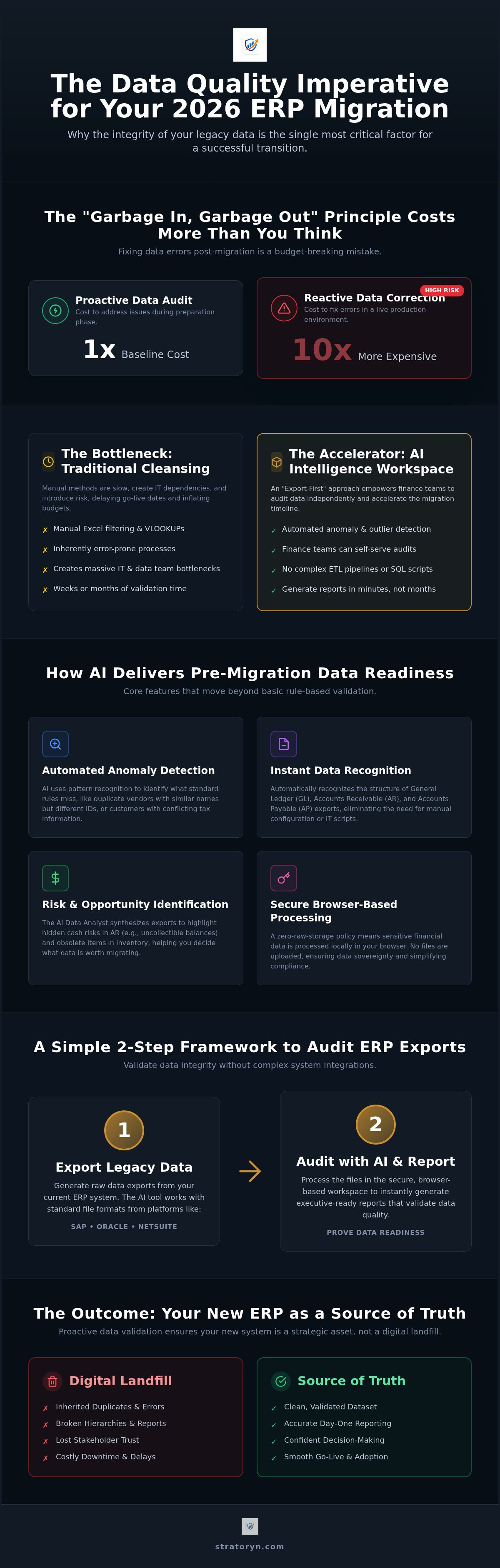
The financial stakes remain high. Industry professionals often report that fixing data errors after they land in a live production environment costs ten times more than addressing them during the preparation phase. Post-migration corrections require manual intervention from finance teams and external consultants. This diverts expensive resources from high-value analysis to basic data entry. Validating data integrity early isn't just a technical step; it's a cost-containment strategy.
Why Traditional Cleansing Methods Fail
Manual Excel filtering isn't viable for modern enterprise datasets. Finance teams often spend weeks performing VLOOKUPs and manual reconciliations. This process is inherently error-prone. A single typo in a spreadsheet formula can compromise the integrity of thousands of rows. Additionally, IT departments are frequently overwhelmed. Waiting for custom SQL scripts to validate exports creates a massive bottleneck. These delays push back go-live dates and inflate project budgets. You can't scale a migration on the back of manual spreadsheets.
The Business Impact of Migration Integrity
Operational continuity depends on data accuracy from day one. If your accounts payable data is fragmented, payments stop. If inventory records are inaccurate, supply chains break. Effective erp implementation data prep ensures that every record is verified against business rules before the transition begins. This proactive approach builds trust with executive stakeholders. They need to know that the new system provides a reliable foundation for decision-making. A clean dataset is a strategic asset that prevents costly downtime during the most sensitive phase of your digital transformation.
Core Features of an AI-Powered ERP Migration Data Quality Tool
Modern erp migration data quality tools have evolved beyond simple rule-based validation. They now utilize machine learning to interpret complex financial exports without requiring direct system integration. This shift allows finance teams to audit their data independently. An AI-powered system recognizes the structure of General Ledger (GL), Accounts Receivable (AR), and Accounts Payable (AP) files instantly. It maps fields automatically, which eliminates the need for manual configuration or custom IT scripts. This speed is essential when dealing with the tight deadlines of a 2026 migration project.
The primary advantage of AI lies in its ability to detect what standard rules miss. While traditional tools check for empty fields or basic formatting, an erp migration data quality tool uses pattern recognition to find deep-seated anomalies. It identifies duplicate vendor records that share similar names but different IDs. It spots customer accounts with conflicting tax identifiers. By isolating these outliers before the migration begins, you prevent the corruption of your new ERP environment. Organizations looking to secure their move can explore an AI-powered intelligence workspace to begin their audit immediately.
Automated Risk and Opportunity Detection
AI doesn't just find errors. It identifies business risks. The AI Data Analyst feature synthesizes complex export files to highlight hidden cash risks in legacy accounts receivable. It flags long-overdue balances that might be uncollectible. Similarly, it detects stock problems in inventory data. By identifying obsolete or slow-moving items, the tool helps you decide what data is worth migrating and what should be archived. This ensures you aren't paying for storage or processing on "dead" data in your new system.
Browser-Based Security for Sensitive Financial Data
Security architecture has shifted toward browser-side processing. In 2026, the standard for data tools is a zero-raw-storage policy. This means your sensitive financial exports are processed locally in your browser. No raw files are ever uploaded to a central server. This approach maintains strict data sovereignty and simplifies compliance with global privacy regulations. It removes the security hurdle of third-party data hosting. You get the insights of a high-powered AI without the risk of exposing your raw financial records to external storage environments. This frictionless security model is designed to satisfy both finance leads and IT security officers.
Traditional ETL vs. AI-Driven Data Readiness Workspaces
Traditional ETL pipelines are built for movement, not readiness. This "Integration-First" approach requires significant engineering resources to map fields and establish connections before any validation occurs. It often takes weeks to configure a pipeline for a single legacy source. In contrast, an AI-driven erp migration data quality tool prioritizes an "Export-First" methodology. By analyzing flat files like CSV or Excel exports, these workspaces provide immediate visibility into data health. You see the risks in minutes, not weeks. This speed allows for iterative auditing throughout the project lifecycle.
The user profile also differs significantly. ETL tools are designed for data engineers who manage complex transformations through code. However, the responsibility for data accuracy usually lies with finance and operations leads. These stakeholders don't need raw technical logs; they need clear, actionable insights. An AI workspace bridges this gap. It empowers the business users who actually understand the data to lead the audit process. This shift reduces the total cost of ownership by eliminating the need for constant IT intervention and expensive external consultants to build custom scripts.
The "No-Integration" Advantage
API limitations often cripple legacy system migrations. Older versions of SAP or Oracle may have restricted connectivity or deprecated endpoints. The "no-integration" advantage allows you to bypass these technical hurdles entirely. You can audit multiple legacy sources simultaneously by simply uploading their exports. This flexibility is a core reason why the best tools for erp migration focus on readiness before movement. It ensures your project stays on schedule regardless of legacy system constraints or API failures.
Executive-Ready Reporting vs. Raw Logs
Steering committees don't want to see raw logs or transformation scripts. They want to see proof of readiness. ETL tools produce technical outputs that are incomprehensible to non-technical stakeholders. Modern workspaces generate Executive-Ready Reports that visualize data health through a business lens. These reports highlight critical issues, such as duplicate vendors or unallocated balances, in a format that supports project sign-off. Transparency is a requirement for migration success. When executives can see the progress of data cleansing in real-time, they can make informed decisions about go-live dates with confidence.
A Framework for Auditing ERP Exports Before Migration
Auditing your data is not a one-time event. It is a systematic process that must occur before the final cutover. Most project failures happen because teams treat data preparation as a side task rather than a core workstream. A structured framework ensures that every record is verified against the logic of your future environment. By using a dedicated erp migration data quality tool, you can automate these checks and reduce the burden on your finance team. This framework moves from raw extraction to a final readiness sign-off in five distinct steps.
- Step 1: Export raw CSV or Excel files from your legacy systems, such as SAP, Oracle, or NetSuite. Don't worry about formatting at this stage.
- Step 2: Upload these exports to an AI Intelligence Workspace. This allows for automated profiling and risk detection without manual mapping.
- Step 3: Use the tool to identify and flag duplicate records, inconsistent naming conventions, and formatting errors.
- Step 4: Remediate the data at the source. It's always more efficient to fix errors in the legacy system before the final extraction.
- Step 5: Generate a final readiness report. This document provides the implementation team with the confidence they need to begin the import.
Identifying Duplicate Records and Inconsistencies
Duplicate records are the most common threat to ERP integrity. They often hide behind minor naming variations, such as "IBM" versus "I.B.M." or "International Business Machines." Standard filters often miss these overlaps. You need to know how to detect duplicate records in erp exports using fuzzy matching and AI-driven pattern recognition. This technology is particularly effective when you need to find duplicate vendors in erp data that may be siloed across different regional entities. Cleaning these records now prevents your new system from becoming cluttered with redundant master data on day one.
Validating Financial Integrity
Financial data requires a higher level of scrutiny. You must audit your Trial Balance for month-end consistency across all historical periods. AI-powered tools can detect anomalies in transaction data that would otherwise break your new General Ledger. This includes identifying unallocated credits or orphaned journal entries. You also need to verify that your master data, specifically your Chart of Accounts, aligns with the requirements of the new system. If the structures don't match, the migration will fail. You can begin your audit today by accessing the Stratoryn ERP Intelligence Workspace to ensure your financial records are migration-ready.
This proactive approach eliminates the "fix it later" mentality that drains project budgets. When you validate integrity before the move, you ensure that the implementation team receives a polished, professional dataset. This transparency builds trust with stakeholders and keeps your 2026 migration on schedule.
Stratoryn: Streamlining Migration Readiness with AI Intelligence
Stratoryn provides the ERP Intelligence Workspace to solve the "garbage in, garbage out" problem at the source. It functions as the definitive erp migration data quality tool for organizations that cannot afford project delays. Unlike traditional platforms that require months of integration, this workspace is ready to use immediately. It analyzes your current data environment through simple file exports. This approach puts the power of sophisticated data auditing directly into the hands of finance and operations professionals.
The AI Data Analyst feature interprets complex file structures without manual intervention. It recognizes the nuances of your legacy records and maps them to modern standards instantly. You don't need to write code or wait for IT to build validation scripts. This level of automation ensures that your migration strategy is based on facts rather than assumptions. Stratoryn offers a free early-access model for firms currently in the planning stage. Signup is frictionless. There's no credit card required and no complex integration to manage.
Transforming Exports into Actionable Insights
Stratoryn turns raw CSV data into Executive-Ready Reports that drive decision-making. These reports go beyond simple error lists. They highlight strategic risks such as inventory aging and critical cash flow gaps that could impact your post-migration performance. Stratoryn is a browser-side AI tool that audits ERP exports without file storage. This architecture ensures your raw financial data never leaves your local environment. You get the clarity of a deep-dive audit with the speed of a modern SaaS application. It's the most efficient way to prove data readiness to your steering committee.
Getting Started with Your Migration Audit
Don't wait for the implementation phase to discover data issues. You can perform a comprehensive Data Health Check on your legacy system today. This proactive step identifies the cleansing requirements early in the project lifecycle. By joining the early access program for the ERP Intelligence Workspace, you gain a competitive advantage in your transition. You'll move from a state of uncertainty to a position of data authority. A clean start is the only way to ensure your 2026 ERP investment delivers its promised value. Audit your ERP data for free with Stratoryn and secure your migration integrity now.
Secure Your 2026 ERP Success with Data Readiness
A successful ERP transition depends on a foundation of validated data. Legacy systems often hide deep-seated risks that manual spreadsheets simply cannot catch. By adopting an erp migration data quality tool, you move from reactive troubleshooting to proactive management. Stratoryn provides the visibility you need through zero-integration browser processing. This ensures your sensitive financial records remain secure while the AI-powered risk detection identifies duplicates and anomalies in minutes. You no longer have to wait for IT bottlenecks to clear before understanding your data health.
You can now deliver executive-ready reporting that proves your project is on track. This transparency builds trust and eliminates the cycle of errors that often plagues enterprise migrations. Don't let legacy data debt delay your digital transformation or compromise your new system. It's time to replace manual auditing with automated precision and clear insights. Join the Stratoryn Early Access to Audit Your ERP Data today. Start your journey toward a clean, high-performing system with total confidence. Your future operations deserve a foundation of absolute integrity.
Frequently Asked Questions
What is an ERP migration data quality tool?
An erp migration data quality tool is a diagnostic software layer that validates legacy records before you transfer them to a new system. It audits exports for integrity issues, such as broken hierarchies, incorrect data types, and missing fields. This prevents the "Garbage In, Garbage Out" effect in your new environment. It acts as a gatekeeper to ensure only clean, verified information enters the target system.
How does AI improve data cleansing during an ERP migration?
AI improves cleansing by moving beyond simple rule-based filters to identify complex patterns. It uses machine learning to detect deep-seated anomalies that manual scripts often overlook. For example, it can identify duplicate vendors with slightly different names or flag historical transaction risks in accounts receivable. This automation reduces the manual workload for finance teams and significantly accelerates the overall migration timeline.
Can I audit my ERP data without a direct software integration?
Yes, you can audit your data using flat file exports like CSV or Excel. This "Export-First" approach eliminates the need for direct system integration or custom API development during the audit phase. It allows you to analyze multiple legacy systems simultaneously without technical bottlenecks. It's the most efficient way to achieve data readiness when dealing with older, restricted legacy platforms that lack modern connectivity.
Is it safe to upload sensitive financial exports to a data quality tool?
Security depends on the specific architecture of the erp migration data quality tool you choose. Modern solutions prioritize browser-side processing to maintain strict data sovereignty. This means the analysis happens locally on your machine, and raw financial files are never uploaded to a central server. This design meets the rigorous security and privacy requirements of 2026 finance and IT departments.
How do I detect duplicate records in my legacy ERP system?
Detecting duplicates requires fuzzy matching logic rather than exact string comparisons. AI-powered tools analyze vendor and customer records for similarities in tax IDs, addresses, and naming variations, such as "IBM" versus "I.B.M." This identifies hidden duplicates that standard Excel filters miss. Cleaning these records at the source prevents master data corruption and ensures your new system remains uncluttered on day one.
What are the most common data quality issues found during ERP migrations?
The most common issues include duplicate master data, inconsistent formatting, and orphaned financial records. Teams often discover unallocated credits or broken account hierarchies that would cause the new General Ledger to fail. Identifying these anomalies during the audit phase prevents operational downtime. It ensures that your financial reporting remains accurate and consistent throughout the transition to the new system.
How much does an ERP data quality audit typically cost?
The cost of an audit varies based on the volume of data and the complexity of the legacy environment. However, industry professionals report that fixing errors after a migration costs ten times more than early detection. Stratoryn currently offers a free early-access model for the ERP Intelligence Workspace. This allows firms to begin their audit and identify risks without an upfront financial commitment.
Does Stratoryn store my raw ERP data files?
No, Stratoryn does not store your raw ERP data files. The platform uses a zero-storage architecture where processing occurs entirely within your browser environment. Only the resulting insights and executive-ready reports are generated. This ensures your raw financial records remain under your direct control at all times. This approach simplifies compliance and eliminates the security risks associated with third-party raw file storage.
Frequently asked questions
What is an ERP migration data quality tool?
An erp migration data quality tool is a diagnostic software layer that validates legacy records before you transfer them to a new system. It audits exports for integrity issues, such as broken hierarchies, incorrect data types, and missing fields. This prevents the "Garbage In, Garbage Out" effect in your new environment. It acts as a gatekeeper to ensure only clean, verified information enters the target system.
How does AI improve data cleansing during an ERP migration?
AI improves cleansing by moving beyond simple rule-based filters to identify complex patterns. It uses machine learning to detect deep-seated anomalies that manual scripts often overlook. For example, it can identify duplicate vendors with slightly different names or flag historical transaction risks in accounts receivable. This automation reduces the manual workload for finance teams and significantly accelerates the overall migration timeline.
Can I audit my ERP data without a direct software integration?
Yes, you can audit your data using flat file exports like CSV or Excel. This "Export-First" approach eliminates the need for direct system integration or custom API development during the audit phase. It allows you to analyze multiple legacy systems simultaneously without technical bottlenecks. It's the most efficient way to achieve data readiness when dealing with older, restricted legacy platforms that lack modern connectivity.
Is it safe to upload sensitive financial exports to a data quality tool?
Security depends on the specific architecture of the erp migration data quality tool you choose. Modern solutions prioritize browser-side processing to maintain strict data sovereignty. This means the analysis happens locally on your machine, and raw financial files are never uploaded to a central server. This design meets the rigorous security and privacy requirements of 2026 finance and IT departments.
How do I detect duplicate records in my legacy ERP system?
Detecting duplicates requires fuzzy matching logic rather than exact string comparisons. AI-powered tools analyze vendor and customer records for similarities in tax IDs, addresses, and naming variations, such as "IBM" versus "I.B.M." This identifies hidden duplicates that standard Excel filters miss. Cleaning these records at the source prevents master data corruption and ensures your new system remains uncluttered on day one.
What are the most common data quality issues found during ERP migrations?
The most common issues include duplicate master data, inconsistent formatting, and orphaned financial records. Teams often discover unallocated credits or broken account hierarchies that would cause the new General Ledger to fail. Identifying these anomalies during the audit phase prevents operational downtime. It ensures that your financial reporting remains accurate and consistent throughout the transition to the new system.
How much does an ERP data quality audit typically cost?
The cost of an audit varies based on the volume of data and the complexity of the legacy environment. However, industry professionals report that fixing errors after a migration costs ten times more than early detection. Stratoryn currently offers a free early-access model for the ERP Intelligence Workspace. This allows firms to begin their audit and identify risks without an upfront financial commitment.
Does Stratoryn store my raw ERP data files?
No, Stratoryn does not store your raw ERP data files. The platform uses a zero-storage architecture where processing occurs entirely within your browser environment. Only the resulting insights and executive-ready reports are generated. This ensures your raw financial records remain under your direct control at all times. This approach simplifies compliance and eliminates the security risks associated with third-party raw file storage.
- erp migration data quality tool
- ERP Migration
- Data Quality
- Data Cleansing
- ERP Implementation
- Legacy Data
- Data Integrity
- SAP Migration
- Data Audit
- erp data migration
- data quality tools
- erp data cleansing
- legacy data migration
- data integrity audit
- erp implementation