
Top Business Intelligence Platforms for ERP Exports in 2026

The most powerful business intelligence tool in your office isn't the one your IT department spent six months integrating; it's the one that reads the files already sitting in your Downloads folder. You've likely spent hours manually cleaning messy CSV exports in Excel or waiting weeks for a developer to fix a broken API connection. It's a common frustration for finance and operations professionals who need answers now, not next quarter. Identifying the most efficient business intelligence tools for ERP exports allows you to bypass this friction and reclaim your schedule.
This guide highlights the leading platforms for 2026 that deliver instant visibility without the technical debt of traditional setups. We'll examine how these tools transform raw rows of data into executive-ready reports while automatically flagging stock and cash flow risks. You'll discover how to move from a raw export to a polished management summary in minutes. We'll evaluate the top solutions that turn your existing data exports into a strategic advantage and provide the clarity you've been missing.
Key Takeaways
- Traditional API integrations often create a bottleneck that delays critical insights for months. Learn why an export-focused approach delivers value faster.
- Evaluate the best business intelligence tools for ERP exports that specialize in interpreting static files without requiring a live database link.
- Understand the "Integration Gap" and why moving to an Export-First architecture reduces technical friction for finance and operations teams.
- Identify key selection criteria, such as automated risk detection, to spot hidden financial and stock issues within thousands of rows of data.
- See how modern intelligence workspaces transform messy CSV files into polished, executive-ready reports with minimal manual effort.
Table of Contents
- Why Traditional Business Intelligence Often Fails ERP Export Analysis
- Evaluating the Top Business Intelligence Platforms for ERP Data in 2026
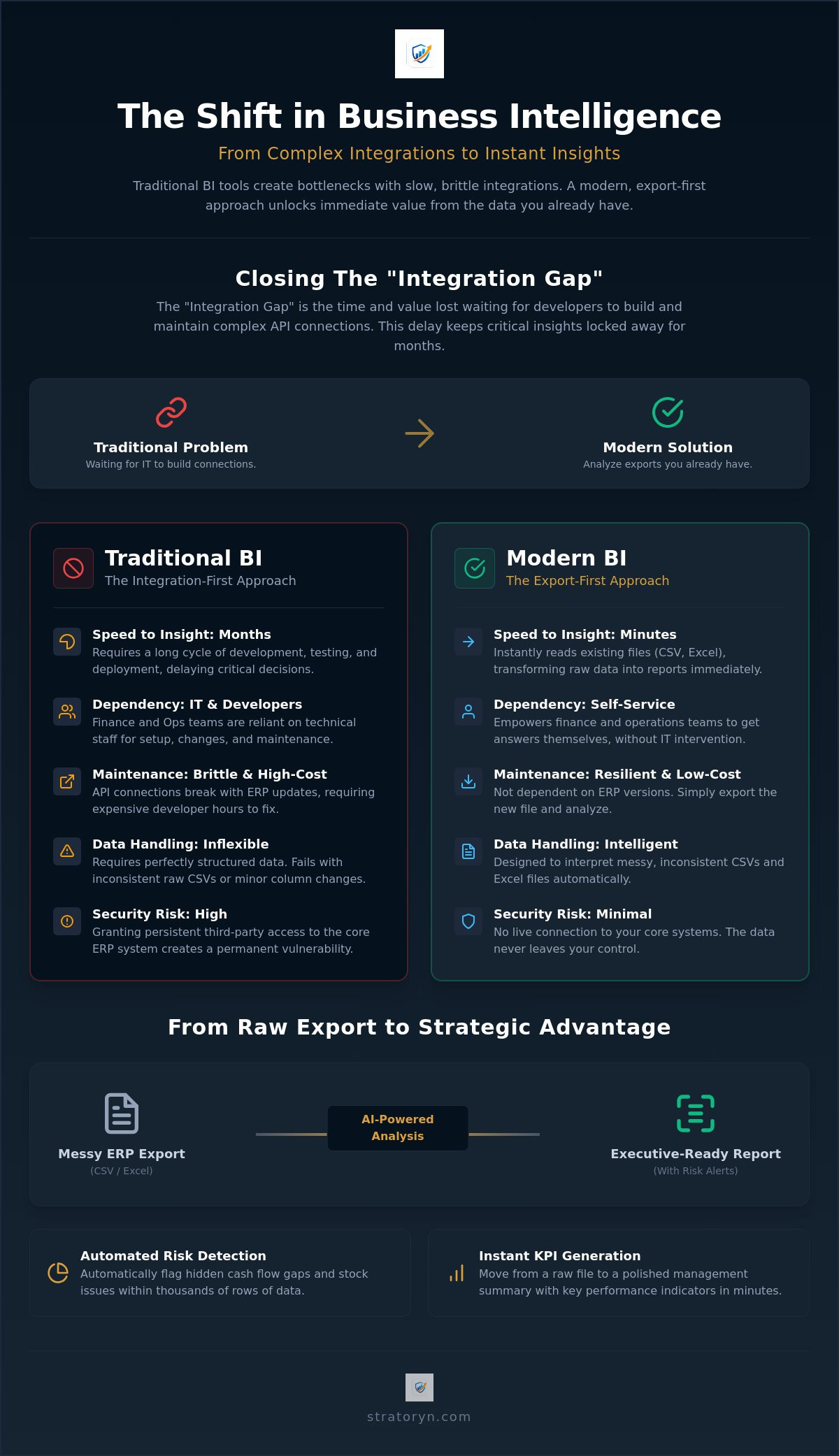
- Comparing Integration-First vs. Export-First BI Architectures
- Key Criteria for Selecting a BI Tool for Manual ERP Exports
- Stratoryn: The AI-Powered Alternative to Complex BI Integrations
Why Traditional Business Intelligence Often Fails ERP Export Analysis
ERP export analysis is the specific process of using Business Intelligence (BI) software to interpret static data files, such as CSV or Excel snapshots. While many vendors promise seamless "live" dashboards, the reality in 2026 is that the most critical financial and operational data still lives in manual exports. Traditional platforms often fail in this context because they're built for persistent, perfectly structured database connections. When you feed them a raw, inconsistent CSV, the logic often breaks. This is why specialized business intelligence tools for ERP exports have become a necessity for teams that need answers faster than IT can provide them.
The "Integration Gap" represents the time and value lost between identifying a business need and finally seeing data in a dashboard. Traditional BI requires a rigid pipeline. If your data structure changes by even one column, the entire visualization collapses. This creates a cycle of constant maintenance that drains resources and leaves decision-makers working with outdated information.
The Friction of Direct ERP Integration
Direct integration is frequently the slowest path to insight. Building custom API connectors involves high upfront costs and significant technical debt. Every ERP update or version change risks breaking the connection, requiring expensive developer hours to fix. Security is another major hurdle. Granting third-party tools persistent access to the ERP core creates a permanent vulnerability that most IT departments prefer to avoid. Consequently, BI integration requests from finance teams are often deprioritized in favor of core infrastructure projects. A direct link is a heavy solution for what should be a straightforward analysis task.
If you find your internal resources are constantly deprioritizing these tasks, you can visit Cornerstone Business Solutions to learn how their multi-award-winning team can provide the bespoke technology support your business needs.
The Limitations of Standard Spreadsheet Reporting
Relying on "Excel Hell" is no longer a viable strategy for modern enterprises. Manual spreadsheet analysis is inherently slow and dangerously prone to human error. One broken VLOOKUP or an incorrect Pivot Table range can hide significant financial liabilities or looming stock-outs. Standard Excel environments lack automated risk detection; they won't flag a cash flow gap unless you've already built a specific formula to find it. This manual approach leads to several operational bottlenecks:
- Manual data cleaning consumes hours that should be spent on strategic analysis.
- Formula errors are nearly impossible to audit in datasets exceeding thousands of rows.
- Static reporting fails to scale as your business data volume grows.
KPI drift is the inevitable result of inconsistent manual reporting across different departments. Without a unified intelligence layer, your operations team and finance team will likely present two different versions of the truth. Standard spreadsheets simply cannot provide the automated, executive-ready clarity required for rapid decision-making in 2026.
Evaluating the Top Business Intelligence Platforms for ERP Data in 2026
The 2026 BI market is clearly bifurcated. General purpose tools offer a blank canvas, but they require significant manual labor to become useful. Specialized ERP intelligence platforms offer a different path. They provide built-in logic designed specifically for enterprise data structures. According to the 2026 ERP Report, organizations are increasingly prioritizing these specialized layers to reduce the time spent on data engineering. Modern business intelligence tools for ERP exports have evolved to handle the complexity of raw data without the need for manual intervention. This shift is driven by a demand for speed and a rejection of complex configuration cycles.
Legacy Leaders: Power BI and Tableau
Microsoft Power BI remains a dominant force for organizations heavily invested in the Microsoft stack. Its primary strength is its familiarity. However, it often leads users into a visualization-only trap. You can build a stunning dashboard that still contains inaccurate data because the tool doesn't automatically clean or validate the source file. Tableau faces similar challenges with an even steeper learning curve. Both systems often necessitate a dedicated Data Scientist to manage the heavy lifting of data preparation. These specialists must write complex DAX or SQL queries just to make sense of a standard general ledger export. This creates a dependency on technical staff that most finance teams find unsustainable. For teams without these deep technical resources, exploring Power BI alternatives for finance has become a strategic necessity.
AI-Native Challengers: The Rise of Autonomous Analytics
The rise of autonomous analytics is changing the expectations for business intelligence tools for ERP exports. These AI-native challengers use generative models to eliminate manual dashboard building entirely. Features like Natural Language Querying allow non-technical managers to interact with their data directly. You simply ask a question and receive a structured, analytical answer. Modern platforms now offer AI-powered ERP analysis as a standard feature. They recognize the difference between an invoice date and a posting date automatically. These tools identify stock-outs or cash flow gaps without any user setup, moving the focus from report construction to active decision-making. This autonomous approach ensures that executive-ready insights are available the moment a file is uploaded. If you need faster results, consider using a specialized ERP Intelligence Workspace to automate your reporting process.
Comparing Integration-First vs. Export-First BI Architectures
Deciding on a BI strategy involves a fundamental choice between two distinct architectures. Integration-first tools require a persistent, live link to your ERP database, prioritizing real-time synchronization above all else. In contrast, export-first tools analyze CSV and Excel files directly without needing a live connection. For most finance teams, the difference in Time to Value (TTV) is staggering. While an integration project often spans several months of development and testing, export-first business intelligence tools for ERP exports deliver insights in minutes. This speed is a critical advantage for teams facing immediate reporting deadlines.
This architectural choice also dictates your operational flexibility. If you are undergoing an ERP migration or a major system upgrade, a live integration becomes a major liability. It requires constant reconfiguration as data fields shift and database schemas change. An export-first approach remains stable regardless of the underlying system transitions. You simply export the new data format and continue your analysis without interruption. This resilience ensures that your reporting remains consistent even during periods of significant organizational change.
Successfully navigating such technological shifts requires a cohesive roadmap, and Sterck specializes in providing the digital strategy and consultancy needed to guide organizations through complex transformation processes.
When Integration-First Makes Sense
Integration-first models are necessary for specific, high-frequency use cases. If your business requires real-time inventory tracking for a complex global supply chain, a live feed is essential. These environments demand instantaneous transactional monitoring where a five-minute delay could impact logistics or sales. However, this level of synchronization comes at a high price. Maintaining custom ERP-BI pipelines requires a dedicated IT budget and persistent developer oversight to manage API versioning and database security. For many mid-market firms, this creates a level of technical debt that outweighs the benefits of real-time data; in such cases, partnering with an IT specialist like Beyer Bytes can help secure your infrastructure while you focus on data insights.
The Strategic Advantage of Export-First BI
Export-first BI offers a "Zero-IT" deployment model that bypasses the traditional integration bottleneck. You can go live in minutes because there is no software to install on the ERP server and no firewall rules to negotiate. This is particularly valuable for companies managing data from multiple, disconnected ERP systems across different subsidiaries or acquired entities. Export-first business intelligence tools for ERP exports act as a sandboxed environment for sensitive data, ensuring that your core financial records remain isolated from external software while still providing the deep visibility you require. This architecture turns raw information into a strategic asset without the technical overhead of a permanent link. Similarly, in specialized sectors, management systems like SalonIQ provide hair and beauty businesses with the tools to turn operational data into strategic growth without needing complex integrations.
Key Criteria for Selecting a BI Tool for Manual ERP Exports
Selecting the right software requires moving beyond visual aesthetics. In 2026, the most effective business intelligence tools for ERP exports are those that understand the semantic meaning of your data. It isn't enough for a tool to recognize a column as a date. It must distinguish between an Invoice Date and a Post Date to ensure your aging reports are accurate. Without this level of granular detection, your analysis remains superficial and prone to structural errors. You need a system that treats your data as business intelligence, not just a collection of cells.
Data quality is the most overlooked factor in export analysis. Raw CSV files are often riddled with formatting inconsistencies or missing values that skew your results. You need robust Data Quality Analysis features that identify these anomalies immediately. Fixing errors at the source of the export ensures that the insights you present to stakeholders are based on a clean foundation. For field service businesses, this often means moving away from paper-based workflows and using Repair-CRM to digitize operations, which prevents the "garbage in, garbage out" cycle that plagues most manual reporting processes. High-quality analysis starts with high-quality data validation.
Automated Intelligence vs. Manual Configuration
Stop building your own formulas. Your team's time is too valuable to spend on manual logic and spreadsheet maintenance. Modern business intelligence tools for ERP exports now include an AI Data Analyst that interprets findings automatically. These tools use pre-built risk models specifically for AR, AP, and Inventory modules. They don't just show you a chart; they provide Executive-Ready Reports in clear prose that explains the business impact. If a tool requires you to write complex code to find a stock-out or a cash flow gap, it's already obsolete. Look for platforms that deliver immediate visibility through intelligent automation.
Security and Privacy in the Age of AI
Security is non-negotiable when handling sensitive financial exports. Demand browser-side processing. This ensures your raw data stays on your machine and never resides on a third-party server. You must also verify the tool's policy on AI training. Professional-grade platforms never use your proprietary data to train public models. Look for SOC2 compliance and end-to-end encryption to protect your financial integrity. A secure environment allows you to analyze sensitive information with confidence and without the risk of data leaks. If you're ready to move from raw files to finished reports without the security risk, explore the ERP Intelligence Workspace today.
Stratoryn: The AI-Powered Alternative to Complex BI Integrations
Stratoryn serves as the modern answer to the integration bottlenecks that have historically slowed down finance and operations teams. As an ERP Intelligence Workspace designed for the 2026 business environment, it operates on a "No Integration" model. You don't need to negotiate firewall rules or wait for IT to configure an API. You simply upload your CSV or Excel files to get immediate results. This approach makes it one of the most efficient business intelligence tools for ERP exports because it removes the technical debt associated with traditional data pipelines. You gain the visibility of a fully integrated system without the months of setup time.
The platform features an AI Data Analyst that acts as a digital consultant for your enterprise data. It doesn't just display numbers; it surfaces hidden risks and identifies opportunities that are often buried in thousands of rows of raw information. Security is a core component of this architecture. Unlike many competitors that require you to store sensitive data on their servers, Stratoryn utilizes browser-side processing. Your raw financial information is analyzed locally in your browser. There is zero raw file storage on the platform, which eliminates the compliance and security risks that often prevent teams from adopting new software.
Transforming Raw Exports into Executive-Ready Reports
Stratoryn excels at turning messy spreadsheet rows into professional management summaries. The platform automatically detects cash flow risks and stock problems that manual Excel analysis frequently misses. By highlighting integrity gaps within your files, it actively improves your overall Data Quality Analysis. You move from a raw export to an Executive-Ready Report in minutes. These reports are designed for immediate use in boardrooms, providing prose-based insights that explain the "why" behind the numbers. This automation ensures that your team spends less time on data entry and more time on high-level strategy.
Get Started with Free Early Access
The 2026 early-access phase offers a unique opportunity to experience these benefits without the typical barriers to entry. There are no setup fees and no long-term commitments required to begin analyzing your data. You can test the "Zero-IT" model today and see how autonomous analytics can transform your reporting cycle. Bypassing the integration gap allows your department to become more agile and responsive to market changes. Use this period to refine your data strategy and secure the clarity your business requires. Experience the future of ERP analysis with Stratoryn and reclaim your time from manual spreadsheet tasks.
Reclaim Your Data Strategy for 2026
The transition to an export-first architecture represents a fundamental change in how finance and operations teams access insights. You don't need to wait months for IT integrations to deliver value from your enterprise data. By selecting modern business intelligence tools for ERP exports, you eliminate technical friction and focus on high-level decision-making. These platforms prioritize speed, security, and automated clarity over complex manual configuration; if you need expert help aligning these tools with your overall digital strategy, you can learn more about Business Analysis & Solutions.
Stratoryn provides a streamlined path from raw CSV files to finished analysis. It offers browser-side processing for maximum privacy; this ensures your sensitive financial data never leaves your machine. With automated risk and opportunity detection, you can generate executive-ready reports in seconds and address cash flow or stock issues before they escalate. The era of manual spreadsheet cleaning is over. You now have the tools to move from raw data to actionable intelligence without the traditional overhead. Take control of your reporting cycle today and turn your exports into a strategic advantage.
Access the ERP Intelligence Workspace for Free
Frequently Asked Questions
What are the best business intelligence tools for ERP exports in 2026?
The best business intelligence tools for ERP exports in 2026 include Microsoft Power BI, Tableau, Qlik Sense, and specialized intelligence workspaces like Stratoryn. While legacy platforms offer deep customization for data scientists, specialized tools prioritize speed for finance teams. These modern solutions allow you to analyze raw files without the technical overhead of traditional integrations. You should choose a tool based on your team's technical capacity and the need for rapid insights.
Can I use Power BI to analyse ERP CSV exports without IT help?
You can use Power BI Desktop to import CSV files, but the process rarely stays simple for long. Cleaning messy ERP data and building accurate relationships between tables typically requires advanced knowledge of DAX or Power Query. Most business users find they still need IT assistance—whether from an internal team or a managed IT provider like SpaceCenter Systems—to move beyond basic charts into meaningful financial analysis. If you want to avoid this technical hurdle, look for platforms designed for zero-IT deployment.
How does AI improve business intelligence for ERP data?
AI eliminates the need for manual data preparation by automatically identifying data types and structures within your files. It uses natural language processing to let you ask questions about your data instead of building complex formulas. This technology proactively surfaces hidden risks, such as cash flow gaps or stock-outs, that a human analyst might miss in a massive dataset. It turns raw information into a strategic guide without manual intervention.
Is it safe to upload financial ERP exports to an AI tool?
Safety depends entirely on the tool's data handling architecture. It's safe if the platform uses browser-side processing, which ensures your raw financial data never stays on a third-party server. Always verify that the tool is SOC2 compliant and has a clear policy against using your proprietary exports to train public AI models. Choosing a "no-storage" solution is the most effective way to maintain data privacy while using AI.
What is the difference between an ERP report and a BI report?
An ERP report is a record of transactions, such as a list of open invoices or current stock levels. It tells you what is happening in the business right now. A BI report provides a strategic layer of analysis that explains why those things are happening and what might happen next. While an ERP report is operational and narrow, a BI report is analytical and connects different data points for a broader view.
Do I need to clean my Excel data before using an AI BI tool?
You don't need to clean your data manually if you use advanced business intelligence tools for ERP exports. These platforms are designed to handle inconsistent formatting and common export errors automatically. They recognize dates, currency values, and product codes even when the raw export is messy. This saves your finance team hours of preparation time every month and reduces the risk of human error in your reporting.
How much does automated ERP reporting software cost?
Pricing for automated reporting varies significantly based on the platform's scale and features. As of 2026, Microsoft Power BI Pro costs $14 per user monthly, while Tableau Creator is approximately $75 per user. Specialized intelligence workspaces often use monthly billing models tailored to the depth of analysis required. You should evaluate the total cost of ownership, including the time saved by avoiding manual IT setups and spreadsheet cleaning.
Can BI tools detect financial risks in my accounts receivable export?
Yes, modern business intelligence tools for ERP exports can automatically detect risks in accounts receivable. They identify aging trends, customer concentration risks, and potential bad debt before they impact your liquidity. This allows finance managers to take proactive steps to secure cash flow without manually auditing every row of an export file. Automated risk detection provides a level of security that manual reporting simply cannot match.
Frequently asked questions
The Friction of Direct ERP Integration
Direct integration is frequently the slowest path to insight. Building custom API connectors involves high upfront costs and significant technical debt. Every ERP update or version change risks breaking the connection, requiring expensive developer hours to fix. Security is another major hurdle. Granting third-party tools persistent access to the ERP core creates a permanent vulnerability that most IT departments prefer to avoid. Consequently, BI integration requests from finance teams are often deprioritized in favor of core infrastructure projects. A direct link is a heavy solution for what should be a straightforward analysis task.
The Limitations of Standard Spreadsheet Reporting
Relying on "Excel Hell" is no longer a viable strategy for modern enterprises. Manual spreadsheet analysis is inherently slow and dangerously prone to human error. One broken VLOOKUP or an incorrect Pivot Table range can hide significant financial liabilities or looming stock-outs. Standard Excel environments lack automated risk detection; they won't flag a cash flow gap unless you've already built a specific formula to find it. This manual approach leads to several operational bottlenecks: KPI drift is the inevitable result of inconsistent manual reporting across different departments. Without a unified intelligence layer, your operations team and finance team will likely present two different versions of the truth. Standard spreadsheets simply cannot provide the automated, executive-ready clarity required for rapid decision-making in 2026. The 2026 BI market is clearly bifurcated. General purpose tools offer a blank canvas, but they require significant manual labor to become useful. Specialized ERP intelligence platforms offer a different path. They provide built-in logic designed specifically for enterprise data structures. According to the 2026 ERP Report, organizations are inc
Legacy Leaders: Power BI and Tableau
Microsoft Power BI remains a dominant force for organizations heavily invested in the Microsoft stack. Its primary strength is its familiarity. However, it often leads users into a visualization-only trap. You can build a stunning dashboard that still contains inaccurate data because the tool doesn't automatically clean or validate the source file. Tableau faces similar challenges with an even steeper learning curve. Both systems often necessitate a dedicated Data Scientist to manage the heavy lifting of data preparation. These specialists must write complex DAX or SQL queries just to make sense of a standard general ledger export. This creates a dependency on technical staff that most finance teams find unsustainable. For teams without these deep technical resources, exploring Power BI alternatives for finance has become a strategic necessity.
AI-Native Challengers: The Rise of Autonomous Analytics
The rise of autonomous analytics is changing the expectations for business intelligence tools for ERP exports. These AI-native challengers use generative models to eliminate manual dashboard building entirely. Features like Natural Language Querying allow non-technical managers to interact with their data directly. You simply ask a question and receive a structured, analytical answer. Modern platforms now offer AI-powered ERP analysis as a standard feature. They recognize the difference between an invoice date and a posting date automatically. These tools identify stock-outs or cash flow gaps without any user setup, moving the focus from report construction to active decision-making. This autonomous approach ensures that executive-ready insights are available the moment a file is uploaded. If you need faster results, consider using a specialized ERP Intelligence Workspace to automate your reporting process. Deciding on a BI strategy involves a fundamental choice between two distinct architectures. Integration-first tools require a persistent, live link to your ERP database, prioritizing real-time synchronization above all else. In contrast, export-first tools analyze CSV and Excel
When Integration-First Makes Sense
Integration-first models are necessary for specific, high-frequency use cases. If your business requires real-time inventory tracking for a complex global supply chain, a live feed is essential. These environments demand instantaneous transactional monitoring where a five-minute delay could impact logistics or sales. However, this level of synchronization comes at a high price. Maintaining custom ERP-BI pipelines requires a dedicated IT budget and persistent developer oversight to manage API versioning and database security. For many mid-market firms, this creates a level of technical debt that outweighs the benefits of real-time data.
The Strategic Advantage of Export-First BI
Export-first BI offers a "Zero-IT" deployment model that bypasses the traditional integration bottleneck. You can go live in minutes because there is no software to install on the ERP server and no firewall rules to negotiate. This is particularly valuable for companies managing data from multiple, disconnected ERP systems across different subsidiaries or acquired entities. Export-first business intelligence tools for ERP exports act as a sandboxed environment for sensitive data, ensuring that your core financial records remain isolated from external software while still providing the deep visibility you require. This architecture turns raw information into a strategic asset without the technical overhead of a permanent link. Selecting the right software requires moving beyond visual aesthetics. In 2026, the most effective business intelligence tools for ERP exports are those that understand the semantic meaning of your data. It isn't enough for a tool to recognize a column as a date. It must distinguish between an Invoice Date and a Post Date to ensure your aging reports are accurate. Without this level of granular detection, your analysis remains superficial and prone to structur
Automated Intelligence vs. Manual Configuration
Stop building your own formulas. Your team's time is too valuable to spend on manual logic and spreadsheet maintenance. Modern business intelligence tools for ERP exports now include an AI Data Analyst that interprets findings automatically. These tools use pre-built risk models specifically for AR, AP, and Inventory modules. They don't just show you a chart; they provide Executive-Ready Reports in clear prose that explains the business impact. If a tool requires you to write complex code to find a stock-out or a cash flow gap, it's already obsolete. Look for platforms that deliver immediate visibility through intelligent automation.
Security and Privacy in the Age of AI
Security is non-negotiable when handling sensitive financial exports. Demand browser-side processing. This ensures your raw data stays on your machine and never resides on a third-party server. You must also verify the tool's policy on AI training. Professional-grade platforms never use your proprietary data to train public models. Look for SOC2 compliance and end-to-end encryption to protect your financial integrity. A secure environment allows you to analyze sensitive information with confidence and without the risk of data leaks. If you're ready to move from raw files to finished reports without the security risk, explore the ERP Intelligence Workspace today. Stratoryn serves as the modern answer to the integration bottlenecks that have historically slowed down finance and operations teams. As an ERP Intelligence Workspace designed for the 2026 business environment, it operates on a "No Integration" model. You don't need to negotiate firewall rules or wait for IT to configure an API. You simply upload your CSV or Excel files to get immediate results. This approach makes it one of the most efficient business intelligence tools for ERP exports because it removes the technical debt
Transforming Raw Exports into Executive-Ready Reports
Stratoryn excels at turning messy spreadsheet rows into professional management summaries. The platform automatically detects cash flow risks and stock problems that manual Excel analysis frequently misses. By highlighting integrity gaps within your files, it actively improves your overall Data Quality Analysis. You move from a raw export to an Executive-Ready Report in minutes. These reports are designed for immediate use in boardrooms, providing prose-based insights that explain the "why" behind the numbers. This automation ensures that your team spends less time on data entry and more time on high-level strategy.
Get Started with Free Early Access
The 2026 early-access phase offers a unique opportunity to experience these benefits without the typical barriers to entry. There are no setup fees and no long-term commitments required to begin analyzing your data. You can test the "Zero-IT" model today and see how autonomous analytics can transform your reporting cycle. Bypassing the integration gap allows your department to become more agile and responsive to market changes. Use this period to refine your data strategy and secure the clarity your business requires. Experience the future of ERP analysis with Stratoryn and reclaim your time from manual spreadsheet tasks. The transition to an export-first architecture represents a fundamental change in how finance and operations teams access insights. You don't need to wait months for IT integrations to deliver value from your enterprise data. By selecting modern business intelligence tools for ERP exports, you eliminate technical friction and focus on high-level decision-making. These platforms prioritize speed, security, and automated clarity over complex manual configuration. Stratoryn provides a streamlined path from raw CSV files to finished analysis. It offers browser-side pr
What are the best business intelligence tools for ERP exports in 2026?
The best business intelligence tools for ERP exports in 2026 include Microsoft Power BI, Tableau, Qlik Sense, and specialized intelligence workspaces like Stratoryn. While legacy platforms offer deep customization for data scientists, specialized tools prioritize speed for finance teams. These modern solutions allow you to analyze raw files without the technical overhead of traditional integrations. You should choose a tool based on your team's technical capacity and the need for rapid insights.
Can I use Power BI to analyse ERP CSV exports without IT help?
You can use Power BI Desktop to import CSV files, but the process rarely stays simple for long. Cleaning messy ERP data and building accurate relationships between tables typically requires advanced knowledge of DAX or Power Query. Most business users find they still need IT assistance to move beyond basic charts into meaningful financial analysis. If you want to avoid this technical hurdle, look for platforms designed for zero-IT deployment.
How does AI improve business intelligence for ERP data?
AI eliminates the need for manual data preparation by automatically identifying data types and structures within your files. It uses natural language processing to let you ask questions about your data instead of building complex formulas. This technology proactively surfaces hidden risks, such as cash flow gaps or stock-outs, that a human analyst might miss in a massive dataset. It turns raw information into a strategic guide without manual intervention.
Is it safe to upload financial ERP exports to an AI tool?
Safety depends entirely on the tool's data handling architecture. It's safe if the platform uses browser-side processing, which ensures your raw financial data never stays on a third-party server. Always verify that the tool is SOC2 compliant and has a clear policy against using your proprietary exports to train public AI models. Choosing a "no-storage" solution is the most effective way to maintain data privacy while using AI.
What is the difference between an ERP report and a BI report?
An ERP report is a record of transactions, such as a list of open invoices or current stock levels. It tells you what is happening in the business right now. A BI report provides a strategic layer of analysis that explains why those things are happening and what might happen next. While an ERP report is operational and narrow, a BI report is analytical and connects different data points for a broader view.
Do I need to clean my Excel data before using an AI BI tool?
You don't need to clean your data manually if you use advanced business intelligence tools for ERP exports. These platforms are designed to handle inconsistent formatting and common export errors automatically. They recognize dates, currency values, and product codes even when the raw export is messy. This saves your finance team hours of preparation time every month and reduces the risk of human error in your reporting.
How much does automated ERP reporting software cost?
Pricing for automated reporting varies significantly based on the platform's scale and features. As of 2026, Microsoft Power BI Pro costs $14 per user monthly, while Tableau Creator is approximately $75 per user. Specialized intelligence workspaces often use monthly billing models tailored to the depth of analysis required. You should evaluate the total cost of ownership, including the time saved by avoiding manual IT setups and spreadsheet cleaning.
Can BI tools detect financial risks in my accounts receivable export?
Yes, modern business intelligence tools for ERP exports can automatically detect risks in accounts receivable. They identify aging trends, customer concentration risks, and potential bad debt before they impact your liquidity. This allows finance managers to take proactive steps to secure cash flow without manually auditing every row of an export file. Automated risk detection provides a level of security that manual reporting simply cannot match.
- business intelligence tools for ERP exports
- Business Intelligence
- ERP
- ERP Exports
- Data Analysis
- CSV Analysis
- BI Tools
- Finance Analytics
- Operations Management
- ERP data analysis
- BI for CSV exports
- ERP reporting solutions
- finance business intelligence
- operations analytics
- export-first BI