
Applying AI to ERP Data: A Strategic Guide for Finance and Operations

Did you know that 70% of ERP implementations fail to meet their core objectives, often leaving finance teams trapped in a cycle of manual data entry? You likely spend hours every week cleaning static exports and building spreadsheets that are obsolete before the board meeting even begins. Applying ai to erp data shouldn't be a multi-year IT burden that drains your budget. It's time to bypass the integration bottlenecks and demand more from your enterprise systems.
We understand that data quality issues often hide significant financial risks, and waiting for IT to build new dashboards isn't a viable strategy for modern leaders. This guide explains how to transform raw data into an AI Data Analyst capable of producing executive-ready reports in minutes. You'll learn how to achieve automated risk detection and gain clear visibility into cash flow and stock levels using an ERP Intelligence Workspace. We will walk through the strategic shift from static analysis to dynamic, automated business intelligence that prioritizes speed and accuracy.
Key Takeaways
- Learn how to transition from manual spreadsheet manipulation to agentic data analysis for real-time visibility.
- Understand the mechanisms behind applying ai to erp data to automatically detect patterns and resolve inconsistent naming conventions in your exports.
- Discover why independent AI workspaces deliver results in minutes while traditional IT integrations often take months to deploy.
- Follow a five-step framework to identify high-risk data exports and standardize them for automated executive-ready reports.
- Explore the security advantages of browser-side processing for protecting sensitive financial information during analysis.
Table of Contents
- What Does Applying AI to ERP Data Actually Mean?
- Core Mechanisms: How AI Interprets Complex ERP Exports
- Strategic Comparison: Integrated AI vs. Independent AI Workspaces
- 5 Steps to Applying AI to Your ERP Data Today
- Transforming ERP Exports into Intelligence with Stratoryn
What Does Applying AI to ERP Data Actually Mean?
Most finance professionals treat their ERP as a digital filing cabinet. You dump data in and pull reports out. This is a passive relationship. Applying ai to erp data changes the dynamic. It shifts from a calculator that sums columns to an agentic system that understands business context. It doesn't just show you what happened; it explains why it happened and what might happen next. Traditional software calculates. AI analyzes. This distinction is the foundation of modern operational efficiency.
Simple automation follows a script. It's "if this, then that." AI-driven pattern recognition is different. It identifies relationships between variables that aren't explicitly linked in your ledger. It recognizes that a delay in a specific raw material shipment correlates with a 5% drop in fulfillment speed three weeks later. This isn't just counting; it's reasoning. We focus on three core pillars to drive this value:
- Data Quality Analysis: Identifying duplicates, missing entries, and formatting errors before they corrupt your reporting.
- Risk Detection: Spotting non-linear patterns that indicate potential fraud, credit risks, or supply chain fragility.
- Opportunity Highlighting: Uncovering hidden cash flow advantages in vendor payment terms or inventory turnover rates.
The Evolution from Legacy Reporting to AI Intelligence
Traditional reporting relies on rigid SQL queries. These tools only answer the specific questions you know to ask. If you don't ask about a specific correlation, the report won't show it. Manual Excel pivots often fail because they can't process the sheer volume of variables required to catch subtle, non-linear risks. Modern Enterprise Resource Planning (ERP) systems are evolving beyond these static boundaries. ERP AI is the bridge between raw ledger data and executive action. It moves your team from reactive data gathering to proactive strategic management.
Key Technologies: ML, NLP, and Predictive Analytics
Machine Learning (ML) is the engine for anomaly detection. It scans millions of historical transactions to flag outliers that a human eye would naturally miss. It's a tireless auditor. Natural Language Processing (NLP) then translates technical ledger codes into human-readable narratives. This allows non-technical stakeholders to understand complex financial shifts without needing a data science degree. Predictive modeling completes the cycle by forecasting stock-outs and cash flow gaps weeks before they manifest. You're no longer looking in the rearview mirror. You're looking through the windshield. Applying ai to erp data ensures your "AI Data Analyst" provides the clarity needed for rapid, confident decision-making.
Core Mechanisms: How AI Interprets Complex ERP Exports
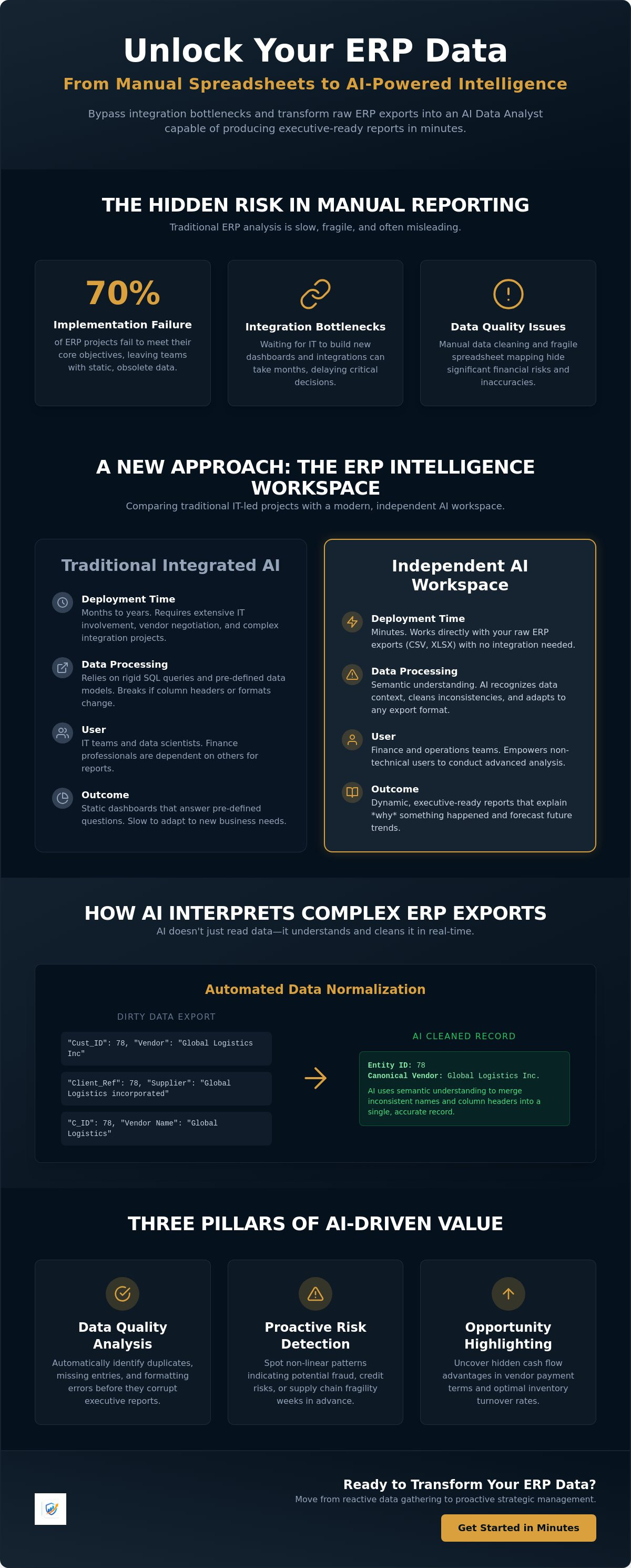
Finance teams often spend hours mapping columns from a CSV export to a report template. A single renamed header or a shifted column can break the entire manual workflow. Applying ai to erp data eliminates this fragile mapping process. Modern AI uses semantic understanding to recognize data types regardless of their labels. It knows that "Cust_ID" in one system and "Client_Ref" in another represent the same entity. This allows for immediate interpretation of diverse exports without the need for technical pre-processing.
AI doesn't just read data; it cleans it. It handles "dirty data" by resolving inconsistent naming conventions in real time. If one entry lists a vendor as "Global Logistics Inc" and another as "Global Logistics incorporated," the AI recognizes the entity as a single record. This normalization is critical for accurate reporting. It ensures your totals reflect reality rather than clerical errors. You can see this in action by utilizing a dedicated ERP Intelligence Workspace to process your raw files instantly.
Automated Data Quality and Integrity Audits
Standard ERP filters often miss subtle duplicates. AI identifies these by analyzing multiple data points, such as tax IDs and address fragments, to find overlapping records that shouldn't exist. This is especially vital during migrations where "orphan" data, entries without a parent record, can hide significant financial leaks. Maintaining high standards through rigorous Data Quality Analysis prevents these errors from scaling into massive reporting gaps that mislead leadership.
Identifying Financial and Operational Risks
The logic behind risk detection is based on non-linear pattern recognition. In Accounts Receivable, the AI identifies hidden cash risks by spotting subtle shifts in payment behavior. If a historically prompt client starts paying three days later each month, the AI flags potential insolvency before it becomes a total default. The same logic applies to inventory management. It detects stock problems by correlating sales velocity with actual procurement lead times, flagging slow-moving items months before they require a write-off. This automated procurement analysis also highlights vendor spend irregularities, ensuring you never overpay for essential supplies due to overlooked contract terms.
Strategic Comparison: Integrated AI vs. Independent AI Workspaces
Most ERP vendors now market native AI modules as the ultimate solution for data analysis. While these integrated tools sound convenient, they often lead to a "legacy trap." Implementation for these modules typically spans months. You must navigate complex configuration phases, security permissioning, and data mapping exercises. Applying ai to erp data through an independent workspace changes the timeline from months to minutes. You don't need a deep integration to find value. You simply need a secure environment that understands your exports.
The "IT Bottleneck" is a primary reason why 70% of ERP implementations fail to meet their objectives. Integrated AI requires your IT department to prioritize the project, manage the API connections, and oversee the rollout. This creates a queue that delays your insights. Independent workspaces bypass this entirely. By using standardized CSV or Excel exports, finance and operations teams regain control. You can analyze data from SAP, NetSuite, and Sage in a single unified view. This cross-system flexibility is impossible with native tools that are locked into a single database.
The True Cost of Native ERP AI
Native solutions often carry significant hidden costs. Vendors frequently tie AI features to their highest-tier cloud subscriptions or charge per-user licensing fees that scale aggressively. Beyond the software cost, there is the "Data Readiness" hurdle. Integrated AI expects perfect data structure within the ERP. If your records are messy, the AI fails. You're then forced into a professional services engagement to clean your database. An independent workspace handles the data quality analysis as you upload, resolving inconsistencies without requiring a database overhaul. This prevents vendor lock-in and keeps your overhead predictable.
Why the "Export-First" Approach Wins for Mid-Market Firms
Mid-market firms don't have the luxury of waiting for a six-month strategic overhaul. You need immediate visibility into cash flow and inventory risks. The export-first approach is a tactical hunt for value. Browser-based tools allow you to upload a report and receive an AI Data Analyst review instantly. This method treats your ERP as the system of record and the workspace as the system of intelligence. It is a frictionless way to get Executive-Ready Reports without asking IT for permission. You focus on the outcome, not the infrastructure. This speed allows you to identify a stock problem or a payment delay today, rather than next quarter.
5 Steps to Applying AI to Your ERP Data Today
Execution matters more than theory. You don't need a massive infrastructure change to start seeing results. Most finance leaders find success by treating the process as a series of tactical wins. Applying ai to erp data is about speed and accuracy. Follow this five-step framework to move from raw exports to actionable intelligence by the end of the week.
- Identify your highest-risk data export: Focus on areas where errors or delays impact the bottom line. Accounts Receivable and Inventory are the most common starting points.
- Cleanse and standardize: You can choose to manually scrub your files, but modern systems let the AI handle detection. It recognizes shifted columns and technical ledger codes automatically.
- Upload to a specialized workspace: Move your data into a dedicated environment designed for intelligence. This keeps your primary ERP clean while you perform deep analysis.
- Review automated flags: Look for the risk and opportunity indicators. The system will highlight payment delays, stock-outs, and spend irregularities that require immediate attention.
- Generate executive-ready reports: Convert these findings into polished summaries. Management needs the "so what" behind the numbers to make confident decisions.
This process bypasses the months of planning required for traditional integrations. You can begin the transformation today by accessing the Stratoryn ERP Intelligence Workspace to process your first export.
Selecting the Right Use Case for a Pilot
Accounts Receivable is the best place to start for immediate ROI. It's easy to quantify the value of identifying a high-risk debtor before they default. If you're currently planning a migration, use this phase as a data quality audit. It ensures you only move clean, reliable records into your new system. Start with a single file to prove value before scaling to the entire ledger. This contained approach reduces risk and builds internal buy-in quickly.
From Raw Data to Executive Action
Executives don't have time to dig through pivot tables. They need "Management-Ready" bullet points that outline exactly what changed and why. Use AI-generated stat blocks to justify operational changes, such as adjusting reorder points or renegotiating vendor terms. An AI Data Analyst functions as a force multiplier for your team. It handles the manual pattern recognition so your human staff can focus on high-level strategy and relationship management. This shift moves your department from a cost center to a strategic partner.
Transforming ERP Exports into Intelligence with Stratoryn
Stratoryn provides the specific environment required for applying ai to erp data without the friction of traditional software deployments. We built the ERP Intelligence Workspace to serve as a high-speed bridge between raw data and decision-making. Most platforms demand deep, invasive integrations that take months to configure. Our solution prioritizes immediate utility. You simply upload your standard CSV or Excel exports and receive polished analysis in seconds. This is the frictionless path to automated intelligence.
Traditional methods of data analysis often compromise security by moving sensitive financial records into permanent cloud storage. We take a different approach. Our platform utilizes browser-side processing to ensure your data remains under your control. By processing information locally on your machine, we maintain your data sovereignty while delivering the power of modern AI. We adhere to a strict "No Raw File Storage" policy. This ensures that your proprietary financial information is never stored on our servers, building a foundation of trust with finance and operations leaders.
The transition from a raw export to an Executive-Ready Reports happens almost instantly. Our system recognizes the semantic meaning of your ledger codes and transaction history without manual mapping. It identifies the risks we discussed in previous sections, such as payment delays or inventory imbalances, and presents them in a structured format. You get the depth of a full-scale audit with the speed of a digital tool. This efficiency allows your team to move away from data preparation and toward strategic execution.
A Secure, Browser-Based AI Analyst
Our AI Data Analyst functions directly within your secure browser session. This local processing model is essential for businesses navigating strict compliance landscapes like the EU AI Act or the US Treasury's operational frameworks. Forward-thinking organizations can now join our "Early Access" model to stay ahead of these regulatory shifts. We support a wide range of ERP formats, including SAP, NetSuite, and Sage, without requiring custom scripts or technical overrides. Your data stays private, and your insights remain accurate.
Immediate Value: No Integration, No IT Queue
The core promise of Stratoryn is clarity without the integration headache. You no longer need to wait in an IT queue for a custom dashboard or a new API connection. Applying ai to erp data becomes a self-service task for the finance department. We invite you to use this workspace for your next month-end close to experience the difference in speed and visibility. Eliminate the manual pivot tables and start making decisions based on real-time pattern recognition. Start analyzing your ERP data for free with Stratoryn and transform your static reports into dynamic business intelligence today.
Modernize Your Financial Intelligence Today
Applying ai to erp data is no longer a multi-month IT project reserved for the largest enterprises. You can now transform static CSV exports into high-impact business intelligence with minimal friction. This strategic shift allows your team to move from manual data preparation to high-level strategic execution. You've seen how independent workspaces bypass the traditional integration bottlenecks that often cause 70% of ERP projects to fail. It's time to demand more from your enterprise systems.
By leveraging automated risk detection for AR and Inventory, you gain immediate visibility into cash flow and stock problems. You can generate Executive-Ready Reports in seconds while maintaining total data sovereignty. Our unique browser-side processing ensures that your raw data never stays on our servers; it provides the security and privacy that modern finance leaders require. The tools to eliminate manual reporting and IT queues are now within your reach.
Get Early Access to the Stratoryn ERP Intelligence Workspace. Take control of your operational data and start delivering the clarity your leadership team demands with confidence.
Frequently Asked Questions
Do I need a data scientist to apply AI to my ERP data?
No, you don't need a data scientist or a technical background. Modern intelligence workspaces are built specifically for finance and operations professionals. These tools handle the complex algorithmic processing in the background. You simply provide the data exports and review the findings. This allows your existing team to function as an augmented analysis unit without specialized training.
Is it safe to upload financial data from my ERP to an AI tool?
Security is a primary concern when applying ai to erp data. It's safe if the tool utilizes browser-side processing. This specific method ensures your raw data stays in your local environment and is never stored on external servers. Always look for platforms with a strict "No Raw File Storage" policy to maintain your data sovereignty and compliance standards.
Which ERP systems are compatible with AI analysis?
Any system capable of generating CSV or Excel exports is fully compatible. This includes major platforms like SAP, Oracle NetSuite, Sage, and Microsoft Dynamics 365. Because the analysis occurs in an independent workspace, you aren't limited by your ERP's native features. You can even combine exports from several different systems into one unified analysis for better visibility.
What is the difference between AI and traditional Business Intelligence (BI)?
Traditional BI focuses on descriptive analytics, showing you what happened in the past through static dashboards. AI provides agentic analysis. It identifies non-linear patterns and predicts future risks like customer insolvency or stock shortages. While BI requires you to ask the right questions, AI proactively flags anomalies and opportunities you likely would have missed.
How long does it take to see results after applying AI to ERP exports?
You can see results in minutes when using an export-first approach. Traditional integrated AI modules often require a three-month implementation phase for configuration and data mapping. By using a specialized workspace, the time to value is nearly instantaneous. You upload a file, the AI interprets the data types, and your first report is ready for review immediately.
Can AI help with ERP data migration quality?
Yes, AI is a critical tool for ensuring data integrity during a system migration. It identifies duplicate records and "orphan" data that standard ERP filters often miss. By auditing your legacy exports before the move, you prevent bad data from corrupting your new environment. This step is essential since many ERP implementations fail to meet their original objectives due to poor data quality.
Does applying AI require a direct connection to our database?
A direct database connection isn't necessary. The "export-first" strategy utilizes standardized CSV and Excel files that your team already generates. This approach bypasses the IT department's integration queue and avoids the security risks associated with open API connections. It's a tactical, frictionless way to gain visibility without a massive, multi-month infrastructure overhaul.
What are the most common risks AI finds in ERP data?
AI most frequently identifies cash flow risks and operational inefficiencies. This includes spotting subtle shifts in customer payment patterns that signal a potential default. In operations, it flags slow-moving inventory before it requires a write-off. It also uncovers vendor spend irregularities, ensuring your procurement team catches overcharges or missed contract terms that manual audits often overlook.
Frequently asked questions
The Evolution from Legacy Reporting to AI Intelligence
Traditional reporting relies on rigid SQL queries. These tools only answer the specific questions you know to ask. If you don't ask about a specific correlation, the report won't show it. Manual Excel pivots often fail because they can't process the sheer volume of variables required to catch subtle, non-linear risks. Modern Enterprise Resource Planning (ERP) systems are evolving beyond these static boundaries. ERP AI is the bridge between raw ledger data and executive action. It moves your team from reactive data gathering to proactive strategic management.
Key Technologies: ML, NLP, and Predictive Analytics
Machine Learning (ML) is the engine for anomaly detection. It scans millions of historical transactions to flag outliers that a human eye would naturally miss. It's a tireless auditor. Natural Language Processing (NLP) then translates technical ledger codes into human-readable narratives. This allows non-technical stakeholders to understand complex financial shifts without needing a data science degree. Predictive modeling completes the cycle by forecasting stock-outs and cash flow gaps weeks before they manifest. You're no longer looking in the rearview mirror. You're looking through the windshield. Applying ai to erp data ensures your "AI Data Analyst" provides the clarity needed for rapid, confident decision-making. Finance teams often spend hours mapping columns from a CSV export to a report template. A single renamed header or a shifted column can break the entire manual workflow. Applying ai to erp data eliminates this fragile mapping process. Modern AI uses semantic understanding to recognize data types regardless of their labels. It knows that "Cust_ID" in one system and "Client_Ref" in another represent the same entity. This allows for immediate interpretation of diverse e
Automated Data Quality and Integrity Audits
Standard ERP filters often miss subtle duplicates. AI identifies these by analyzing multiple data points, such as tax IDs and address fragments, to find overlapping records that shouldn't exist. This is especially vital during migrations where "orphan" data, entries without a parent record, can hide significant financial leaks. Maintaining high standards through rigorous Data Quality Analysis prevents these errors from scaling into massive reporting gaps that mislead leadership.
Identifying Financial and Operational Risks
The logic behind risk detection is based on non-linear pattern recognition. In Accounts Receivable, the AI identifies hidden cash risks by spotting subtle shifts in payment behavior. If a historically prompt client starts paying three days later each month, the AI flags potential insolvency before it becomes a total default. The same logic applies to inventory management. It detects stock problems by correlating sales velocity with actual procurement lead times, flagging slow-moving items months before they require a write-off. This automated procurement analysis also highlights vendor spend irregularities, ensuring you never overpay for essential supplies due to overlooked contract terms. Most ERP vendors now market native AI modules as the ultimate solution for data analysis. While these integrated tools sound convenient, they often lead to a "legacy trap." Implementation for these modules typically spans months. You must navigate complex configuration phases, security permissioning, and data mapping exercises. Applying ai to erp data through an independent workspace changes the timeline from months to minutes. You don't need a deep integration to find value. You simply need a se
The True Cost of Native ERP AI
Native solutions often carry significant hidden costs. Vendors frequently tie AI features to their highest-tier cloud subscriptions or charge per-user licensing fees that scale aggressively. Beyond the software cost, there is the "Data Readiness" hurdle. Integrated AI expects perfect data structure within the ERP. If your records are messy, the AI fails. You're then forced into a professional services engagement to clean your database. An independent workspace handles the data quality analysis as you upload, resolving inconsistencies without requiring a database overhaul. This prevents vendor lock-in and keeps your overhead predictable.
Why the "Export-First" Approach Wins for Mid-Market Firms
Mid-market firms don't have the luxury of waiting for a six-month strategic overhaul. You need immediate visibility into cash flow and inventory risks. The export-first approach is a tactical hunt for value. Browser-based tools allow you to upload a report and receive an AI Data Analyst review instantly. This method treats your ERP as the system of record and the workspace as the system of intelligence. It is a frictionless way to get Executive-Ready Reports without asking IT for permission. You focus on the outcome, not the infrastructure. This speed allows you to identify a stock problem or a payment delay today, rather than next quarter. Execution matters more than theory. You don't need a massive infrastructure change to start seeing results. Most finance leaders find success by treating the process as a series of tactical wins. Applying ai to erp data is about speed and accuracy. Follow this five-step framework to move from raw exports to actionable intelligence by the end of the week. This process bypasses the months of planning required for traditional integrations. You can begin the transformation today by accessing the Stratoryn ERP Intelligence Workspace to process your f
Selecting the Right Use Case for a Pilot
Accounts Receivable is the best place to start for immediate ROI. It's easy to quantify the value of identifying a high-risk debtor before they default. If you're currently planning a migration, use this phase as a data quality audit. It ensures you only move clean, reliable records into your new system. Start with a single file to prove value before scaling to the entire ledger. This contained approach reduces risk and builds internal buy-in quickly.
From Raw Data to Executive Action
Executives don't have time to dig through pivot tables. They need "Management-Ready" bullet points that outline exactly what changed and why. Use AI-generated stat blocks to justify operational changes, such as adjusting reorder points or renegotiating vendor terms. An AI Data Analyst functions as a force multiplier for your team. It handles the manual pattern recognition so your human staff can focus on high-level strategy and relationship management. This shift moves your department from a cost center to a strategic partner. Stratoryn provides the specific environment required for applying ai to erp data without the friction of traditional software deployments. We built the ERP Intelligence Workspace to serve as a high-speed bridge between raw data and decision-making. Most platforms demand deep, invasive integrations that take months to configure. Our solution prioritizes immediate utility. You simply upload your standard CSV or Excel exports and receive polished analysis in seconds. This is the frictionless path to automated intelligence. Traditional methods of data analysis often compromise security by moving sensitive financial records into permanent cloud storage. We take a
A Secure, Browser-Based AI Analyst
Our AI Data Analyst functions directly within your secure browser session. This local processing model is essential for businesses navigating strict compliance landscapes like the EU AI Act or the US Treasury's operational frameworks. Forward-thinking organizations can now join our "Early Access" model to stay ahead of these regulatory shifts. We support a wide range of ERP formats, including SAP, NetSuite, and Sage, without requiring custom scripts or technical overrides. Your data stays private, and your insights remain accurate.
Immediate Value: No Integration, No IT Queue
The core promise of Stratoryn is clarity without the integration headache. You no longer need to wait in an IT queue for a custom dashboard or a new API connection. Applying ai to erp data becomes a self-service task for the finance department. We invite you to use this workspace for your next month-end close to experience the difference in speed and visibility. Eliminate the manual pivot tables and start making decisions based on real-time pattern recognition. Start analyzing your ERP data for free with Stratoryn and transform your static reports into dynamic business intelligence today. Applying ai to erp data is no longer a multi-month IT project reserved for the largest enterprises. You can now transform static CSV exports into high-impact business intelligence with minimal friction. This strategic shift allows your team to move from manual data preparation to high-level strategic execution. You've seen how independent workspaces bypass the traditional integration bottlenecks that often cause 70% of ERP projects to fail. It's time to demand more from your enterprise systems. By leveraging automated risk detection for AR and Inventory, you gain immediate visibility into cash flo
Do I need a data scientist to apply AI to my ERP data?
No, you don't need a data scientist or a technical background. Modern intelligence workspaces are built specifically for finance and operations professionals. These tools handle the complex algorithmic processing in the background. You simply provide the data exports and review the findings. This allows your existing team to function as an augmented analysis unit without specialized training.
Is it safe to upload financial data from my ERP to an AI tool?
Security is a primary concern when applying ai to erp data. It's safe if the tool utilizes browser-side processing. This specific method ensures your raw data stays in your local environment and is never stored on external servers. Always look for platforms with a strict "No Raw File Storage" policy to maintain your data sovereignty and compliance standards.
Which ERP systems are compatible with AI analysis?
Any system capable of generating CSV or Excel exports is fully compatible. This includes major platforms like SAP, Oracle NetSuite, Sage, and Microsoft Dynamics 365. Because the analysis occurs in an independent workspace, you aren't limited by your ERP's native features. You can even combine exports from several different systems into one unified analysis for better visibility.
What is the difference between AI and traditional Business Intelligence (BI)?
Traditional BI focuses on descriptive analytics, showing you what happened in the past through static dashboards. AI provides agentic analysis. It identifies non-linear patterns and predicts future risks like customer insolvency or stock shortages. While BI requires you to ask the right questions, AI proactively flags anomalies and opportunities you likely would have missed.
How long does it take to see results after applying AI to ERP exports?
You can see results in minutes when using an export-first approach. Traditional integrated AI modules often require a three-month implementation phase for configuration and data mapping. By using a specialized workspace, the time to value is nearly instantaneous. You upload a file, the AI interprets the data types, and your first report is ready for review immediately.
Can AI help with ERP data migration quality?
Yes, AI is a critical tool for ensuring data integrity during a system migration. It identifies duplicate records and "orphan" data that standard ERP filters often miss. By auditing your legacy exports before the move, you prevent bad data from corrupting your new environment. This step is essential since many ERP implementations fail to meet their original objectives due to poor data quality.
Does applying AI require a direct connection to our database?
A direct database connection isn't necessary. The "export-first" strategy utilizes standardized CSV and Excel files that your team already generates. This approach bypasses the IT department's integration queue and avoids the security risks associated with open API connections. It's a tactical, frictionless way to gain visibility without a massive, multi-month infrastructure overhaul.
What are the most common risks AI finds in ERP data?
AI most frequently identifies cash flow risks and operational inefficiencies. This includes spotting subtle shifts in customer payment patterns that signal a potential default. In operations, it flags slow-moving inventory before it requires a write-off. It also uncovers vendor spend irregularities, ensuring your procurement team catches overcharges or missed contract terms that manual audits often overlook.
- applying ai to erp data
- ERP
- AI
- Data Analysis
- Finance
- Operations
- Business Intelligence
- Automated Reporting
- ERP Data
- AI in Finance
- ERP intelligence
- AI data analysis
- finance automation
- ERP reporting
- business intelligence
- operations management