
How to Use an AI Spreadsheet Auditor for ERP Data Exports

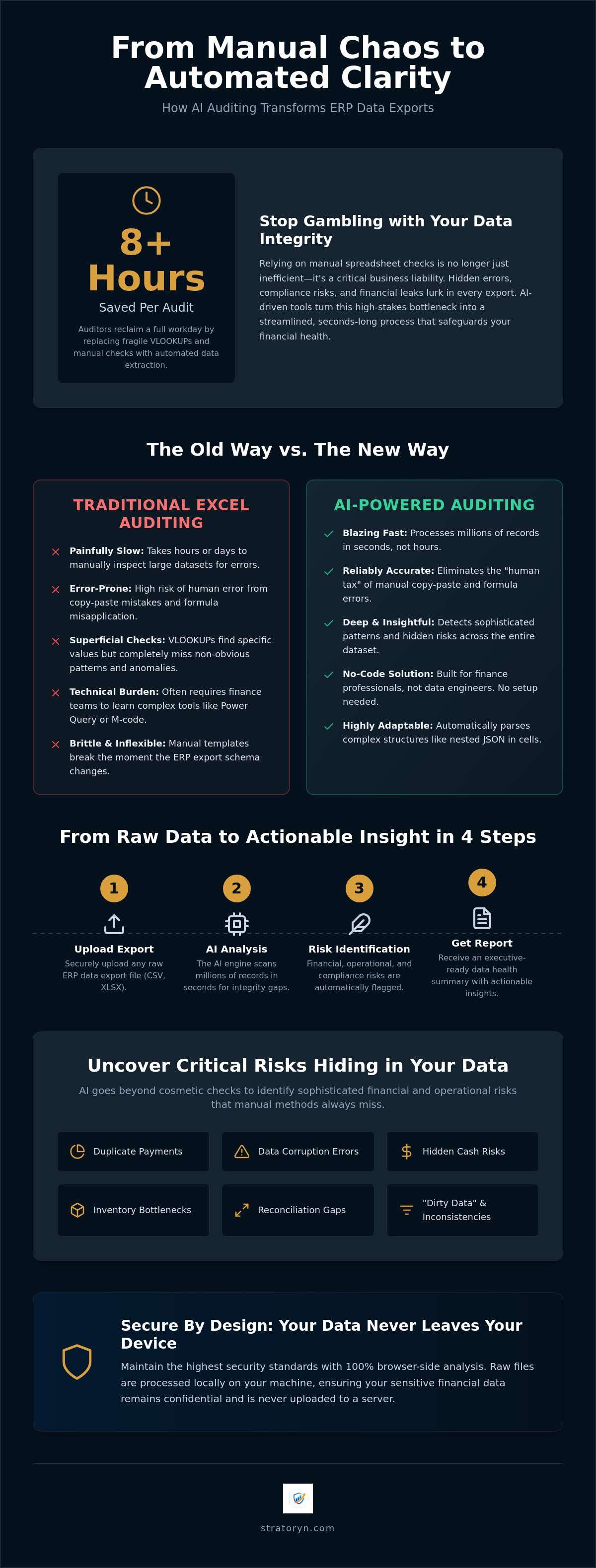
Junior auditors save over 8 hours per engagement by replacing manual checks with automated extraction, yet most finance teams still rely on fragile VLOOKUPs to verify their data. You likely know the frustration of staring at a 50,000-row export, wondering if a hidden duplicate payment or a data corruption error is lurking in the cells. It is a high-stakes gamble. With the U.S. Department of Justice now enforcing strict rules on bulk data exports and OFAC extending retention mandates to ten years, the margin for error has vanished. Relying on manual oversight is no longer just inefficient; it is a liability.
By implementing a dedicated erp data export audit tool, you can transform this manual bottleneck into a streamlined, seconds-long process that identifies financial risks and integrity gaps automatically. You deserve a clean, verified dataset without the midnight oil. This guide explains how to use AI-driven spreadsheet auditing to generate executive-ready reports and secure your data health. We will show you how to move from raw, messy information to polished, actionable insights in a few clicks.
Key Takeaways
- Automate the identification of "dirty data" that breaks downstream reporting and catch non-obvious anomalies across large datasets.
- Use a modern erp data export audit tool to process millions of records in seconds, identifying patterns that traditional VLOOKUPs cannot see.
- Follow a simple four-step process to upload and audit files without the need for direct ERP integration or lengthy IT setups.
- Detect hidden cash risks and inventory bottlenecks, such as late payments and aging stock, before they impact the bottom line.
- Maintain high security standards with browser-side analysis that keeps your raw files local while producing professional data health summaries.
Table of Contents
- The Hidden Risks in Manual ERP Data Export Auditing
- Traditional Excel Auditing vs. AI Spreadsheet Auditor Tools
- How to Audit an ERP Export with AI: A 4-Step Process
- Critical Risks Your AI Auditor Must Detect
- Stratoryn: Secure, Browser-Based ERP Auditing
The Hidden Risks in Manual ERP Data Export Auditing
Manual spreadsheet auditing is no longer a viable strategy for high-growth finance teams. While a traditional Enterprise Resource Planning (ERP) system serves as the single source of truth for an organization, the data it exports is rarely ready for immediate analysis. These exports often arrive as "dirty data" filled with formatting inconsistencies, missing values, and hidden structural errors. When you rely on manual Excel checks, you're essentially looking for a needle in a haystack while wearing a blindfold. Standard VLOOKUPs and pivot tables are designed to organize data, not to detect the sophisticated financial risks that lead to cash flow leaks or duplicate payments.
Legacy auditing methods focus heavily on cosmetic formatting rather than deep business risk detection. You might spend three hours ensuring the dates are in the correct DD/MM/YYYY format, yet miss a multi-million dollar reconciliation gap. This is where a dedicated erp data export audit tool becomes essential. It shifts the focus from manual data cleaning to strategic risk mitigation. Without automated oversight, non-obvious anomalies across massive datasets remain invisible, creating a "silent" risk profile that can compromise your next financial audit or executive report.
The Complexity of the AuditData Column
Modern ERPs don't just export simple rows and columns. They often bundle critical information into complex JSON objects or nested arrays within a single cell. Standard Excel filters cannot penetrate these multi-layered data structures. When a finance professional attempts to manually parse these strings, the risk of human error skyrockets. It's easy to accidentally delete a bracket or misinterpret a nested value, leading to significant data loss. Manual parsing isn't just slow; it's dangerous. An erp data export audit tool handles these technical complexities automatically, ensuring that every layer of your export is scanned for accuracy without the need for manual intervention.
Data Quality Gaps in ERP Migrations
The transition between systems is the most vulnerable period for your financial records. "Garbage in, garbage out" is a common phrase for a reason. If you migrate corrupted or unverified data into a new system, you're simply automating your previous errors at a larger scale. Identifying these corruption points before they enter the new environment is critical for a successful implementation. This is why a comprehensive data quality analysis is non-negotiable during any migration or system upgrade. By auditing your exports through an AI workspace, you ensure that only clean, verified information moves forward, protecting the integrity of your long-term reporting and financial health.
Traditional Excel Auditing vs. AI Spreadsheet Auditor Tools
Manual auditing is a race you cannot win. Research shows that junior auditors save over 8 hours per engagement by using robust data extraction tools. When you rely on manual processes, you're essentially paying for a "human tax" on your data integrity. An erp data export audit tool processes millions of records in seconds, a task that would take a human analyst days to complete. The difference isn't just about time; it's about the elimination of the inevitable copy-paste errors that plague large-scale spreadsheet management. One misplaced formula in a 100,000-row export can compromise an entire executive report.
Traditional tools like VLOOKUPs and pivot tables are strictly linear. They can tell you if a specific value exists, but they don't identify the subtle patterns or trends that signal financial risk. AI goes deeper. It scans the entire dataset to find anomalies that a human eye would naturally skip. Instead of delivering a messy workbook that requires further cleaning, automated tools generate executive-ready reports immediately. You move from raw data to actionable insight without the manual heavy lifting. If you want to see how this looks in practice, you can explore the Stratoryn workspace for a more streamlined approach.
The Problem with Power Query for Finance
Many organizations expect finance teams to use Power Query for data transformation. This is a technical burden that most professionals don't have time for. You shouldn't be expected to write JSON transforms or manage complex M-code just to verify your numbers. Manual audit templates are brittle; they break the moment your ERP schema changes. A more efficient strategy applies AI to ERP data without the technical overhead. It removes the maintenance burden and lets your team focus on high-level analysis rather than data plumbing.
Moving Beyond Simple Visualisation
Standard visualization tools like Power BI are designed to show you what happened, but they often fail to explain the risk. Seeing a bar chart of your monthly spend is helpful, but it won't flag a duplicate vendor payment hidden in a sub-ledger. Understanding risk is different from seeing data. We prioritize automated risk detection over simple charts because clarity on your financial exposure is what drives better business decisions. You don't just need to see your data; you need to know if it is reliable and where your cash is at risk.
How to Audit an ERP Export with AI: A 4-Step Process
Transitioning from manual spreadsheet verification to automated oversight is a straightforward shift in workflow. You don't need to be a data scientist to operate an erp data export audit tool. The process is designed to minimize technical friction and maximize the speed of insight. By following a logical, four-step sequence, you can move from a raw data dump to a verified risk assessment in minutes. It's about working smarter, not harder, to ensure your financial reporting remains beyond reproach.
- Step 1: Export your ERP data as a CSV or Excel file from your primary system.
- Step 2: Upload the file directly into the ERP Intelligence Workspace.
- Step 3: Allow the AI Data Analyst to scan for data types, structural anomalies, and hidden patterns.
- Step 4: Review the generated findings and share the Executive-Ready Reports with your stakeholders.
This workflow eliminates the need for complex internal IT projects. You aren't building a custom integration; you're using a focused tool to handle the heavy lifting. The result is a clean, professional output that highlights exactly where your attention is required. There's no guesswork involved. You get a clear, declarative statement on the health of your data.
Generating the Correct Export
The quality of your audit depends on the quality of your source file. When exporting from systems like SAP, NetSuite, or Oracle, ensure you select a flat file format like CSV or XLSX. It's vital to include technical columns such as AuditData and CreationDate. These fields provide the context the AI needs to track the lifecycle of a transaction. Don't fall into the common export limit traps where systems truncate files after 50,000 rows. Always verify that your export contains the full dataset intended for review to prevent gaps in your final analysis.
Automated Anomaly Detection
Once your file is uploaded, the AI begins the process of pattern recognition. It identifies duplicate entries, missing records, and inconsistent formatting that manual filters often miss. This is where ai financial analysis proves its value. It validates the integrity of your data without requiring you to write a single formula. The tool looks for logical breaks in your accounting sequences, such as skipped invoice numbers or unusual vendor payment patterns. You get a high-level view of your risks without the granular manual labor typically associated with deep-dive auditing.
Critical Risks Your AI Auditor Must Detect
Identifying risk is not a passive exercise. It requires a proactive scan of every transaction, relationship, and timestamp within your dataset. A high-performance erp data export audit tool does more than just organize information; it interrogates it. It looks for the subtle discrepancies that indicate systemic failure or intentional fraud. While manual checks might catch a glaring typo, they rarely surface the complex patterns that lead to significant financial loss. Your audit process must be rigorous enough to protect your bottom line and your regulatory standing simultaneously.
Effective risk detection focuses on four primary categories of failure:
- Cash Risks: Identifying collection bottlenecks and late payments that drain your working capital.
- Inventory Stock Problems: Detecting aging stock and potential stock-outs from raw exports before they disrupt your supply chain.
- Data Integrity Gaps: Finding duplicate records, broken links, and orphaned entries that compromise your reporting accuracy.
- Compliance Issues: Surfacing unauthorized user activities and logs that could signal internal control weaknesses.
By automating these checks, you transform your audit from a defensive chore into a strategic advantage. You gain the ability to act on risks before they manifest as losses on your balance sheet. To start securing your financial data today, you can access our ERP Intelligence Workspace and run your first automated audit.
Financial and Operational Risk Detection
AI highlights cash flow risks within your accounts receivable by identifying payment trends that deviate from historical norms. It doesn't just see a late invoice; it sees a pattern of deteriorating credit terms. Operationally, this allows you to detect stock-outs before they impact the customer experience. The tool translates raw numbers into operational opportunities by flagging inefficiencies in your procurement and sales cycles. You move from reactive troubleshooting to proactive management, ensuring that your resources are always allocated where they generate the most value. To further enhance your outreach during these cycles, you can check out Enginemailer for automated marketing solutions.
Preparing Executive-Ready Reports
Management does not need a data dump; they need a clear path forward. An effective audit report must bridge the gap between technical findings and business outcomes. Our Executive-Ready Reports prioritize actionable insight over raw volume. They summarize your data health into digestible metrics that are ready for board-level review. This ensures that stakeholders understand the exact nature of your financial exposure without getting bogged down in the minutiae of the spreadsheet. You provide the clarity they require to make informed, high-stakes decisions with total confidence.
Stratoryn: Secure, Browser-Based ERP Auditing
Traditional software deployments often stall in IT committees for months. Finance and operations professionals don't have the luxury of waiting for backend integrations or complex API configurations. Stratoryn functions as a streamlined erp data export audit tool that requires zero direct integration with your primary systems. You simply use the data you already have. By focusing on the exports your ERP already generates, we remove the technical friction that typically prevents teams from adopting advanced automation. You can begin auditing your records today without a single line of code or a formal IT project.
The speed of the outcome is the primary driver of value here. Our workspace is designed to transform messy, unstructured CSVs into executive-ready management reports instantly. This isn't just a data processing exercise; it's a transformation of raw information into professional intelligence. Through a simple SaaS model, you gain access to a sophisticated AI Data Analyst that works at a scale no human team could match. It's a modern solution built for the high-stakes environment of enterprise finance, where clarity and speed are the only metrics that matter.
Why Browser-Side Processing Matters
Security is often the biggest barrier to adopting AI in finance. We address this by utilizing browser-side processing. This means your raw ERP exports are analyzed locally within your browser. Your sensitive financial data never needs to be stored in our cloud. We provide a "No-Storage" guarantee for your raw files, ensuring that your organization maintains total control over its information. This architecture effectively eliminates the risk of raw file leaks and satisfies the most stringent data privacy requirements. It's a calm, reassuring approach to a complex technical hurdle, allowing you to leverage AI without compromising your security posture.
Getting Started with the ERP Intelligence Workspace
The transition from raw data to business intelligence should be frictionless. We're currently offering early-access features to professionals who need to move beyond the limitations of manual spreadsheet auditing. This is your opportunity to lead the shift toward automated oversight within your organization. You can move from a state of data uncertainty to a position of quiet authority by letting the AI handle the granular verification tasks. It's time to stop fighting with your spreadsheets and start trusting your data. Experience the ERP Intelligence Workspace today and see how quickly you can secure your financial integrity.
Securing Your Financial Integrity with Automated Oversight
Manual spreadsheet verification is a high-stakes gamble you no longer need to take. By adopting a dedicated erp data export audit tool, you replace hours of fragile VLOOKUPs with a streamlined process that prioritizes visibility and speed. You've seen how automated analysis identifies hidden cash risks and inventory bottlenecks that traditional methods simply miss. The shift from raw data dumps to executive-ready reports isn't just about efficiency; it's about providing the clarity your organization requires to make informed decisions.
Security remains at the forefront of this transition. With browser-side processing, your raw files stay local, ensuring that sensitive financial information is never compromised in the cloud. You get the benefits of an AI Data Analyst that generates executive-ready reports in seconds without the traditional technical hurdles or security trade-offs. It is time to move beyond the limitations of legacy auditing and embrace a more confident, data-driven future.
Start auditing your ERP exports for free with Stratoryn and transform your data into a strategic asset today.
Frequently Asked Questions
What is an AI spreadsheet auditor?
An AI spreadsheet auditor is an automated system that uses machine learning to scan, verify, and analyze large datasets without manual intervention. It functions as a specialized erp data export audit tool by identifying financial risks, such as duplicate payments or data corruption, in seconds. Unlike traditional software, it looks for complex patterns and structural anomalies that human eyes or basic filters often miss.
Can an AI auditor work with any ERP export?
Yes, the system is designed to be platform-agnostic. It processes data exported in standard formats like CSV or Excel from any major system, including SAP, Oracle, and NetSuite. Because it doesn't require direct IT integration, you can start auditing your records immediately. You simply use the reports your system already generates to gain deep visibility into your financial health.
Is it safe to upload sensitive financial data to an AI tool?
Safety depends entirely on the tool's architecture. Stratoryn prioritizes security by utilizing browser-side processing, which means your raw files stay local and are never stored in our cloud. This "No-Storage" guarantee ensures that your sensitive financial information remains under your total control. It's a reassuring, modern approach to data privacy that meets the highest enterprise security standards.
Do I need technical skills to use Stratoryn?
No technical expertise is required to operate the platform. You don't need to write complex formulas, manage JSON transforms, or understand M-code. The ERP Intelligence Workspace is built for finance and operations professionals who value efficiency. You simply upload your export, and the AI Data Analyst handles the heavy lifting, providing you with clear, actionable insights through a frictionless interface.
How does AI auditing differ from manual Excel formulas?
Manual Excel formulas are linear and often brittle, meaning they break when your data schema changes. An AI-driven erp data export audit tool is dynamic and identifies non-obvious anomalies across millions of rows. While a VLOOKUP only finds what you tell it to look for, AI detects unexpected risks and trends. It also automates the creation of Executive-Ready Reports, eliminating hours of manual formatting work.
What file formats are supported for ERP audits?
The workspace supports the most common flat-file formats used in enterprise reporting, specifically CSV and XLSX. These formats are the standard output for almost every modern enterprise resource planning system. By supporting these universal file types, the tool ensures you can audit your data without needing to perform complex pre-processing or file conversions before you begin your analysis.
Can an AI auditor help with ERP migration data cleansing?
It's an essential component of a successful migration strategy. Performing a thorough Data Quality Analysis before moving records into a new system prevents the "garbage in, garbage out" cycle. The AI identifies corrupted entries, orphaned records, and formatting gaps that could compromise your new implementation. Using these insights ensures your new environment starts with a clean, verified, and high-integrity dataset.
How long does it take to generate an audit report?
Audit reports are generated nearly instantly. The AI processes massive datasets, including those with millions of records, in a matter of seconds. You move from a raw, messy data dump to professional, Executive-Ready Reports without the traditional waiting period associated with manual reviews. This speed allows your team to focus on strategic decision-making rather than the tedious mechanics of data verification.
Frequently asked questions
The Complexity of the AuditData Column
Modern ERPs don't just export simple rows and columns. They often bundle critical information into complex JSON objects or nested arrays within a single cell. Standard Excel filters cannot penetrate these multi-layered data structures. When a finance professional attempts to manually parse these strings, the risk of human error skyrockets. It's easy to accidentally delete a bracket or misinterpret a nested value, leading to significant data loss. Manual parsing isn't just slow; it's dangerous. An erp data export audit tool handles these technical complexities automatically, ensuring that every layer of your export is scanned for accuracy without the need for manual intervention.
Data Quality Gaps in ERP Migrations
The transition between systems is the most vulnerable period for your financial records. "Garbage in, garbage out" is a common phrase for a reason. If you migrate corrupted or unverified data into a new system, you're simply automating your previous errors at a larger scale. Identifying these corruption points before they enter the new environment is critical for a successful implementation. This is why a comprehensive data quality analysis is non-negotiable during any migration or system upgrade. By auditing your exports through an AI workspace, you ensure that only clean, verified information moves forward, protecting the integrity of your long-term reporting and financial health. Manual auditing is a race you cannot win. Research shows that junior auditors save over 8 hours per engagement by using robust data extraction tools. When you rely on manual processes, you're essentially paying for a "human tax" on your data integrity. An erp data export audit tool processes millions of records in seconds, a task that would take a human analyst days to complete. The difference isn't just about time; it's about the elimination of the inevitable copy-paste errors that plague large-scale s
The Problem with Power Query for Finance
Many organizations expect finance teams to use Power Query for data transformation. This is a technical burden that most professionals don't have time for. You shouldn't be expected to write JSON transforms or manage complex M-code just to verify your numbers. Manual audit templates are brittle; they break the moment your ERP schema changes. A more efficient strategy applies AI to ERP data without the technical overhead. It removes the maintenance burden and lets your team focus on high-level analysis rather than data plumbing.
Moving Beyond Simple Visualisation
Standard visualization tools like Power BI are designed to show you what happened, but they often fail to explain the risk. Seeing a bar chart of your monthly spend is helpful, but it won't flag a duplicate vendor payment hidden in a sub-ledger. Understanding risk is different from seeing data. We prioritize automated risk detection over simple charts because clarity on your financial exposure is what drives better business decisions. You don't just need to see your data; you need to know if it is reliable and where your cash is at risk. Transitioning from manual spreadsheet verification to automated oversight is a straightforward shift in workflow. You don't need to be a data scientist to operate an erp data export audit tool. The process is designed to minimize technical friction and maximize the speed of insight. By following a logical, four-step sequence, you can move from a raw data dump to a verified risk assessment in minutes. It's about working smarter, not harder, to ensure your financial reporting remains beyond reproach. This workflow eliminates the need for complex internal IT projects. You aren't building a custom integration; you're using a focused tool to handle the
Generating the Correct Export
The quality of your audit depends on the quality of your source file. When exporting from systems like SAP, NetSuite, or Oracle, ensure you select a flat file format like CSV or XLSX. It's vital to include technical columns such as AuditData and CreationDate. These fields provide the context the AI needs to track the lifecycle of a transaction. Don't fall into the common export limit traps where systems truncate files after 50,000 rows. Always verify that your export contains the full dataset intended for review to prevent gaps in your final analysis.
Automated Anomaly Detection
Once your file is uploaded, the AI begins the process of pattern recognition. It identifies duplicate entries, missing records, and inconsistent formatting that manual filters often miss. This is where ai financial analysis proves its value. It validates the integrity of your data without requiring you to write a single formula. The tool looks for logical breaks in your accounting sequences, such as skipped invoice numbers or unusual vendor payment patterns. You get a high-level view of your risks without the granular manual labor typically associated with deep-dive auditing. Identifying risk is not a passive exercise. It requires a proactive scan of every transaction, relationship, and timestamp within your dataset. A high-performance erp data export audit tool does more than just organize information; it interrogates it. It looks for the subtle discrepancies that indicate systemic failure or intentional fraud. While manual checks might catch a glaring typo, they rarely surface the complex patterns that lead to significant financial loss. Your audit process must be rigorous enough to protect your bottom line and your regulatory standing simultaneously. Effective risk detection foc
Financial and Operational Risk Detection
AI highlights cash flow risks within your accounts receivable by identifying payment trends that deviate from historical norms. It doesn't just see a late invoice; it sees a pattern of deteriorating credit terms. Operationally, this allows you to detect stock-outs before they impact the customer experience. The tool translates raw numbers into operational opportunities by flagging inefficiencies in your procurement and sales cycles. You move from reactive troubleshooting to proactive management, ensuring that your resources are always allocated where they generate the most value.
Preparing Executive-Ready Reports
Management does not need a data dump; they need a clear path forward. An effective audit report must bridge the gap between technical findings and business outcomes. Our Executive-Ready Reports prioritize actionable insight over raw volume. They summarize your data health into digestible metrics that are ready for board-level review. This ensures that stakeholders understand the exact nature of your financial exposure without getting bogged down in the minutiae of the spreadsheet. You provide the clarity they require to make informed, high-stakes decisions with total confidence. Traditional software deployments often stall in IT committees for months. Finance and operations professionals don't have the luxury of waiting for backend integrations or complex API configurations. Stratoryn functions as a streamlined erp data export audit tool that requires zero direct integration with your primary systems. You simply use the data you already have. By focusing on the exports your ERP already generates, we remove the technical friction that typically prevents teams from adopting advanced automation. You can begin auditing your records today without a single line of code or a formal IT pro
Why Browser-Side Processing Matters
Security is often the biggest barrier to adopting AI in finance. We address this by utilizing browser-side processing. This means your raw ERP exports are analyzed locally within your browser. Your sensitive financial data never needs to be stored in our cloud. We provide a "No-Storage" guarantee for your raw files, ensuring that your organization maintains total control over its information. This architecture effectively eliminates the risk of raw file leaks and satisfies the most stringent data privacy requirements. It's a calm, reassuring approach to a complex technical hurdle, allowing you to leverage AI without compromising your security posture.
Getting Started with the ERP Intelligence Workspace
The transition from raw data to business intelligence should be frictionless. We're currently offering early-access features to professionals who need to move beyond the limitations of manual spreadsheet auditing. This is your opportunity to lead the shift toward automated oversight within your organization. You can move from a state of data uncertainty to a position of quiet authority by letting the AI handle the granular verification tasks. It's time to stop fighting with your spreadsheets and start trusting your data. Experience the ERP Intelligence Workspace today and see how quickly you can secure your financial integrity. Manual spreadsheet verification is a high-stakes gamble you no longer need to take. By adopting a dedicated erp data export audit tool, you replace hours of fragile VLOOKUPs with a streamlined process that prioritizes visibility and speed. You've seen how automated analysis identifies hidden cash risks and inventory bottlenecks that traditional methods simply miss. The shift from raw data dumps to executive-ready reports isn't just about efficiency; it's about providing the clarity your organization requires to make informed decisions. Security remains at th
What is an AI spreadsheet auditor?
An AI spreadsheet auditor is an automated system that uses machine learning to scan, verify, and analyze large datasets without manual intervention. It functions as a specialized erp data export audit tool by identifying financial risks, such as duplicate payments or data corruption, in seconds. Unlike traditional software, it looks for complex patterns and structural anomalies that human eyes or basic filters often miss.
Can an AI auditor work with any ERP export?
Yes, the system is designed to be platform-agnostic. It processes data exported in standard formats like CSV or Excel from any major system, including SAP, Oracle, and NetSuite. Because it doesn't require direct IT integration, you can start auditing your records immediately. You simply use the reports your system already generates to gain deep visibility into your financial health.
Is it safe to upload sensitive financial data to an AI tool?
Safety depends entirely on the tool's architecture. Stratoryn prioritizes security by utilizing browser-side processing, which means your raw files stay local and are never stored in our cloud. This "No-Storage" guarantee ensures that your sensitive financial information remains under your total control. It's a reassuring, modern approach to data privacy that meets the highest enterprise security standards.
Do I need technical skills to use Stratoryn?
No technical expertise is required to operate the platform. You don't need to write complex formulas, manage JSON transforms, or understand M-code. The ERP Intelligence Workspace is built for finance and operations professionals who value efficiency. You simply upload your export, and the AI Data Analyst handles the heavy lifting, providing you with clear, actionable insights through a frictionless interface.
How does AI auditing differ from manual Excel formulas?
Manual Excel formulas are linear and often brittle, meaning they break when your data schema changes. An AI-driven erp data export audit tool is dynamic and identifies non-obvious anomalies across millions of rows. While a VLOOKUP only finds what you tell it to look for, AI detects unexpected risks and trends. It also automates the creation of Executive-Ready Reports, eliminating hours of manual formatting work.
What file formats are supported for ERP audits?
The workspace supports the most common flat-file formats used in enterprise reporting, specifically CSV and XLSX. These formats are the standard output for almost every modern enterprise resource planning system. By supporting these universal file types, the tool ensures you can audit your data without needing to perform complex pre-processing or file conversions before you begin your analysis.
Can an AI auditor help with ERP migration data cleansing?
It's an essential component of a successful migration strategy. Performing a thorough Data Quality Analysis before moving records into a new system prevents the "garbage in, garbage out" cycle. The AI identifies corrupted entries, orphaned records, and formatting gaps that could compromise your new implementation. Using these insights ensures your new environment starts with a clean, verified, and high-integrity dataset.
How long does it take to generate an audit report?
Audit reports are generated nearly instantly. The AI processes massive datasets, including those with millions of records, in a matter of seconds. You move from a raw, messy data dump to professional, Executive-Ready Reports without the traditional waiting period associated with manual reviews. This speed allows your team to focus on strategic decision-making rather than the tedious mechanics of data verification.
- erp data export audit tool
- ERP
- Data Audit
- AI in Finance
- Spreadsheet Automation
- Financial Compliance
- Data Integrity
- VLOOKUP
- Dirty Data
- ai spreadsheet auditor
- erp data validation
- automated financial audit
- data integrity check
- bulk data export compliance
- vlookup alternative