
The Ultimate ERP Implementation Data Prep Checklist: Ensure Migration Success

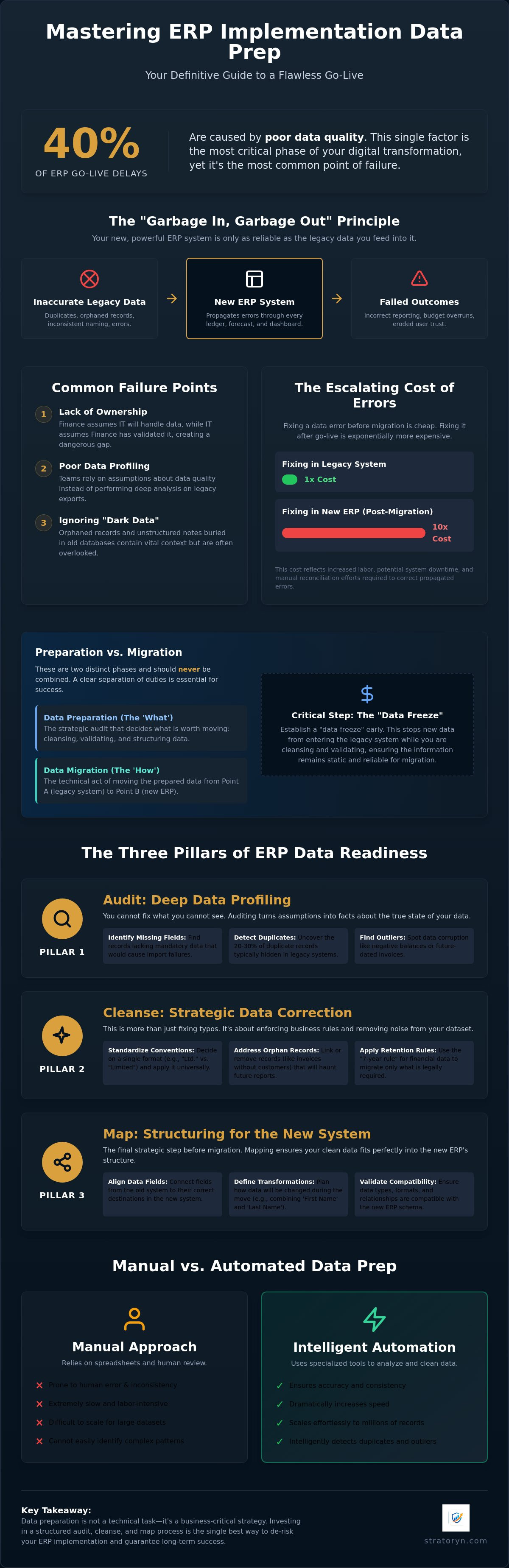
Did you know that 40% of ERP go-live delays are caused by poor data quality? It's a staggering figure that highlights why erp implementation data prep is the most critical phase of your digital transformation. Most teams treat migration as a final weekend task, but the reality is that your new system is only as reliable as the legacy information you feed into it. If you're currently staring at massive Excel exports and wondering how to spot the 20% to 30% of duplicates typically hidden in legacy systems, you aren't alone.
We understand the pressure to maintain financial reporting integrity while managing complex technical hurdles. It's easy to feel overwhelmed by orphaned records and inconsistent naming conventions that threaten your timeline. This guide provides a clear, sequential checklist to help you master your data readiness. You'll learn how to audit, clean, and validate your information to ensure a frictionless transition. We'll walk through the essential steps to eliminate errors before they reach your new environment, giving you total confidence in your post-migration reporting.
Key Takeaways
- Understand the "Garbage In, Garbage Out" principle to prevent legacy errors from corrupting your new enterprise environment.
- Execute the three pillars of data readiness—auditing, cleansing, and mapping—to ensure your information is accurate and properly structured.
- Evaluate the risks of manual erp implementation data prep versus the speed and accuracy of intelligent automation.
- Apply a sequential checklist for master data and transactional records to maintain financial reporting integrity throughout the transition.
- Extend your data strategy beyond migration by using the ERP Intelligence Workspace for continuous post-go-live monitoring.
Table of Contents
- What is ERP Implementation Data Prep and Why Does It Fail?
- The Three Pillars of ERP Data Readiness: Audit, Cleanse, Map
- Manual vs. Automated Data Prep: Which Approach Wins?
- The Definitive ERP Implementation Data Prep Checklist
- Beyond the Move: Using ERP Intelligence to Secure Go-Live
What is ERP Implementation Data Prep and Why Does It Fail?
Effective erp implementation data prep is the strategic process of auditing, cleansing, and mapping legacy information before it enters a new environment. It's not a technical checkbox. It's a business-critical filter. Modern Enterprise Resource Planning (ERP) systems rely on high-fidelity data to drive automation and reporting. If you feed the system inaccurate records, you guarantee failure. This is the "Garbage In, Garbage Out" (GIGO) principle in action. When bad data enters a sophisticated system, it doesn't just sit there. It propagates through every ledger, forecast, and dashboard.
Most organizations stumble during this phase for three specific reasons. First, there is a chronic lack of ownership. Finance often assumes IT will handle the "data move," while IT assumes Finance has validated the numbers. This gap leads to unverified records entering the new system, but engaging with Business Analysis & Solutions can provide the expert consultancy needed to bridge this divide. Second, poor profiling prevents teams from seeing the true state of their data. They rely on assumptions rather than deep analysis of their legacy exports. Finally, many teams ignore "dark data." These are the orphaned records and unstructured notes buried in old databases that often contain vital historical context.
The financial stakes are high. Inaccurate erp implementation data prep leads to incorrect trial balances that require weeks of manual reconciliation. It causes inventory stockouts because the system thinks you have items that don't exist. These errors aren't just inconveniences. They are direct threats to your operational efficiency and financial accuracy.
The Cost of Poor Data Preparation
Industry benchmarks indicate that 50% to 70% of ERP projects exceed their original budget. A primary driver of these overruns is the discovery of data errors late in the implementation cycle. Fixing a record in your legacy system costs pennies. Fixing that same record after it has been integrated into a complex new ERP costs ten times more in labor and system downtime. Beyond the capital cost, bad data erodes user trust. If employees see wrong inventory counts or incorrect customer balances on day one, they will stop using the system and return to their manual spreadsheets.
Data Prep vs. Data Migration: Understanding the Difference
It's vital to distinguish between preparation and migration. Migration is the technical act of moving data from Point A to Point B. Preparation is the strategic audit that decides what is worth moving. You should never combine these phases into a single timeline. If you're still cleaning data while trying to map it to new fields, your project will stall. Establish a "data freeze" early in the process. This ensures that while you're cleansing and validating, the legacy information remains static. This separation of duties allows your technical team to focus on the move while your business team ensures the data integrity.
The Three Pillars of ERP Data Readiness: Audit, Cleanse, Map
Readiness isn't a single task. It's a structured framework that prevents your new system from collapsing under the weight of legacy errors. Following ERP implementation best practices requires a disciplined approach to three distinct pillars: auditing, cleansing, and mapping. These stages ensure your erp implementation data prep is thorough and defensible. You don't just move data. You transform it into a functional asset. Success depends on department heads defining "clean" data early. Sales might prioritize email accuracy, while Finance requires balanced trial ledgers. Without this consensus, your migration will lack a clear finish line.
Pillar 1: Deep Data Profiling
Auditing begins with profiling. You must know exactly what sits inside your CSV and Excel exports before you attempt an upload. This phase identifies missing mandatory fields that would otherwise cause the system to reject your batch. Look for outliers. If a vendor record has a negative balance or a future-dated invoice, you've found corruption. For a more granular approach, learn how to detect duplicate records in ERP exports to catch the duplicates that often plague legacy systems. Profiling turns "we think our data is okay" into "we know our data is ready."
Pillar 2: The Cleansing Strategy
Cleansing is about removing noise. It's the time to standardize naming conventions. Decide now if you'll use "Ltd" or "Limited" across all master data. You must also address "orphan" records, such as invoices that lack an associated customer ID. These records are financial ghosts that will haunt your reporting post-go-live. Apply the "7-year rule" for financial data. Migrate what's legally required and move the rest to a secure archive. This keeps your new environment lean and fast. A thorough Data Quality Analysis can reveal these hidden orphans before they break your new workflows.
Pillar 3: Technical Data Mapping
Mapping is the final bridge. You need a cross-reference table that aligns legacy IDs with your new system IDs. This is where you define transformation rules. You might need to convert date formats or change currency codes. Never skip the "dry run." Perform a test upload in a sandbox environment to see how the data behaves. If the trial balance doesn't match perfectly, your mapping rules need refinement. This iterative process is the only way to guarantee a successful go-live. It's better to find a mapping error in a sandbox than in your production environment on Monday morning.
Manual vs. Automated Data Prep: Which Approach Wins?
Choosing the right methodology for erp implementation data prep determines your project's final cost and accuracy. Many finance teams default to "Excel Hell," relying on complex VLOOKUPs and manual scrolling to validate records. This approach is fundamentally flawed for modern enterprise requirements. Manual audits are prone to fatigue and oversight, often missing up to 40% of data integrity issues. When you rely on human eyes to spot inconsistencies across hundreds of thousands of rows, you aren't just slowing down. You're introducing risk. Automation transforms this phase from a multi-week bottleneck into a streamlined, multi-hour process.
A structured ERP implementation checklist often highlights data cleansing as a high-effort milestone. However, the effort level depends entirely on your tools. Modern automation handles the heavy lifting of profiling and outlier detection. It provides a level of precision that manual efforts cannot replicate. Beyond speed, security remains a top priority. Leading solutions now utilize browser-side processing. This allows you to analyze and clean your information without ever sending raw, sensitive records to a third-party server. You maintain total control over your data sovereignty while benefiting from advanced algorithmic insights.
The Limitations of Traditional Spreadsheet Auditing
Excel was never designed to function as an industrial-grade erp implementation data prep tool. It struggles with large-scale exports, often hitting row limits or suffering from significant performance lag that crashes workstations. Human error is an even greater threat. It's remarkably easy to delete a record that looks like a duplicate but is actually a critical adjustment entry. Spreadsheets also lack the depth to identify complex financial risks. They can't easily detect subtle cash-flow anomalies or inconsistent vendor terms that could lead to post-migration reporting errors. Relying on manual spreadsheets is a gamble with your organization's financial visibility.
The AI Advantage in Data Prep
AI-driven profiling removes the guesswork from your migration strategy. Instead of writing manual rules for every field, AI automatically detects data types and identifies outliers that deviate from the norm. This provides instant visibility into the health of your legacy system before the first file is even mapped. These tools don't just find errors. They synthesize information into executive-ready management reports that help stakeholders make informed decisions about data retention. You move from reactive troubleshooting to proactive management, ensuring your new ERP launches with a foundation of verified, high-quality data.
The Definitive ERP Implementation Data Prep Checklist
Success in erp implementation data prep requires moving beyond high-level strategy into granular verification. You must categorize your data into master, transactional, and operational sets to ensure nothing is overlooked. This checklist serves as your final gate before the technical move. It prevents the financial and operational risks that vague readiness plans often ignore. A disciplined approach here ensures your trial balances remain accurate and your supply chain remains uninterrupted. You aren't just moving files. You're preparing a foundation for automated decision making.
Financial Data Integrity Check
Ensure your legacy system's Trial Balance matches your export totals to the penny. Discrepancies at this stage will only amplify once they enter the new environment. Identify and resolve unallocated payments or hanging credits in the source system first. These records are common sources of post-migration reconciliation pain that can delay your first month-end close. Data Integrity Gaps are the discrepancy between physical reality and digital records. Closing these gaps now prevents costly forensic accounting later.
Inventory and Supply Chain Audit
Migrating obsolete stock is a waste of system resources and distorts your balance sheet valuation. Identify items with no movement in the last 12 months and exclude them from the migration set. Check for duplicate SKU numbers across different warehouse locations to prevent inventory inflation. Research shows that duplicates affect 20% to 30% of legacy systems' data, so this step is vital for stock accuracy. Verify that lead times and safety stock levels are updated to reflect current market realities before the upload.
Customer and Vendor Master Data
Cleanse your partner lists by removing inactive accounts with no activity in the last 24 months. This reduces the noise in your new CRM and procurement modules. Standardizing VAT and Tax IDs is mandatory for compliance, especially with new regulations taking effect in 2026. Validate every email address used for automated invoicing and purchase order transmission. If these addresses are wrong, your cash flow will stall on day one. Perform a Data Quality Analysis to identify these partner-level risks before they reach your new ERP.
Operational Data and System Configuration
- Bill of Materials (BOM): Verify that every component and routing sequence is accurate for production planning.
- Tax and Currency: Confirm that tax codes and currency exchange settings match the new system’s architecture.
- User Permissions: Map legacy roles to the new security framework to ensure immediate access for your team.
- The Gold Build: Conduct a final verification of the cleansed dataset against your business requirements to sign off on readiness.
Beyond the Move: Using ERP Intelligence to Secure Go-Live
The final upload doesn't mark the end of your data journey. It's the beginning of a new phase of operational visibility. Your erp implementation data prep strategy should evolve into a continuous monitoring framework. If you only audit your data during the migration, you risk new errors creeping in during the first week of production. By using the ERP Intelligence Workspace, you can verify data health in your new environment immediately after go-live. This ensures that the clean state you worked hard to achieve remains intact as your team begins entering new transactions in the new system.
Maintaining high data quality usually requires significant IT overhead. Traditional methods involve custom scripts or manual spot-checks that drain internal resources. Automated financial risk detection removes this burden. It allows finance leads to transition from reactive troubleshooting to proactive management. You don't need a direct integration to stay informed. Simply exporting your new system's data and running it through an intelligence layer provides the clarity needed to secure your investment. This approach keeps your master data pristine without requiring a dedicated team of analysts.
Early Access to AI-Powered Auditing
Stratoryn changes how finance teams interact with their information. You can upload CSV exports for instant analysis without waiting for IT approval or complex API configurations. This provides a "second pair of eyes" for operations leads who need to verify balances and identify anomalies quickly. Security is built into the process from the ground up. We use browser-side processing, which means your raw files are never stored on our servers. You get the insights you need while maintaining total data sovereignty. It's a streamlined solution for a high-stakes environment where speed and security are equally vital.
Preparing for the Future of ERP AI
The industry is moving toward proactive risk detection as a standard requirement. In 2026, 65% of organizations state that AI capabilities are essential to their ERP selection criteria. Staying "data-ready" isn't just about this migration; it's about positioning your company to leverage the rise of AI tools in 2026. These tools transform raw exports into actionable intelligence, allowing you to spot cash-flow risks before they impact your bottom line. Don't let your erp implementation data prep efforts go to waste after the transition. Audit your exports for free today to secure your implementation and ensure long-term reporting accuracy.
Secure Your Migration and Future-Proof Your Data
Successful ERP transitions depend on the work done before the first file is ever uploaded. You now have the framework to move beyond manual spreadsheets and into a phase of automated precision. A disciplined erp implementation data prep phase is the only way to ensure your new system delivers the ROI you expect. It transforms legacy information from a liability into a strategic asset. Data health is not a one-time milestone; it is a continuous requirement for financial accuracy.
You can gain instant visibility into your exports without the need for complex IT integrations. Audit your ERP exports for free with the Stratoryn Intelligence Workspace to secure your implementation. Our solution leverages AI-powered risk detection and browser-side processing for maximum security. You'll receive executive-ready reports in seconds, allowing you to focus on leading your organization through this transition. Take control of your migration today. With a clear checklist and intelligent tools, you'll launch with total confidence in your data integrity.
Frequently Asked Questions
How long does ERP data preparation usually take?
Data preparation typically consumes 30% to 50% of the total implementation timeline. For a mid-sized business, this translates to three to six months of active auditing and cleansing. Starting early is essential to prevent bottlenecks. If you wait until the technical configuration is complete, you will likely face project delays. Automation can reduce the active labor hours, but the strategic review of legacy records requires consistent stakeholder attention throughout the project lifecycle.
Who should be responsible for data prep in an ERP project?
Business process owners from finance and operations must own the data preparation, supported by IT for technical exports. Finance leads are best positioned to verify the accuracy of the Chart of Accounts and trial balances. Operations managers should validate inventory and vendor master data. IT handles the extraction and formatting, but they cannot decide if a record is functionally correct. Data integrity is a business responsibility, not a technical one.
Can I use AI to clean my ERP data exports automatically?
Yes, you can use AI to identify outliers, detect duplicates, and standardize formats across large datasets. Intelligent tools analyze your erp implementation data prep files to find inconsistencies that manual VLOOKUPs often miss. These solutions provide instant visibility into the health of your legacy data. Using AI allows your team to focus on high-value decision-making rather than manual data entry, significantly accelerating your path to a successful go-live.
What is the most common mistake in ERP data migration?
The most frequent error is migrating "dirty" data without a prior audit. Many teams assume the new system will automatically fix legacy formatting issues or duplicate records. In reality, the new ERP will only amplify these problems. Another common mistake is failing to freeze legacy data. If you continue making changes in the old system during the migration window, your final upload will be obsolete before you even launch.
How do I handle duplicate records in my legacy system before migration?
You should identify a survivor record for each duplicate set and merge all associated transaction history before exporting. Use automated profiling to catch subtle duplicates, such as vendors with slightly different names or shared tax IDs. Once identified, deactivate the redundant records in the source system. This ensures that only the most accurate, singular version of the truth enters your new environment, preventing reporting errors post-migration.
Why is data mapping important for ERP implementation?
Data mapping ensures that information from your legacy fields lands in the correct corresponding fields in the new system. It acts as the translation layer for your business logic. Without precise mapping, your financial periods, tax codes, and customer categories may become misaligned. This alignment is a core part of erp implementation data prep. It guarantees that your historical data remains functional and searchable within the new software's architecture.
Should I migrate all historical data to the new ERP?
No, you should only migrate what is necessary for active operations and legal compliance. Most organizations migrate two years of detailed transactional history and seven years of summarized financial data. Moving ten years of dark data increases migration costs and slows down system performance. Archive the older records in a secure, searchable format. This keeps your new production environment lean while maintaining access for potential audits.
How do I verify if my data prep was successful?
Conduct a Gold Build test by uploading your cleansed dataset into a sandbox environment and performing a full reconciliation. Your new trial balance must match your legacy totals exactly. Run standard reports, such as aging summaries and inventory valuations, to check for anomalies. If the numbers align and your process owners sign off on the results, your preparation is complete. Successful verification provides the confidence needed for the final production move.
Frequently asked questions
The Cost of Poor Data Preparation
Industry benchmarks indicate that 50% to 70% of ERP projects exceed their original budget. A primary driver of these overruns is the discovery of data errors late in the implementation cycle. Fixing a record in your legacy system costs pennies. Fixing that same record after it has been integrated into a complex new ERP costs ten times more in labor and system downtime. Beyond the capital cost, bad data erodes user trust. If employees see wrong inventory counts or incorrect customer balances on day one, they will stop using the system and return to their manual spreadsheets.
Data Prep vs. Data Migration: Understanding the Difference
It's vital to distinguish between preparation and migration. Migration is the technical act of moving data from Point A to Point B. Preparation is the strategic audit that decides what is worth moving. You should never combine these phases into a single timeline. If you're still cleaning data while trying to map it to new fields, your project will stall. Establish a "data freeze" early in the process. This ensures that while you're cleansing and validating, the legacy information remains static. This separation of duties allows your technical team to focus on the move while your business team ensures the data integrity. Readiness isn't a single task. It's a structured framework that prevents your new system from collapsing under the weight of legacy errors. Following ERP implementation best practices requires a disciplined approach to three distinct pillars: auditing, cleansing, and mapping. These stages ensure your erp implementation data prep is thorough and defensible. You don't just move data. You transform it into a functional asset. Success depends on department heads defining "clean" data early. Sales might prioritize email accuracy, while Finance requires balanced trial led
Pillar 1: Deep Data Profiling
Auditing begins with profiling. You must know exactly what sits inside your CSV and Excel exports before you attempt an upload. This phase identifies missing mandatory fields that would otherwise cause the system to reject your batch. Look for outliers. If a vendor record has a negative balance or a future-dated invoice, you've found corruption. For a more granular approach, learn how to detect duplicate records in ERP exports to catch the duplicates that often plague legacy systems. Profiling turns "we think our data is okay" into "we know our data is ready."
Pillar 2: The Cleansing Strategy
Cleansing is about removing noise. It's the time to standardize naming conventions. Decide now if you'll use "Ltd" or "Limited" across all master data. You must also address "orphan" records, such as invoices that lack an associated customer ID. These records are financial ghosts that will haunt your reporting post-go-live. Apply the "7-year rule" for financial data. Migrate what's legally required and move the rest to a secure archive. This keeps your new environment lean and fast. A thorough Data Quality Analysis can reveal these hidden orphans before they break your new workflows.
Pillar 3: Technical Data Mapping
Mapping is the final bridge. You need a cross-reference table that aligns legacy IDs with your new system IDs. This is where you define transformation rules. You might need to convert date formats or change currency codes. Never skip the "dry run." Perform a test upload in a sandbox environment to see how the data behaves. If the trial balance doesn't match perfectly, your mapping rules need refinement. This iterative process is the only way to guarantee a successful go-live. It's better to find a mapping error in a sandbox than in your production environment on Monday morning. Choosing the right methodology for erp implementation data prep determines your project's final cost and accuracy. Many finance teams default to "Excel Hell," relying on complex VLOOKUPs and manual scrolling to validate records. This approach is fundamentally flawed for modern enterprise requirements. Manual audits are prone to fatigue and oversight, often missing up to 40% of data integrity issues. When you rely on human eyes to spot inconsistencies across hundreds of thousands of rows, you aren't just slowing down. You're introducing risk. Automation transforms this phase from a multi-week bottleneck into
The Limitations of Traditional Spreadsheet Auditing
Excel was never designed to function as an industrial-grade erp implementation data prep tool. It struggles with large-scale exports, often hitting row limits or suffering from significant performance lag that crashes workstations. Human error is an even greater threat. It's remarkably easy to delete a record that looks like a duplicate but is actually a critical adjustment entry. Spreadsheets also lack the depth to identify complex financial risks. They can't easily detect subtle cash-flow anomalies or inconsistent vendor terms that could lead to post-migration reporting errors. Relying on manual spreadsheets is a gamble with your organization's financial visibility.
The AI Advantage in Data Prep
AI-driven profiling removes the guesswork from your migration strategy. Instead of writing manual rules for every field, AI automatically detects data types and identifies outliers that deviate from the norm. This provides instant visibility into the health of your legacy system before the first file is even mapped. These tools don't just find errors. They synthesize information into executive-ready management reports that help stakeholders make informed decisions about data retention. You move from reactive troubleshooting to proactive management, ensuring your new ERP launches with a foundation of verified, high-quality data. Success in erp implementation data prep requires moving beyond high-level strategy into granular verification. You must categorize your data into master, transactional, and operational sets to ensure nothing is overlooked. This checklist serves as your final gate before the technical move. It prevents the financial and operational risks that vague readiness plans often ignore. A disciplined approach here ensures your trial balances remain accurate and your supply chain remains uninterrupted. You aren't just moving files. You're preparing a foundation for aut
Financial Data Integrity Check
Ensure your legacy system's Trial Balance matches your export totals to the penny. Discrepancies at this stage will only amplify once they enter the new environment. Identify and resolve unallocated payments or hanging credits in the source system first. These records are common sources of post-migration reconciliation pain that can delay your first month-end close. Data Integrity Gaps are the discrepancy between physical reality and digital records. Closing these gaps now prevents costly forensic accounting later.
Inventory and Supply Chain Audit
Migrating obsolete stock is a waste of system resources and distorts your balance sheet valuation. Identify items with no movement in the last 12 months and exclude them from the migration set. Check for duplicate SKU numbers across different warehouse locations to prevent inventory inflation. Research shows that duplicates affect 20% to 30% of legacy systems' data, so this step is vital for stock accuracy. Verify that lead times and safety stock levels are updated to reflect current market realities before the upload.
Customer and Vendor Master Data
Cleanse your partner lists by removing inactive accounts with no activity in the last 24 months. This reduces the noise in your new CRM and procurement modules. Standardizing VAT and Tax IDs is mandatory for compliance, especially with new regulations taking effect in 2026. Validate every email address used for automated invoicing and purchase order transmission. If these addresses are wrong, your cash flow will stall on day one. Perform a Data Quality Analysis to identify these partner-level risks before they reach your new ERP.
Operational Data and System Configuration
The final upload doesn't mark the end of your data journey. It's the beginning of a new phase of operational visibility. Your erp implementation data prep strategy should evolve into a continuous monitoring framework. If you only audit your data during the migration, you risk new errors creeping in during the first week of production. By using the ERP Intelligence Workspace, you can verify data health in your new environment immediately after go-live. This ensures that the clean state you worked hard to achieve remains intact as your team begins entering new transactions in the new system. Maintaining high data quality usually requires significant IT overhead. Traditional methods involve custom scripts or manual spot-checks that drain internal resources. Automated financial risk detection removes this burden. It allows finance leads to transition from reactive troubleshooting to proactive management. You don't need a direct integration to stay informed. Simply exporting your new system's data and running it through an intelligence layer provides the clarity needed to secure your investment. This approach keeps your master data pristine without requiring a dedicated team of analysts
Early Access to AI-Powered Auditing
Stratoryn changes how finance teams interact with their information. You can upload CSV exports for instant analysis without waiting for IT approval or complex API configurations. This provides a "second pair of eyes" for operations leads who need to verify balances and identify anomalies quickly. Security is built into the process from the ground up. We use browser-side processing, which means your raw files are never stored on our servers. You get the insights you need while maintaining total data sovereignty. It's a streamlined solution for a high-stakes environment where speed and security are equally vital.
Preparing for the Future of ERP AI
The industry is moving toward proactive risk detection as a standard requirement. In 2026, 65% of organizations state that AI capabilities are essential to their ERP selection criteria. Staying "data-ready" isn't just about this migration; it's about positioning your company to leverage the rise of AI tools in 2026. These tools transform raw exports into actionable intelligence, allowing you to spot cash-flow risks before they impact your bottom line. Don't let your erp implementation data prep efforts go to waste after the transition. Audit your exports for free today to secure your implementation and ensure long-term reporting accuracy. Successful ERP transitions depend on the work done before the first file is ever uploaded. You now have the framework to move beyond manual spreadsheets and into a phase of automated precision. A disciplined erp implementation data prep phase is the only way to ensure your new system delivers the ROI you expect. It transforms legacy information from a liability into a strategic asset. Data health is not a one-time milestone; it is a continuous requirement for financial accuracy. You can gain instant visibility into your exports without the need fo
How long does ERP data preparation usually take?
Data preparation typically consumes 30% to 50% of the total implementation timeline. For a mid-sized business, this translates to three to six months of active auditing and cleansing. Starting early is essential to prevent bottlenecks. If you wait until the technical configuration is complete, you will likely face project delays. Automation can reduce the active labor hours, but the strategic review of legacy records requires consistent stakeholder attention throughout the project lifecycle.
Who should be responsible for data prep in an ERP project?
Business process owners from finance and operations must own the data preparation, supported by IT for technical exports. Finance leads are best positioned to verify the accuracy of the Chart of Accounts and trial balances. Operations managers should validate inventory and vendor master data. IT handles the extraction and formatting, but they cannot decide if a record is functionally correct. Data integrity is a business responsibility, not a technical one.
Can I use AI to clean my ERP data exports automatically?
Yes, you can use AI to identify outliers, detect duplicates, and standardize formats across large datasets. Intelligent tools analyze your erp implementation data prep files to find inconsistencies that manual VLOOKUPs often miss. These solutions provide instant visibility into the health of your legacy data. Using AI allows your team to focus on high-value decision-making rather than manual data entry, significantly accelerating your path to a successful go-live.
What is the most common mistake in ERP data migration?
The most frequent error is migrating "dirty" data without a prior audit. Many teams assume the new system will automatically fix legacy formatting issues or duplicate records. In reality, the new ERP will only amplify these problems. Another common mistake is failing to freeze legacy data. If you continue making changes in the old system during the migration window, your final upload will be obsolete before you even launch.
How do I handle duplicate records in my legacy system before migration?
You should identify a survivor record for each duplicate set and merge all associated transaction history before exporting. Use automated profiling to catch subtle duplicates, such as vendors with slightly different names or shared tax IDs. Once identified, deactivate the redundant records in the source system. This ensures that only the most accurate, singular version of the truth enters your new environment, preventing reporting errors post-migration.
Why is data mapping important for ERP implementation?
Data mapping ensures that information from your legacy fields lands in the correct corresponding fields in the new system. It acts as the translation layer for your business logic. Without precise mapping, your financial periods, tax codes, and customer categories may become misaligned. This alignment is a core part of erp implementation data prep. It guarantees that your historical data remains functional and searchable within the new software's architecture.
Should I migrate all historical data to the new ERP?
No, you should only migrate what is necessary for active operations and legal compliance. Most organizations migrate two years of detailed transactional history and seven years of summarized financial data. Moving ten years of dark data increases migration costs and slows down system performance. Archive the older records in a secure, searchable format. This keeps your new production environment lean while maintaining access for potential audits.
- erp implementation data prep
- ERP Implementation
- Data Preparation
- Data Migration
- ERP Checklist
- Data Cleansing
- Legacy Data
- ERP
- erp data migration
- data cleansing for erp
- erp implementation checklist
- legacy data migration
- erp data quality
- erp go-live success