
How to Detect Duplicate Records in ERP Exports: A Practical Guide

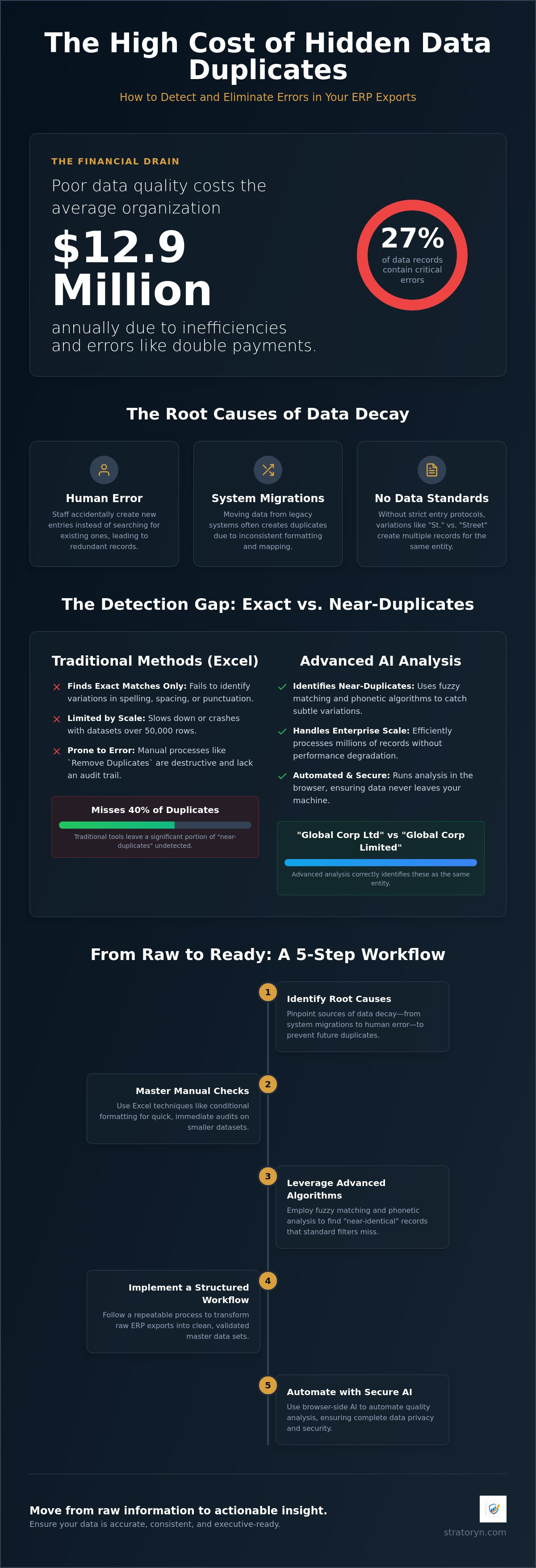
Poor data quality costs the average organization $12.9 million annually. When 27% of enterprise data records contain at least one critical accuracy error, the risk of double payments and skewed financial reports becomes a daily reality. You likely know the frustration of manual auditing. It's a slow, error-prone process that drains your team's resources and leaves room for costly mistakes. To maintain a clean master data set, you must learn how to efficiently detect duplicate records in ERP exports before they compromise your bottom line.
We agree that manual data cleansing shouldn't be your primary focus. You need a streamlined solution that provides visibility and speed. This guide provides a practical roadmap to transform your raw exports into polished, professional outputs. We'll start with standard manual techniques for immediate checks. Then, we'll explore how advanced AI analysis identifies non-exact matches that traditional filters often miss. By the end, you'll have a repeatable process to ensure your data is accurate, consistent, and executive-ready. This approach moves you from raw information to actionable insight with minimal cognitive load.
Key Takeaways
- Identify the root causes of data decay, from system migrations to human error, to stop duplicates at the source.
- Master manual Excel techniques like conditional formatting to quickly detect duplicate records in erp exports for immediate auditing.
- Discover how fuzzy matching and phonetic algorithms identify "near-identical" records that standard filters often miss.
- Implement a structured five-step workflow to transition raw data exports into clean, executive-ready reports.
- Understand how browser-side AI processing automates data quality analysis while maintaining complete data security.
Table of Contents
- What is Duplicate Record Detection in ERP Systems?
- Traditional Methods to Detect Duplicate Records in Excel
- Advanced Pattern Recognition: Beyond Exact Matches
- 5 Steps to Detect and Resolve ERP Duplicates
- Automating Data Quality with Stratoryn
What is Duplicate Record Detection in ERP Systems?
Duplicate record detection is the systematic process of identifying identical or near-identical entries within your database. It is a critical component of Data deduplication strategies. When you attempt to detect duplicate records in erp exports, you are essentially hunting for data redundancy that compromises system integrity. This isn't just about cleaning up a spreadsheet. It's about protecting the "single source of truth" that your business relies on for every major decision.
Redundancy often stems from three main areas. Human error is the most common, where staff members accidentally create new entries instead of searching for existing ones. System migrations also play a massive role. When moving data from legacy systems to a modern ERP, inconsistent formatting often creates a sea of duplicates. Finally, a lack of data entry standards allows variations to flourish. Without strict protocols, one user might enter "St." while another enters "Street," creating two distinct records for one location. Your ERP becomes a graveyard of "dirty" data without these controls.
The most common culprits for these errors include vendor master files, customer lists, and invoice records. These areas are high-stakes because they directly impact your cash flow. Traditional filters often fail to catch 40% of duplicates because most basic tools only look for exact matches. They miss the "near-duplicates" that exist due to slight variations in formatting or spelling. Relying solely on exact-match filters leaves your organization vulnerable to hidden financial leaks that compound over time.
The Financial Impact of "Dirty" ERP Data
Poor data quality is a significant financial liability. Unintentional double payments to vendors occur when two records exist for the same entity under slightly different names. This creates immediate cash risks that can go unnoticed for months. Beyond the finance department, dirty data causes operational friction. Your sales team might struggle when multiple records exist for a single customer; this leads to fragmented communication and frustrated clients. Reporting errors are the final blow. Inaccurate inventory levels and skewed revenue figures in executive reports lead to poor strategic decisions. When the data is wrong, the strategy is flawed.
Exact Matches vs. Near-Duplicates
Exact duplicates are identical rows that represent the same entity or transaction. These are relatively easy to spot with basic spreadsheet tools or standard database queries. However, near-duplicates are more elusive. These involve variations in spelling, punctuation, or formatting, such as "Global Corp Ltd" versus "Global Corp Limited." Catching these requires more than a simple filter; it requires sophisticated pattern recognition. Master Data Management is the foundation of ERP integrity, ensuring that a single, accurate version of every data element exists across the enterprise. By prioritizing this foundation, you move from reactive cleanup to proactive data health.
Traditional Methods to Detect Duplicate Records in Excel
Excel is the universal fallback for data cleanup. Most finance professionals turn here first to detect duplicate records in erp exports. The most common method involves Conditional Formatting. You select a column, such as "Vendor Name," and highlight duplicate values. It provides immediate visual feedback. However, it only works for exact matches. If one entry has an extra space or a different case, Excel considers it unique. This limitation often leaves significant errors hidden in your master data.
The "Remove Duplicates" tool is another staple. It's fast. You select your range, click a button, and the system handles the rest. But it's destructive. It deletes the data without leaving a trace of what was removed. For high-stakes financial data, this lack of transparency is a major risk. A safer alternative is formula-based detection using COUNTIF. By counting occurrences of a value across a range, you identify duplicates without erasing them. This allows for a manual review before any data is purged, which is a standard step in resolving duplicate data issues effectively.
These methods provide a basic framework, yet Excel has hard limits. Once your export exceeds 50,000 rows, the software often lags or crashes. It's not designed to handle complex patterns or multi-column comparisons at scale. It's a tool for small-scale analysis, not enterprise-grade data integrity.
Step 1: Preparing Your ERP CSV Export
Success in Excel starts with rigorous preparation. You must standardize your columns first. Ensure all headers are consistent across different exports. Next, trim whitespace. Invisible characters at the end of a string will break your matches. Use the TRIM function to strip these away. Finally, format your data types. ERP exports often treat numbers as text. Convert these to actual numeric values so your formulas function correctly and your analysis remains accurate.
The Problem with Manual Auditing
Manual auditing is a drain on your team's resources. Human fatigue is a constant factor. After reviewing thousands of rows, the error rate inevitably spikes. You'll miss duplicates that a machine would catch in seconds. There's also a distinct lack of an audit trail. If you delete a record manually, it's difficult to track who made the change or why. This lack of accountability can become a nightmare during year-end audits. For a more reliable solution, The ERP Intelligence Workspace offers a way to automate these checks, moving beyond the limitations of manual spreadsheets.
Advanced Pattern Recognition: Beyond Exact Matches
Standard filters fail because real-world data is messy. To truly detect duplicate records in erp exports, you must look beyond exact character strings. Fuzzy matching is the solution. It identifies records that are "close enough" to be duplicates by calculating the distance between strings. For instance, it recognizes that "Global Corp" and "Global Corporation" likely represent the same entity. Without this capability, your data remains fragmented and your financial reports stay inaccurate.
Phonetic algorithms add another layer of protection. These catch duplicates that sound identical but are spelled differently, such as "Smyth" and "Smith." While a human might catch these in a small set, they're impossible to find manually in a 50,000-row export. Additionally, numeric proximity helps identify duplicate invoices. It flags transactions with identical amounts but slightly different dates or invoice numbers. Cross-field validation completes the picture. It matches a vendor name in one record with a physical address or tax ID in another, unmasking duplicates that hide behind different aliases.
- Fuzzy Matching: Accounts for typos, abbreviations, and punctuation differences.
- Phonetic Analysis: Groups records based on how names are pronounced.
- Numeric Proximity: Detects suspicious patterns in financial values and dates.
- Cross-field Logic: Links records using secondary data points like addresses or tax IDs.
Why Fuzzy Matching is Critical for ERP Migration
Data migrations are high-risk events. Industry data indicates that 85% of big data projects fail due to poor data accuracy. During a move to a new system like SAP S/4HANA or Oracle NetSuite 2026.1, "cleaning" data often creates more duplicates than it removes. AI-driven tools identify complex patterns that standard Excel filters miss entirely. These systems assign "Confidence Scores" to potential matches. A high score suggests a definite duplicate, while a lower score prompts a manual review. This prioritized approach allows your team to focus their auditing efforts where they matter most, ensuring a clean transition.
Identifying Hidden Risks in Vendor Master Files
Duplicate records aren't just an administrative nuisance; they're a security risk. Pattern analysis can search for duplicate bank details across entirely different vendor names. This often reveals "Ghost Vendors," where a fraudulent account is set up to siphon funds. By comparing employee addresses with vendor addresses, automated systems flag potential internal fraud. Automated risk detection protects company cash flow by ensuring every payment is legitimate and every vendor is verified. This level of visibility is impossible to achieve with manual spreadsheets or basic ERP search functions.
5 Steps to Detect and Resolve ERP Duplicates
You need a repeatable workflow to detect duplicate records in erp exports. Without a structured process, you risk inconsistent results and wasted effort. This five-step roadmap ensures your data remains clean, reliable, and ready for executive reporting. By moving from raw exports to refined master data, you protect your organization from financial leakage and operational friction.
Begin by pulling your raw data from your system. Whether you use SAP S/4HANA 2023 or Oracle NetSuite 2026.1, export the file in CSV or Excel format. This provides a static snapshot for analysis without affecting live production data. Once exported, perform a "Data Health Check." Look for obvious inconsistencies in formatting. Are dates in the same YYYY-MM-DD format? Are there trailing spaces in the vendor names? Addressing these basics now prevents "false uniques" during the deeper analysis phase.
Step 3: Multi-Column Analysis Techniques
Matching on "Name" alone is insufficient for global enterprises. You might have multiple vendors with similar names across different regions. This is the most critical phase when you detect duplicate records in erp systems. You must use unique identifiers like VAT numbers, Tax IDs, or IBANs for higher accuracy. If you're working in Excel, you can concatenate multiple fields, such as Name + Postcode, to create a temporary unique key. This "poor man's" key helps isolate records that share multiple attributes, revealing duplicates that a single-column filter would miss.
Next, review your "Near-Matches" using the fuzzy logic concepts discussed in the previous section. Automated tools will flag these for your attention. Your task is to confirm if entries like "Corp." and "Corporation" are indeed the same entity. This step ensures you don't accidentally delete legitimate, similar-sounding records. Confirmation is the bridge between automated detection and data integrity.
The final step is to merge or flag these records in the source ERP. If your system allows it, merge the histories of the duplicate entries. If not, flag the redundant records for deletion or inactivation. This maintains a single version of truth across your financial ecosystem, ensuring that your next export is clean from the start.
Step 5: Maintaining Data Integrity Post-Cleanup
Cleanup isn't a one-time event; it's a discipline. You must establish strict data entry protocols to prevent new duplicates from entering the system. Consider implementing mandatory fields for unique identifiers during vendor onboarding. Schedule monthly audits to catch errors before they impact your financial reports. Utilizing AI tools to analyse ERP exports automates this cycle, providing constant data quality analysis without the burden of manual labor. This approach transforms your data management from a reactive chore into a streamlined business advantage.
Automating Data Quality with Stratoryn
Manual auditing and complex Excel formulas provide a baseline, but they don't scale with the speed of modern business. To detect duplicate records in erp exports with absolute precision, you need a system that removes the burden of manual oversight. Stratoryn provides an ERP Intelligence Workspace designed to handle the heavy lifting of data validation. Our AI workspace automatically detects data types in your CSV exports, identifying whether a column represents a currency, a date, or a unique tax identifier. It eliminates the need for tedious pre-formatting, allowing you to move from raw data to actionable insight immediately.
Security is a primary concern for finance and operations professionals. Stratoryn addresses this through browser-side processing. Your data is analyzed locally within your browser; this means you don't need to worry about raw file storage or the security risks of uploading sensitive financial information to external servers. This approach lowers the barrier to entry, providing the power of advanced AI without the typical IT bottleneck. There's no direct ERP integration required. You simply export your data from your current system and let the AI Data Analyst identify the integrity gaps that human eyes often miss.
Frictionless Risk and Opportunity Detection
Clean data is the starting point, not the finish line. Beyond identifying duplicates, Stratoryn performs comprehensive data quality analysis to highlight broader risks. It identifies stock problems and cash risks that stem from fragmented records. By acting as a dedicated AI Data Analyst, the platform uncovers patterns of inefficiency that traditional reporting ignores. You gain an instant overview of your data health, allowing you to address integrity gaps before they escalate into financial liabilities. This proactive visibility ensures your operations remain lean and your cash flow stays protected.
Generating Management-Ready Outputs
The ultimate goal of data management is clarity for decision-makers. Stratoryn transforms your cleaned data into Executive-Ready Reports that are professional, polished, and ready for stakeholder review. This process significantly reduces the cognitive load on your finance and ops teams. Instead of spending days fighting with spreadsheets, your staff can focus on high-value strategic analysis. You provide your leadership with confidence in the numbers, backed by a repeatable, automated process. Get early access to Stratoryn and analyse your first export for free to experience the transition from raw information to professional output.
Secure Your Data Integrity
Managing enterprise data doesn't have to be a manual burden. You now have the tools to move beyond simple filters and address the root causes of data decay. By implementing a structured five-step workflow, you protect your organization from the financial risks associated with "dirty" data. You've learned how fuzzy matching catches the duplicates that standard Excel tools miss. Effectively using these techniques ensures you can detect duplicate records in erp exports with confidence and speed.
Stratoryn simplifies this transition through intelligent automation. Our workspace provides AI-powered risk detection without the need for raw file storage; this ensures your sensitive information remains secure within your browser. You can generate executive-ready reports instantly, moving from raw information to professional insight in minutes. This streamlined approach allows your team to focus on strategic growth rather than spreadsheet maintenance. Start your free ERP data analysis with Stratoryn and take the first step toward a cleaner, more reliable master data set. Your path to data clarity starts today.
Frequently Asked Questions
How do I prevent duplicate records from being created in the first place?
Establish strict data entry protocols and validation rules within your system. You should mandate unique identifiers, such as Tax IDs or IBANs, for every new entry. Regular training for procurement and finance teams ensures they search for existing records before creating new ones. These proactive steps stop data decay at the source, reducing the need to constantly detect duplicate records in erp exports later.
Is there a way to automate duplicate detection without a direct ERP integration?
You can use an external intelligence workspace that processes CSV or Excel exports directly. This method avoids the IT bottlenecks and security hurdles often associated with direct API access. Stratoryn allows you to perform advanced data quality analysis using your browser's processing power. You get the benefits of automation and speed without the complexity of a permanent system integration or raw file storage concerns.
What is the best way to handle "Fuzzy" duplicates like different spellings of the same company?
Fuzzy matching algorithms are the most effective solution for identifying non-exact matches. These tools calculate the distance between strings to group records that are "close enough" to be duplicates. You should use a system that provides confidence scores for these matches. This allows your team to focus their manual review on low-confidence entries while instantly confirming obvious variations like "Corp" versus "Corporation."
Can Excel handle duplicate detection for large ERP datasets with over 100,000 rows?
Excel is not the ideal tool for datasets of this scale. While it can open large files, its performance degrades significantly once you cross 50,000 rows, leading to frequent crashes and slow formula calculations. To efficiently detect duplicate records in erp datasets with over 100,000 rows, you need purpose-built software. Automated tools provide the stability and processing speed required to analyze massive exports without compromising accuracy.
What are the most common fields to check for duplicates in a vendor master file?
Prioritize unique financial identifiers like VAT numbers, Tax IDs, and bank account details. These fields are less prone to spelling variations than company names. For higher accuracy, perform a multi-column analysis that combines the vendor name with a postcode or IBAN. This cross-field validation unmasks duplicates that might hide behind different aliases or slight formatting changes, ensuring your master data remains reliable and clean.
How often should a business perform an ERP data quality audit?
Perform a comprehensive data quality audit at least once a month. In high-volume environments with thousands of weekly transactions, a weekly check is more appropriate. Regular auditing prevents minor errors from compounding into significant financial risks like double payments. By maintaining a consistent schedule, you ensure your executive-ready reports are always based on accurate, verified information, providing leadership with total confidence in the numbers.
Frequently asked questions
The Financial Impact of "Dirty" ERP Data
Poor data quality is a significant financial liability. Unintentional double payments to vendors occur when two records exist for the same entity under slightly different names. This creates immediate cash risks that can go unnoticed for months. Beyond the finance department, dirty data causes operational friction. Your sales team might struggle when multiple records exist for a single customer; this leads to fragmented communication and frustrated clients. Reporting errors are the final blow. Inaccurate inventory levels and skewed revenue figures in executive reports lead to poor strategic decisions. When the data is wrong, the strategy is flawed.
Exact Matches vs. Near-Duplicates
Exact duplicates are identical rows that represent the same entity or transaction. These are relatively easy to spot with basic spreadsheet tools or standard database queries. However, near-duplicates are more elusive. These involve variations in spelling, punctuation, or formatting, such as "Global Corp Ltd" versus "Global Corp Limited." Catching these requires more than a simple filter; it requires sophisticated pattern recognition. Master Data Management is the foundation of ERP integrity, ensuring that a single, accurate version of every data element exists across the enterprise. By prioritizing this foundation, you move from reactive cleanup to proactive data health. Excel is the universal fallback for data cleanup. Most finance professionals turn here first to detect duplicate records in erp exports. The most common method involves Conditional Formatting. You select a column, such as "Vendor Name," and highlight duplicate values. It provides immediate visual feedback. However, it only works for exact matches. If one entry has an extra space or a different case, Excel considers it unique. This limitation often leaves significant errors hidden in your master data. The "Remove D
Step 1: Preparing Your ERP CSV Export
Success in Excel starts with rigorous preparation. You must standardize your columns first. Ensure all headers are consistent across different exports. Next, trim whitespace. Invisible characters at the end of a string will break your matches. Use the TRIM function to strip these away. Finally, format your data types. ERP exports often treat numbers as text. Convert these to actual numeric values so your formulas function correctly and your analysis remains accurate.
The Problem with Manual Auditing
Manual auditing is a drain on your team's resources. Human fatigue is a constant factor. After reviewing thousands of rows, the error rate inevitably spikes. You'll miss duplicates that a machine would catch in seconds. There's also a distinct lack of an audit trail. If you delete a record manually, it's difficult to track who made the change or why. This lack of accountability can become a nightmare during year-end audits. For a more reliable solution, The ERP Intelligence Workspace offers a way to automate these checks, moving beyond the limitations of manual spreadsheets. Standard filters fail because real-world data is messy. To truly detect duplicate records in erp exports, you must look beyond exact character strings. Fuzzy matching is the solution. It identifies records that are "close enough" to be duplicates by calculating the distance between strings. For instance, it recognizes that "Global Corp" and "Global Corporation" likely represent the same entity. Without this capability, your data remains fragmented and your financial reports stay inaccurate. Phonetic algorithms add another layer of protection. These catch duplicates that sound identical but are spelled different
Why Fuzzy Matching is Critical for ERP Migration
Data migrations are high-risk events. Industry data indicates that 85% of big data projects fail due to poor data accuracy. During a move to a new system like SAP S/4HANA or Oracle NetSuite 2026.1, "cleaning" data often creates more duplicates than it removes. AI-driven tools identify complex patterns that standard Excel filters miss entirely. These systems assign "Confidence Scores" to potential matches. A high score suggests a definite duplicate, while a lower score prompts a manual review. This prioritized approach allows your team to focus their auditing efforts where they matter most, ensuring a clean transition.
Identifying Hidden Risks in Vendor Master Files
Duplicate records aren't just an administrative nuisance; they're a security risk. Pattern analysis can search for duplicate bank details across entirely different vendor names. This often reveals "Ghost Vendors," where a fraudulent account is set up to siphon funds. By comparing employee addresses with vendor addresses, automated systems flag potential internal fraud. Automated risk detection protects company cash flow by ensuring every payment is legitimate and every vendor is verified. This level of visibility is impossible to achieve with manual spreadsheets or basic ERP search functions. You need a repeatable workflow to detect duplicate records in erp exports. Without a structured process, you risk inconsistent results and wasted effort. This five-step roadmap ensures your data remains clean, reliable, and ready for executive reporting. By moving from raw exports to refined master data, you protect your organization from financial leakage and operational friction. Begin by pulling your raw data from your system. Whether you use SAP S/4HANA 2023 or Oracle NetSuite 2026.1, export the file in CSV or Excel format. This provides a static snapshot for analysis without affecting liv
Step 3: Multi-Column Analysis Techniques
Matching on "Name" alone is insufficient for global enterprises. You might have multiple vendors with similar names across different regions. This is the most critical phase when you detect duplicate records in erp systems. You must use unique identifiers like VAT numbers, Tax IDs, or IBANs for higher accuracy. If you're working in Excel, you can concatenate multiple fields, such as Name + Postcode, to create a temporary unique key. This "poor man's" key helps isolate records that share multiple attributes, revealing duplicates that a single-column filter would miss. Next, review your "Near-Matches" using the fuzzy logic concepts discussed in the previous section. Automated tools will flag these for your attention. Your task is to confirm if entries like "Corp." and "Corporation" are indeed the same entity. This step ensures you don't accidentally delete legitimate, similar-sounding records. Confirmation is the bridge between automated detection and data integrity. The final step is to merge or flag these records in the source ERP. If your system allows it, merge the histories of the duplicate entries. If not, flag the redundant records for deletion or inactivation. This maintains
Step 5: Maintaining Data Integrity Post-Cleanup
Cleanup isn't a one-time event; it's a discipline. You must establish strict data entry protocols to prevent new duplicates from entering the system. Consider implementing mandatory fields for unique identifiers during vendor onboarding. Schedule monthly audits to catch errors before they impact your financial reports. Utilizing AI tools to analyse ERP exports automates this cycle, providing constant data quality analysis without the burden of manual labor. This approach transforms your data management from a reactive chore into a streamlined business advantage. Manual auditing and complex Excel formulas provide a baseline, but they don't scale with the speed of modern business. To detect duplicate records in erp exports with absolute precision, you need a system that removes the burden of manual oversight. Stratoryn provides an ERP Intelligence Workspace designed to handle the heavy lifting of data validation. Our AI workspace automatically detects data types in your CSV exports, identifying whether a column represents a currency, a date, or a unique tax identifier. It eliminates the need for tedious pre-formatting, allowing you to move from raw data to actionable insight immediat
Frictionless Risk and Opportunity Detection
Clean data is the starting point, not the finish line. Beyond identifying duplicates, Stratoryn performs comprehensive data quality analysis to highlight broader risks. It identifies stock problems and cash risks that stem from fragmented records. By acting as a dedicated AI Data Analyst, the platform uncovers patterns of inefficiency that traditional reporting ignores. You gain an instant overview of your data health, allowing you to address integrity gaps before they escalate into financial liabilities. This proactive visibility ensures your operations remain lean and your cash flow stays protected.
Generating Management-Ready Outputs
The ultimate goal of data management is clarity for decision-makers. Stratoryn transforms your cleaned data into Executive-Ready Reports that are professional, polished, and ready for stakeholder review. This process significantly reduces the cognitive load on your finance and ops teams. Instead of spending days fighting with spreadsheets, your staff can focus on high-value strategic analysis. You provide your leadership with confidence in the numbers, backed by a repeatable, automated process. Get early access to Stratoryn and analyse your first export for free to experience the transition from raw information to professional output. Managing enterprise data doesn't have to be a manual burden. You now have the tools to move beyond simple filters and address the root causes of data decay. By implementing a structured five-step workflow, you protect your organization from the financial risks associated with "dirty" data. You've learned how fuzzy matching catches the duplicates that standard Excel tools miss. Effectively using these techniques ensures you can detect duplicate records in erp exports with confidence and speed. Stratoryn simplifies this transition through intelligent au
How do I prevent duplicate records from being created in the first place?
Establish strict data entry protocols and validation rules within your system. You should mandate unique identifiers, such as Tax IDs or IBANs, for every new entry. Regular training for procurement and finance teams ensures they search for existing records before creating new ones. These proactive steps stop data decay at the source, reducing the need to constantly detect duplicate records in erp exports later.
Is there a way to automate duplicate detection without a direct ERP integration?
You can use an external intelligence workspace that processes CSV or Excel exports directly. This method avoids the IT bottlenecks and security hurdles often associated with direct API access. Stratoryn allows you to perform advanced data quality analysis using your browser's processing power. You get the benefits of automation and speed without the complexity of a permanent system integration or raw file storage concerns.
What is the best way to handle "Fuzzy" duplicates like different spellings of the same company?
Fuzzy matching algorithms are the most effective solution for identifying non-exact matches. These tools calculate the distance between strings to group records that are "close enough" to be duplicates. You should use a system that provides confidence scores for these matches. This allows your team to focus their manual review on low-confidence entries while instantly confirming obvious variations like "Corp" versus "Corporation."
Can Excel handle duplicate detection for large ERP datasets with over 100,000 rows?
Excel is not the ideal tool for datasets of this scale. While it can open large files, its performance degrades significantly once you cross 50,000 rows, leading to frequent crashes and slow formula calculations. To efficiently detect duplicate records in erp datasets with over 100,000 rows, you need purpose-built software. Automated tools provide the stability and processing speed required to analyze massive exports without compromising accuracy.
What are the most common fields to check for duplicates in a vendor master file?
Prioritize unique financial identifiers like VAT numbers, Tax IDs, and bank account details. These fields are less prone to spelling variations than company names. For higher accuracy, perform a multi-column analysis that combines the vendor name with a postcode or IBAN. This cross-field validation unmasks duplicates that might hide behind different aliases or slight formatting changes, ensuring your master data remains reliable and clean.
How often should a business perform an ERP data quality audit?
Perform a comprehensive data quality audit at least once a month. In high-volume environments with thousands of weekly transactions, a weekly check is more appropriate. Regular auditing prevents minor errors from compounding into significant financial risks like double payments. By maintaining a consistent schedule, you ensure your executive-ready reports are always based on accurate, verified information, providing leadership with total confidence in the numbers.
- detect duplicate records in erp
- ERP
- Data Quality
- Data Cleansing
- Duplicate Records
- Master Data Management
- Excel Tips
- AI in Data Analysis
- Data Auditing
- erp data cleansing
- find duplicate data
- master data management
- data quality management
- fuzzy matching
- remove duplicates